Operating Menus
Model DW-700/702 User's Manual
8
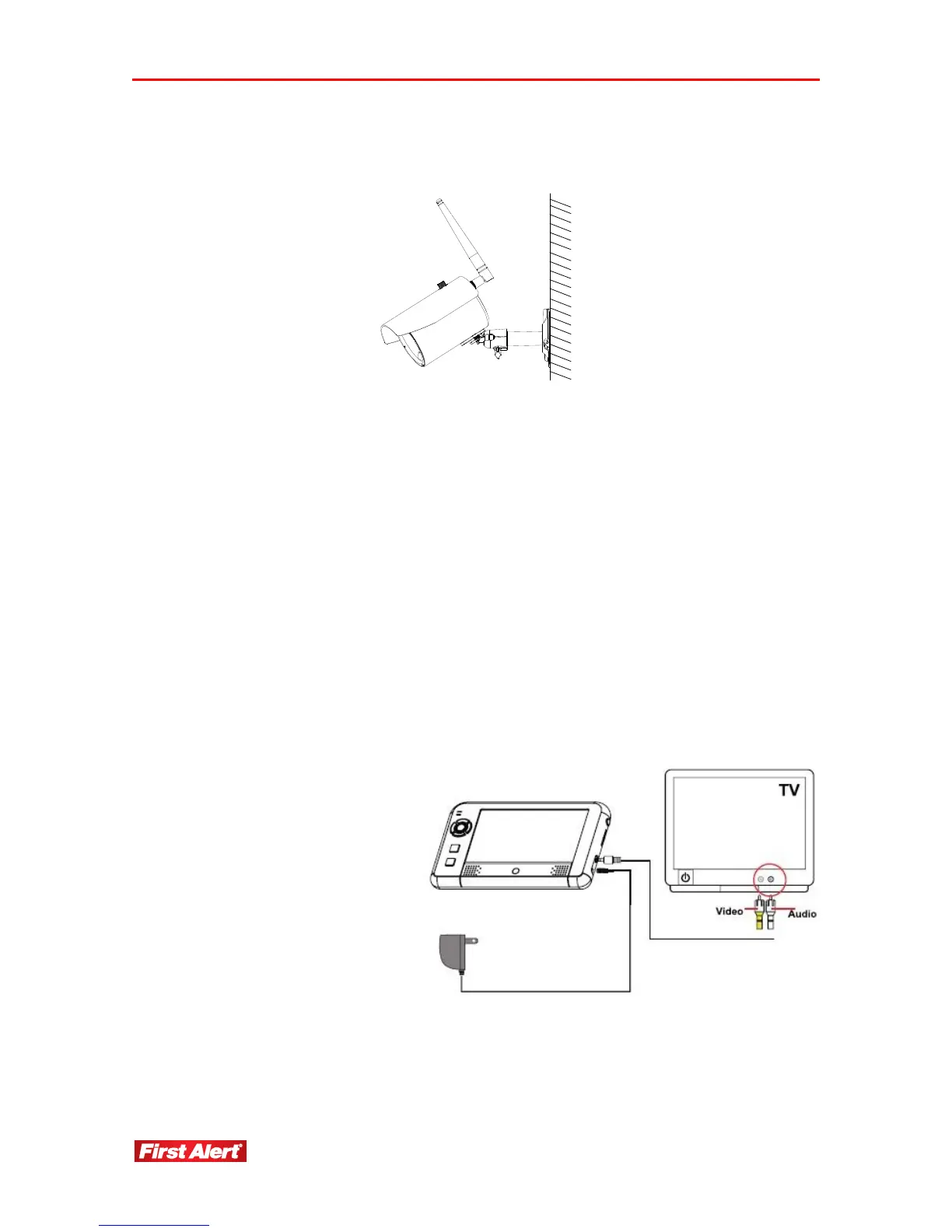
3 Adjust camera to the proper view angle. Make sure the lens is upright relative to your
subject. Tighten the thumb bolt.
4 Screw the antenna into place on the rear of the camera. Adjust the antenna to an
upright position.
INSTALLING THE RECEIVER
1
Connect the power cable to the DC IN of the receiver.
2 Plug the power supply into the electrical outlet.
3 Once the receiver is connected, see Camera Setup, Pairing (Operating Menus) to link
the camera(s) to the receiver.
OPTIONAL: VIEW ON TELEVISION OR OTHER MONITOR
1 If connecting to another
monitor such as a TV:
Connect the AV cable into
the AV OUT of the
receiver.
2 Connect the two RCA
jacks to the TV AV IN.
Yellow = Video; White =
Audio
3 Press POWER button to
turn on the receiver.


 To Next Page