34
CHANGING PRE-SET OPTIONS
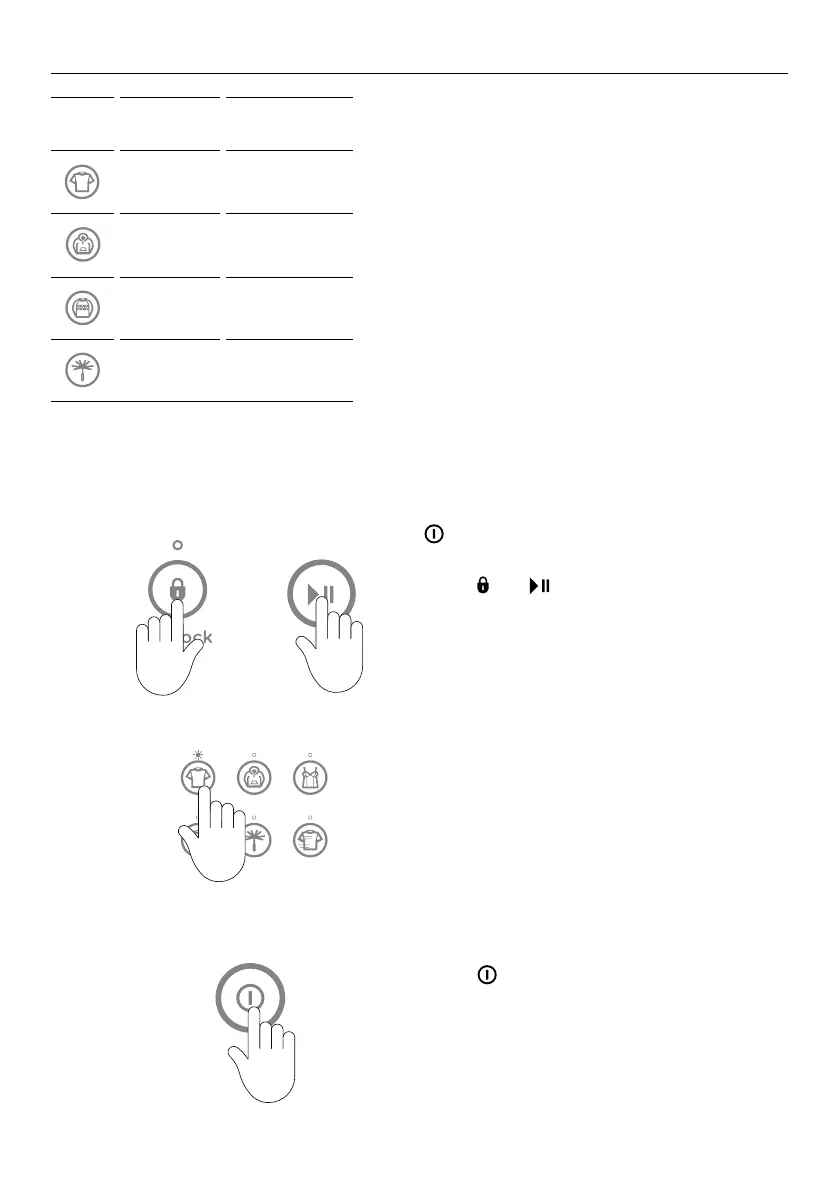
To enter Option Adjustment mode
To change or reset any of the options, repeat the below steps.
1
Turn machine on at the wall but do not touch
.
Touch
and together for 3seconds.
You will hear 3quick beeps indicating you
have entered Option Adjustment mode. The
washer will show the default setting for the
Cold wash temperature
2
OOB
Recovery
Factory
Reset
Wash Temp
EOC Beeps
Use buttons on the panel to make your
changes to the pre-setoptions, eg Select
REGULAR for Wash Temp.
3
Touch to return to normal mode. Your
washer will automatically remember your
changes.
+
OOB
Recovery
Factory
Reset
Wash Temp
EOC Beeps
+
OOB
Recovery
Factory
Reset
Wash Temp
EOC Beeps
ICON DEFAULT
CUSTOMISED
FUNCTION
+
OOB
Recovery
Factory
Reset
Wash Temp
EOC Beeps
Regular Wash Temp
+
OOB
Recovery
Factory
Reset
Wash Temp
EOC Beeps
Heavy
OOB
Recovery
+
OOB
Recovery
Factory
Reset
Wash Temp
EOC Beeps
Wool EOC Beeps
+
OOB
Recovery
Factory
Reset
Wash Temp
EOC Beeps
Delicate Factory Reset
Option Adjustment mode
After using your washer a number of times
you may want to fine tune some of the
options to suit your wash needs.
There are a number of pre-set options,
which can be altered:
1 The wash temperatures, including
changing the
COLD wash temperature to
CONTROLLEDCOLD.
2 The out of balance recovery routine.
3 The number of beeps at the end of the
cycle.
4 Resetting to factory default settings.
(WashSmart™ Eco washer displayed.)



 To Next Page
 Loading...