
 Need help?
Do you have a question about the Fisher Labs F75 and is the answer not in the manual?
Details on battery types, life, and installation for the F75 detector.
Explains the adjustable width and position of the arm rest for user comfort and stability.
Highlights the F75's capabilities in sensitivity, ground balancing, and target identification for various uses.
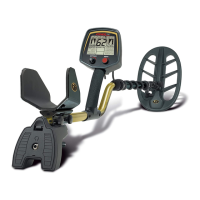
Focuses on the detector's lightweight design, adjustable arm rest, and ergonomic grip for user comfort.
Describes the LCD display's menu system, target ID, battery condition, and mineralisation information.
Provides step-by-step instructions on how to reset the F75's microprocessor settings to factory defaults.
Details the function of the knob for powering on/off and controlling audio volume for speaker and headphones.
Explains how to use the red button to navigate menu selections and recall settings.
Describes how to use the knob to change settings and select operating modes.
Explains the trigger's function for PinPoint and FASTGRAB automatic ground balancing activation.
Outlines the steps for using the FASTGRAB feature to automatically balance the detector to ground conditions.
Explains when manual ground balancing is preferred and the general process involved.
Provides step-by-step instructions for manually adjusting the ground balance setting to eliminate ground signals.
Explains how incorrect ground balance settings cause positive or negative mineral responses.
Explains how to adjust the audio threshold for optimal detection of weak signals and noise reduction.
Describes the function of sensitivity for signal gain and its adjustment based on environmental noise levels.
Explains how to adjust the audio threshold, noting it may drift and require retuning.
Advises setting sensitivity high for depth, reducing it if chatter is too high.
Details how to adjust the discrimination level to eliminate unwanted targets, with instructions on setting the value.
Explains the NOTCH feature for including or excluding specific target ranges, detailing how to set and program notches.
Describes how to select the number of audio tones, outlining different selections for target identification.
Explains the Process Number selection for audio discrimination methods to suit different search conditions and preferences.
Provides step-by-step instructions on how to accurately pinpoint a target's location using the PinPoint feature.
Explains ground pick-up in PinPoint mode and recommends prior ground balancing to eliminate it.
Presents a table of common objects and their typical 2-digit target identification numbers on the LCD.
Explains how the LCD display categorizes signals into probable target ID zones based on metal object characteristics.
Explains how the numerical display and bar graph indicate the estimated depth of a detected object.
Explains the bar graph that displays magnetic mineralization factor and its influence on detection depth.
Lists advisory messages displayed on the LCD, such as OVERLOAD, RAISE COIL, and PUMP COIL TO GB.
States the detection depth for coins and large objects under various conditions.
Explains how the F75 identifies probable metal types, noting factors affecting accuracy.
Discusses achieving maximum depth via ground balancing and its importance in different modes and conditions.
Defines discrimination as ignoring metal objects and highlights the F75's features for customization.
Offers methods to minimize digging steel bottle caps and flat iron trash by using specific processes and sweep techniques.
Explains how to use the trigger switch to pinpoint target location after detection, emphasizing prior ground balancing.
Instructs to keep the searchcoil in motion parallel to the ground for target detection and accurate ID.
Details techniques for differentiating target size, depth, and shape, especially for aluminum cans versus coins.
Identifies five major causes of false signals and chatter, including electrical interference, and suggests solutions.
Describes how conductive mineral salts and altered soil minerals affect detection and ground balance, offering strategies to manage them.
Differentiates between negative and positive hot rocks, explaining how they affect detector response and how to identify them.
Provides practical advice on finding a metal-free spot, performing ground balancing, and interpreting ground settings.
Details coinshooting locations, typical targets, discrimination use, and etiquette in public places.
Describes relic hunting targets, the importance of depth sensitivity, and managing iron trash.
Identifies areas for gold prospecting in the US and the importance of finding gold where it is known to be present.
Explains cache hunting, research methods, ownership issues, and recommended search modes.
Covers searching in shallow water, coil waterproofing, beach hunting etiquette, and dealing with water conductivity.
Provides measures to silence salt water response while retaining sensitivity for searching in or over salt water.
Explains the VLF Induction Balance technology used by most hobby metal detectors, including coil function and signal analysis.
 General
| Brand | Fisher Labs |
|---|---|
| Model | F75 |
| Category | Metal Detector |
| Language | English |






 To Next Page