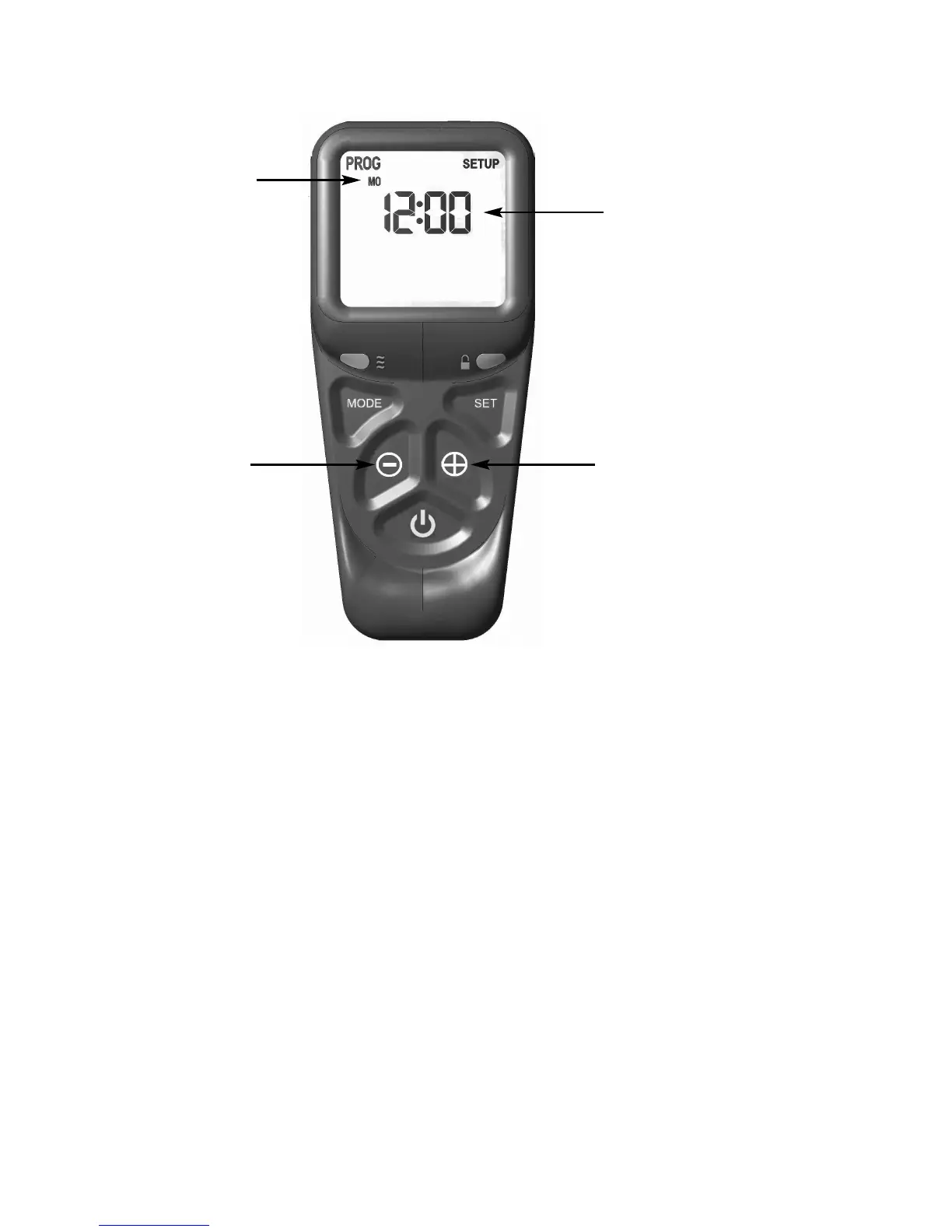
Fig. 22
3.7.7 As shown above in figure 22 the time on the handset can now be set by
using the + and - buttons to change the hour to the correct hour then
press SET to store and to move to setting the minute. Repeat this
process for setting the minute to the correct minute then press SET to
store.
3.7.8 The handset will then display the temperature setting screen as shown
overpage in figure 23, the option to choose either Celsius or Fahrenheit
can be chosen, these settings are shown as either C or F. Use the +
and - buttons to toggle between these two options then press SET to
store. The important settings have now been completed so press and
hold the SET button for a few seconds and this will exit the set-up
menu.
24
H
our and Minute display,
press the + or - buttons as
shown to toggle between
t
hese two settings and set
the correct time of day.
+ button
- button
Day of the week



 To Next Page