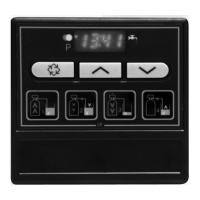
The program lockout can be cancelled by pressing the button for 25 seconds.
ATTENTION: press the button for 25 seconds when the program lockout is not activated will
erase all previous display setting; the electronic will reset to default values. The electronic
programming will have to be completely redone.
EXITING THE LEVEL 2 PROGRAMMING
Press again the button , the electronic comes back in service.
Note: for further information, please contact our customer service.
3200 ET & RM
37
3 - PROGRAM LEVEL #2
PROGRAM LOCKOUT (Pl)
Press the button . This display is identified by the letters "Pl". This display is used to prevent
certain programming displays from being viewed or set. Two settings are available:
Protection cancelled [Pl - - - OFF]
Protection active [Pl - - - - On]
2.18
E
N
G
L
I
S
H
Settings and displays able to be viewed or reset
with protection active
In service:
- Time of day
- Volume remaining
- Flow rate
- Totalizer
In programming level 1:
- Water hardness
- Water hardness after mixing valve (P)
- regeneration time
In programming level 2:
- Flow rate (Fr)
- Days since the last regeneration (d)
- Prior service volume used (E)
- Reserve capacity (rc)
- Previous days water usage (Pd)



 To Next Page