Flexcom Communication Ltd Installation and operating instructions (2021/06/09)
11/26
service provided by your dealer, you must activate GPRS (Internet) data traffic and enter the
appropriate network settings. To do this, you need to send SMS messages from your phone to the
phone number of the SIM card inserted in the tracking device, as shown in the table below.
The factory-set access password for the tracking device in the commands: 123456
Setting SMS message Device response
Turn on GPRS data
traffic
gprs123456 GPRS ok
Enter the APN
name
apn123456(space)APN-name apn ok
APN names for domestic service providers: Telenor: online
or net
Telekom: internet
Vodafone:
- in case of subscription: internet.vodafone.net
- in the case of a top-up card:
vitamax.internet.vodafone.net
Digi: internet
If your mobile network provider has not provided you with an APN username and password, you do
not need to send the following SMS messages to the tracking device!
APN username apnuser123456(space)APN-username apnuser ok
APN password apnpasswd123456(space)APN-password apnpasswd ok
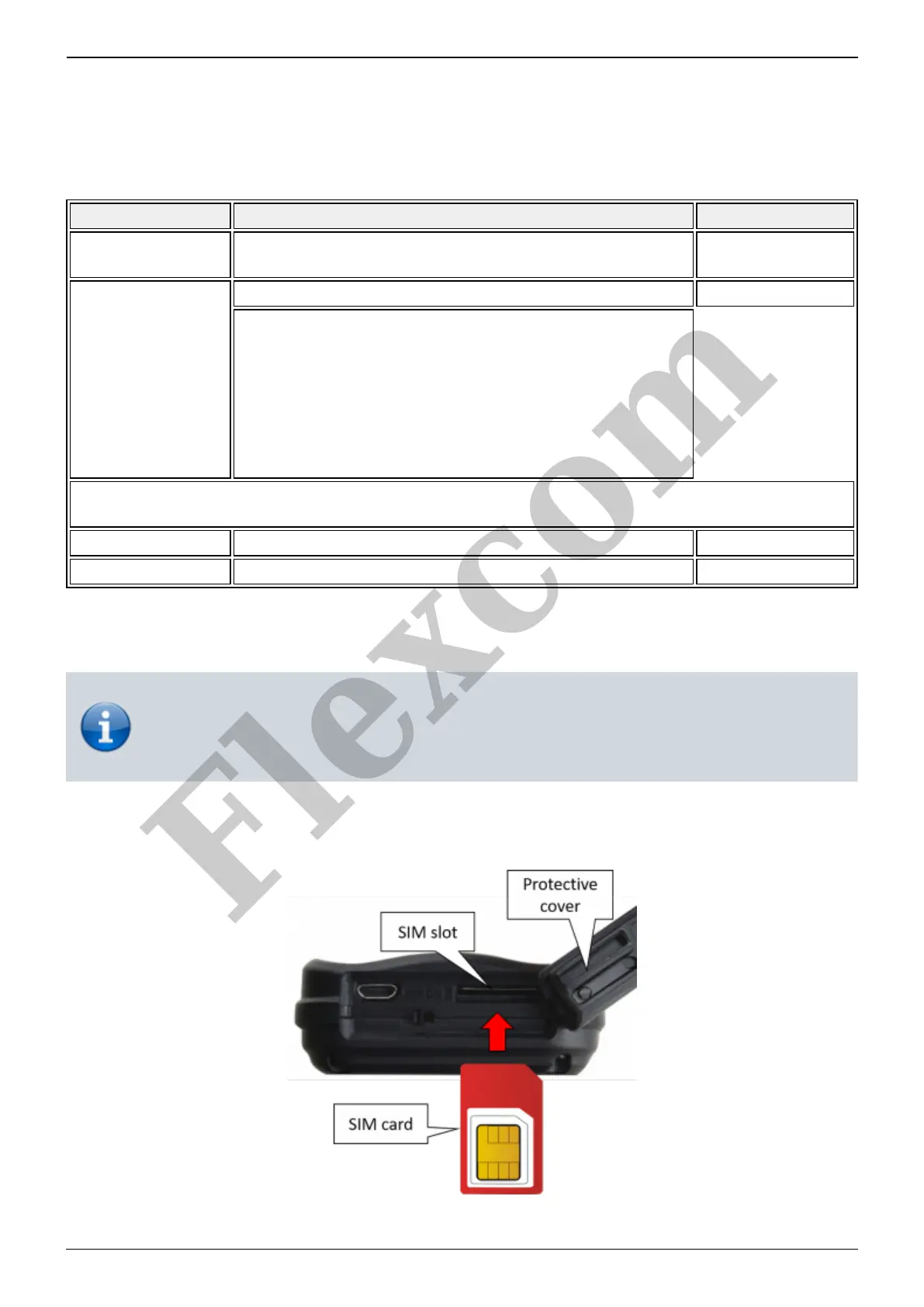
Inserting the SIM card
Only standard size SIM cards can be used with this product. If you have a micro or nano
SIM, use a card adapter!
Insert the SIM card into the device as follows:
Steps:
Flexcom


 To Next Page