Page 10
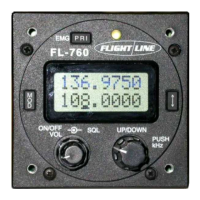
⑦ External memory toggle
This button alternately replaces an active frequency and the standby frequency.
Active
Standby
6.3 Memory programming
1 The top line should read memory channel 1 (1 to 99 and PRI).
2 Select the required memory number with the up/down dial.
3 Next push the dial to select the bottom line MHz.
4 Now enter the desired frequency.
5 Push the dial again to enter the kHz and adjust.
6 Next push the arrows button, the memory number will flash then programmed will
appear. You now have a programmed memory channel.
7 Repeat this operation for other memory channels.
8 Up to 99 channels can be programmed.
9 Only programmed channels will be displayed.
10 By programming a frequency into Memory “PRI” this will give you a priority selection.
6.4 Memory delete
1 The top line should read memory channel 1 (1 to 99 and PRI).
2 Select the required memory number with the up/down dial.
3 Push the “PRI” button, the memory channel is deleted.
6.5 Operation of intercom
Internal adjustment of the sidetone volume may need to be done to set the correct level.
In a noisy environment reducing the microphone gain may also be required. Do not
adjust the modulation! A wind sock over the mike will also help reduce noise.
The VOX operation can be used and sensitivity can be set in the user setting mode.
Note: VOX (Voice-operated Transmission)
6.6 User setting
You can set the use of this radio. There are 2 way to enter the User Setting mode.
Turn the radio ON with hold down the [mod] button, or Press and hold the
[UP/DOWN] knob more than 2 seconds while the radio is in VFO mode/ MEMORY
mode/ PRIORITY mode.
・ Continuous on of the backlight.
① Push the “MOD” button and select the LAMP.
② Push the dial switch and select the OFF or ON.
③ Push the arrow key, enter the backlight function.
Note: If you select the on, you can not adjust the dimmer.
・ Automatic voice operation control gain for intercom.
① Push the “MOD” button and select the VOX.
② Turn on the dial switch and Select the 00 to 80.
③ Push the arrow key, enter the VOX sensitivity.
・ MIC. Sens. of tansmit.
① Push the “MOD” button and select the MIC1 or MIC2.
② Turn on the dial switch and Select the 00 to 80.
③ Push the arrow key, enter the MIC. sensitivity.


 To Next Page