EasyManua.ls Logo

FLIR Lorex LNB3321 Series - User Manual

FLIR Lorex LNB3321 Series
2 pages
Print Icon
To Next Page IconTo Next Page
Loading...
Contents
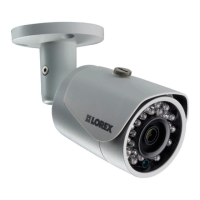
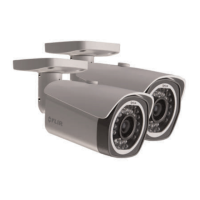
IP Bullet Camera*
Mounting Kit*
Mounting Template*
Cat5e UL Compliant (CM) Ethernet Extension Cable*
Copyright © 2015 Lorex Corporation
As our products are subject to continuous improvement, Lorex Corporation reserves the right to modify
product design, specifications and prices, without notice and without incurring any obligation. E&OE
LNB3321_SERIES_TRIFOLDQSG_EN_R1
Warning/Caution
Use the camera only with compatible Lorex NVRs
Read this guide carefully and keep it for future reference
Follow all instructions for safe use of the product and handle with care
Use the camera within given temperature, humidity and voltage levels
noted in Camera Specifications
Do not disassemble the camera
Do not point the camera directly towards the sun or a source of intense
light
Periodic cleaning may be required. Use a damp cloth only. Do not use
harsh cleaners or aerosol cleaners
The supplied extension cable is rated for surface mounting only
Cables for in-wall / floor-to-floor installations are sold separately
Installation Tips
Point the camera where there is the least amount of obstructions (i.e. tree
branches)
Install the camera in a location that is difficult for vandals to reach
Secure cabling so that it is not exposed or easily cut
Camera rated for outdoor use. Installation in a sheltered location
recommended
WEATHERPROOF HIGH DEFINITION
NIGHT VISION IP SECURITY CAMERA
Quick Start Guide
English Version 1.0
LNB3321 SERIES
* Per camera.
172mm / 6.7”
72mm / 2.8”
Dimensions
75mm / 3.0”
ATTENTION - It is recommended to connect the camera to the NVR or
an external PoE switch. If using a DC power adapter with the camera, a
REGULATED power supply is REQUIRED for use with this camera. Use of a non-
regulated, non-conforming power supply can damage this product and voids
the warranty.
Need Help?
Visit us online for up-to-date software and complete
instruction manuals
1
2
3
4
Go to www.lorextechnology.com
Search the model number of your product
Click on your product in the search results
Click on the Downloads tab
Resources
Question and Answer IconNeed help?

Do you have a question about the FLIR Lorex LNB3321 Series and is the answer not in the manual?

Summary

Dimensions

Installing the Camera

Before installing the camera

Guidance on deciding cable routing paths before camera installation, including wall/ceiling options.

To install the camera

Step-by-step instructions for mounting the camera, including marking holes and feeding cables.

Connecting the Camera

Instructions and diagrams for connecting the camera to an NVR or router/switch, including PoE considerations.

Cable Extension Options

Information on extending Ethernet cable runs, including cable types, maximum distances, and number of extensions.

Troubleshooting

Common camera issues like no picture, brightness problems, or night vision not working with solutions.

Overview

This document provides a comprehensive guide for the installation, connection, and troubleshooting of the Lorex LNB3321 Series Weatherproof High Definition Night Vision IP Security Camera. It is designed to assist users in setting up and maintaining their security system effectively.

Function Description:

The Lorex LNB3321 Series camera is an IP bullet camera designed for security surveillance, offering high-definition video and night vision capabilities. It is weatherproof, making it suitable for outdoor use, though installation in a sheltered location is recommended for optimal performance and longevity. The camera is intended to be used with compatible Lorex NVRs (Network Video Recorders) or integrated into a local area network (LAN) via a router or PoE (Power over Ethernet) switch. Its primary function is to capture and transmit video footage for monitoring and recording purposes, enhancing the security of a property. The camera features an Auto Mechanical IR Cut Filter, which allows it to switch between day and night viewing modes, optimizing image quality in varying light conditions. This filter produces an audible clicking noise during mode transitions, which is a normal operational sound.

Usage Features:

The camera offers several features to facilitate its use and integration into a security system:

  • Connectivity: The camera can be connected directly to a Lorex NVR via an Ethernet cable, utilizing PoE for both power and data transmission. Alternatively, it can be connected to a router or PoE switch on a local network. If connecting to a router or switch without PoE capabilities, a separate 12V DC power adapter (not included) is required.
  • Cable Extension: The Ethernet cable run for the camera can be extended up to 300 feet (92 meters) using Cat5e or higher Ethernet cables. Up to three extensions can be used, and UL CMR approved cables are recommended for reliable performance. RJ45 couplers or switches (not included) can be used to connect male ends of Ethernet cables.
  • Adjustable Positioning: The camera features an adjustment screw that allows users to loosen and adjust the camera's position as needed. Once the desired angle is achieved, the screw can be tightened to secure the camera in place. Suggested stand positions for wall and ceiling mounts are provided to guide installation.
  • Night Vision: The camera is equipped with night vision, which activates automatically when light levels drop, enabling surveillance in low-light or dark conditions.
  • Image Sensor Sensitivity: The camera incorporates an image sensor that is highly sensitive to light, allowing it to maintain color mode even in low-light conditions. Instructions for switching the camera to night mode are available online for users who prefer monochrome night vision.
  • Troubleshooting Guide: A comprehensive troubleshooting section is included to address common issues such as no picture/signal, overly bright or dark pictures, non-functional night vision, unclear picture, and bright spots in video at night. This guide provides practical solutions to help users resolve problems quickly.

Maintenance Features:

To ensure the camera operates effectively and maintains optimal image quality, certain maintenance practices are recommended:

  • Pre-Installation Check: Before permanent installation, it is crucial to temporarily connect the camera(s) and cable(s) to the NVR to ensure they are working correctly. This step helps identify and resolve any issues before the camera is fully mounted.
  • Power Supply Requirement: If using a DC power adapter, a REGULATED power supply is REQUIRED. Using a non-regulated or non-conforming power supply can damage the product and void the warranty. It is recommended to connect the camera to the NVR or an external PoE switch.
  • Cleaning: Periodic cleaning of the camera lens is necessary to prevent dirt, dust, or spiderwebs from affecting image clarity. A damp cloth should be used for cleaning; harsh cleaners or aerosol cleaners are explicitly discouraged.
  • Environmental Considerations: The camera should be used within the specified temperature, humidity, and voltage levels outlined in the Camera Specifications. It should not be pointed directly towards the sun or any source of intense light, as this can affect image quality and potentially damage the sensor.
  • Cable Management: Secure cabling is essential to prevent exposure or easy cutting, which could compromise the camera's functionality. The supplied extension cable is rated for surface mounting only; cables for in-wall or floor-to-floor installations must be purchased separately. When running cables along a wall or ceiling, they should be routed through the cable notch on the base to ensure the camera base sits flush against the mounting surface.
  • Physical Integrity: The camera should not be disassembled. Any attempts to disassemble the camera could void the warranty and potentially damage the device.
  • Online Resources: Lorex provides online resources, including software updates and complete instruction manuals, to help users maintain and optimize their camera's performance. Users can visit the Lorex website, search for their product's model number, and access the Downloads tab for relevant information.

FLIR Lorex LNB3321 Series Specifications

General IconGeneral
Camera TypeBullet
Weatherproof RatingIP66
IR Cut FilterYes
Housing MaterialMetal
Power Supply12V DC
Operating Temperature-30° ~ 60°C

Related product manuals