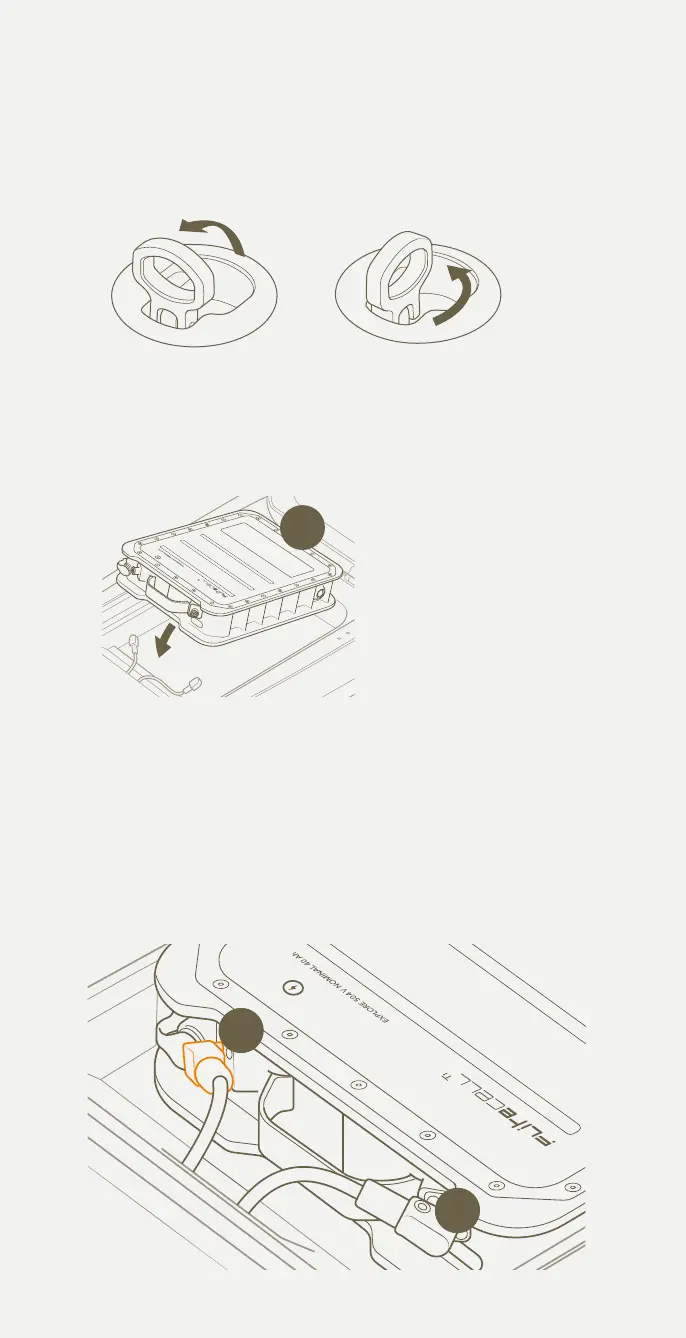
Connect Flitecell to Flitescooter
With the eFoil, fuselage tail and wings attached, it’s time to carefully turn
your board over so it stands on BOTH the front wing and nose of the board.
1 Twist the lid latches and open the board lid.
2 Take Flitecell by the handle and carefully lower it into the board cavity,
ensuring to move cables out of the way first. The warning label should
be facing up.
3 If using Flitecell Sport, place the spacer in the board cavity first.
4 Connect the orange power cable to the orange power in Flitecell.
You will feel a secure click when properly engaged. Note: Depress the
button on the side of the connector when removing the connector.
5 Connect the black power cable to the black power in Flitecell.
Flitecell is now connected.
5
6
BE CAREFUL NOT TO DAMAGE
THE BOARD SEAL WHEN
FITTING FLITECELL. ANY
KNICKS, CUTS OR DAMAGE TO
THE SEAL MAY RESULT IN LEAKS.
BE CAREFUL NOT TO
RECONNECT FLITECELL POWER
CABLES WITHIN 10 SECONDS
OF DISCONNECTION TO AVOID
A POSSIBLE ARC.
DO NOT OPEN LID WHILST IN THE WATER UNDER ANY CIRCUMSTANCES.
4
5
2
26



 To Next Page