Flitescooter common mistakes
Flitescooter rides on wings that fly under water. Just like an airplane,
Flitescooter needs sucient and constant speed to avoid ‘stalling’ the
wings, and must be flown level to avoid changes in altitude (which can
cause a wing breach and splashdown). The three most common mistakes
riders make when learning to Flitescooter are as follows:
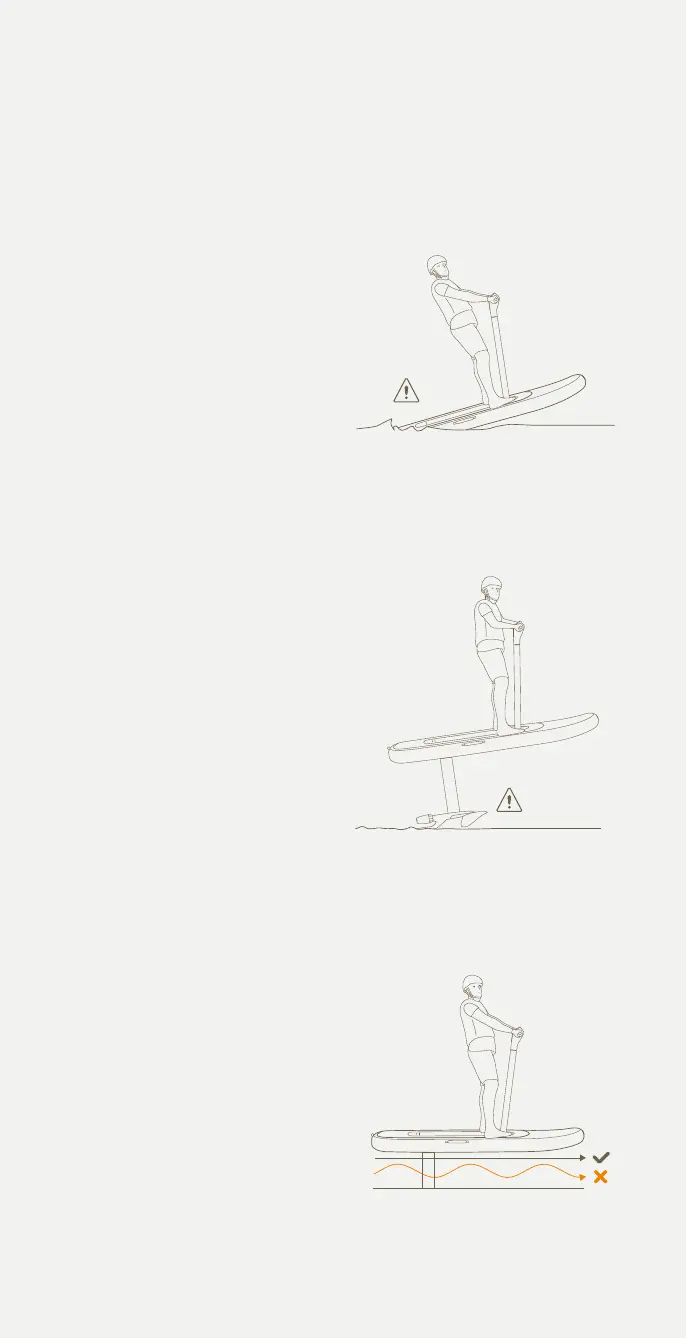
1 Taking off with insufficient speed
Pushing or pulling the handlebars
changes the angle of the board
above the water, and the wings
below the water. Pulling back to
fly with insucient speed will ‘stall’
the wing, causing a splashdown.
To avoid this common mistake,
continue gently pushing forward
on the handlebars (to keep the
nose of the board and wing down)
until at flying speed. Flying speed
is generally 20km/h / 12.5mph or
slightly faster for heavier riders.
2 Flying too high
Once at sucient flying speed,
riders should take o smoothly
by very gently shifting weight
back and pulling back on the
handlebars. Riders need to angle
the nose of the board up a few
degrees to take o, but then
quickly return board and wing
to level position to maintain
constant altitude. The skill (and
thrill) of Flitescooter is finding the
right balance above the water.
Pulling or leaning back too hard,
or being too aggressive with the
handlebars will cause a wing
breach or stall, and will result in
a splashdown.
3 Speed variations
The thrust from Flite Jet is part
of the overall balance of the
hydrofoil system. Make changes
using the thumb throttle smoothly
and slowly to maintain smooth
and level flight. Varying speed
too aggressively can disrupt
balance and cause a wing breach,
stall or splashdown.
Pg. 43 - Angle too aggressive
Updates
Pg. 12 - Update ite scooter bladder
Pg. 12 - Update ite scooter core
Pg. 27 - Update 'turning on itescooter' image
Pg. 17 - long throw trigger update
Pg. 32 - Update handlebar image to one without controller in it.
- Add existing controller image back into this page
-Add ‘Latch for Flite Controller’ to handlebar diagram
-Update line ‘throttle trigger’ to ‘Thumb throttle’
Controller as it previously was showing all controls
Add below images in this order to
Flitescooter Common Mistakes
Pg. 14 - wing and stab update - Cruiser 1800 + 500 + jet
Pg. 43 - Angle too aggressive
Updates
Pg. 12 - Update ite scooter bladder
Pg. 12 - Update ite scooter core
Pg. 27 - Update 'turning on itescooter' image
Pg. 17 - long throw trigger update
Pg. 32 - Update handlebar image to one without controller in it.
- Add existing controller image back into this page
-Add ‘Latch for Flite Controller’ to handlebar diagram
-Update line ‘throttle trigger’ to ‘Thumb throttle’
Controller as it previously was showing all controls
Add below images in this order to
Flitescooter Common Mistakes
Pg. 14 - wing and stab update - Cruiser 1800 + 500 + jet
Pg. 43 - Angle too aggressive
Updates
Pg. 12 - Update ite scooter bladder
Pg. 12 - Update ite scooter core
Pg. 27 - Update 'turning on itescooter' image
Pg. 17 - long throw trigger update
Pg. 32 - Update handlebar image to one without controller in it.
- Add existing controller image back into this page
-Add ‘Latch for Flite Controller’ to handlebar diagram
-Update line ‘throttle trigger’ to ‘Thumb throttle’
Controller as it previously was showing all controls
Add below images in this order to
Flitescooter Common Mistakes
Pg. 14 - wing and stab update - Cruiser 1800 + 500 + jet
44


 To Next Page
 Loading...