Fluance Ai81 User Manual 10
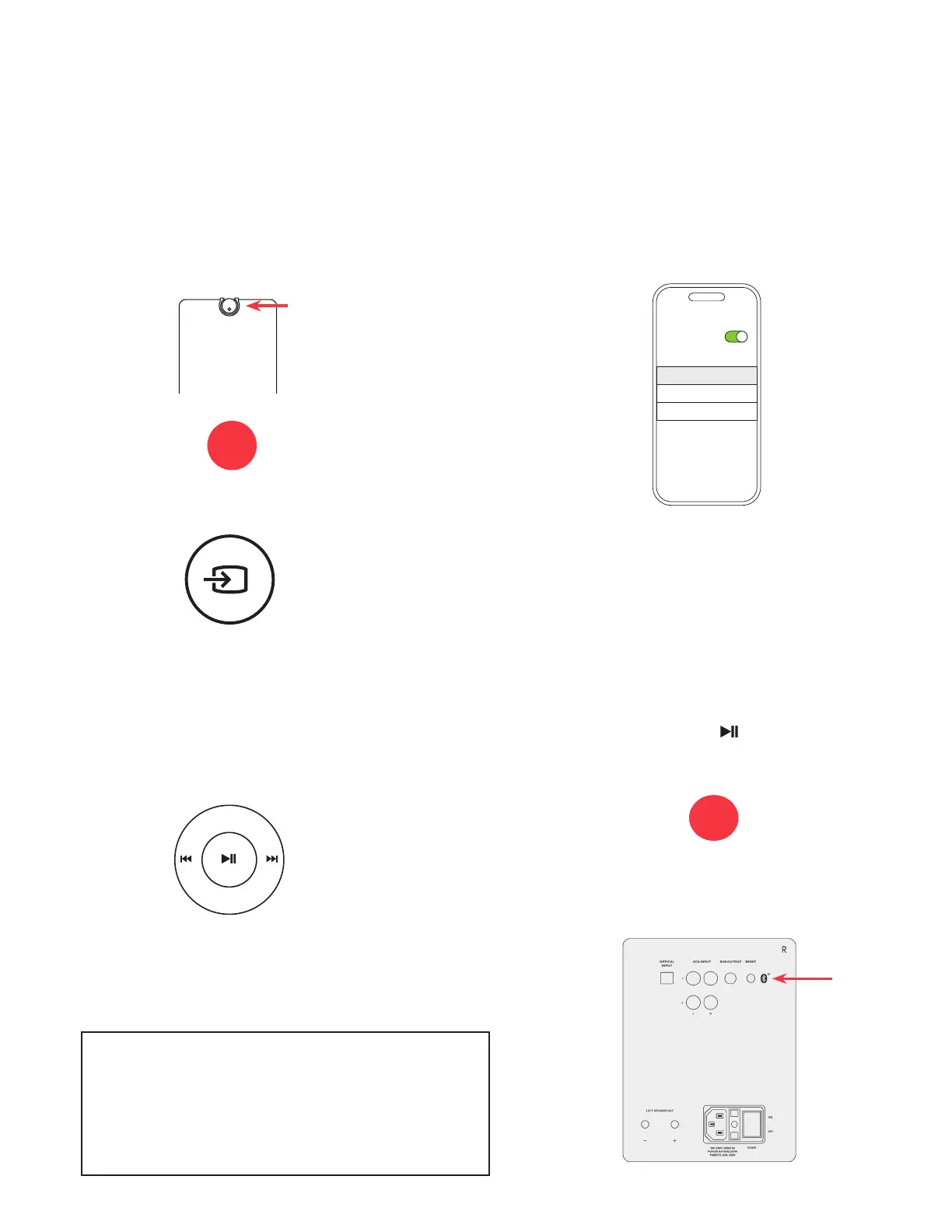
• Press and hold on the Remote
for 3 seconds to reset Bluetooth
©
pairing.
• Press the Bluetooth
©
Pairing Reset
Button on the back of the unit.
Bluetooth
®
Pairing
1. Press the Control Knob to select the
Bluetooth
©
input (Blue LED).
3. Use the Remote to Play/Pause and go
Forward/Backward on your source
device.
2. Pair to “Fluance Ai81” on your
source device.
4. If your device cannot nd “Fluance
Ai81”, you can reset Bluetooth
©
pairing:
NOTE: Adjust Volume on the source
device as well as the Ai81.
Important: Ensure any apps and
devices have the EQ disabled (at)
and Volume Normalization disabled
for best performance
NOTE: How you access your device’s
Bluetooth
©
settings may vary from one
manufacturer to another. Maximum line of
sight for Bluetooth
©
range is 33ft. Obstacles
may decrease transmission distance.
Note: Unit will attempt to auto-pair to
the last paired device.
Bluetooth
My Devices
Settings
Fluance Ai81
OR
OR
Press the Source button on the remote
control.


 To Next Page