Fluance Ai81 User Manual 5
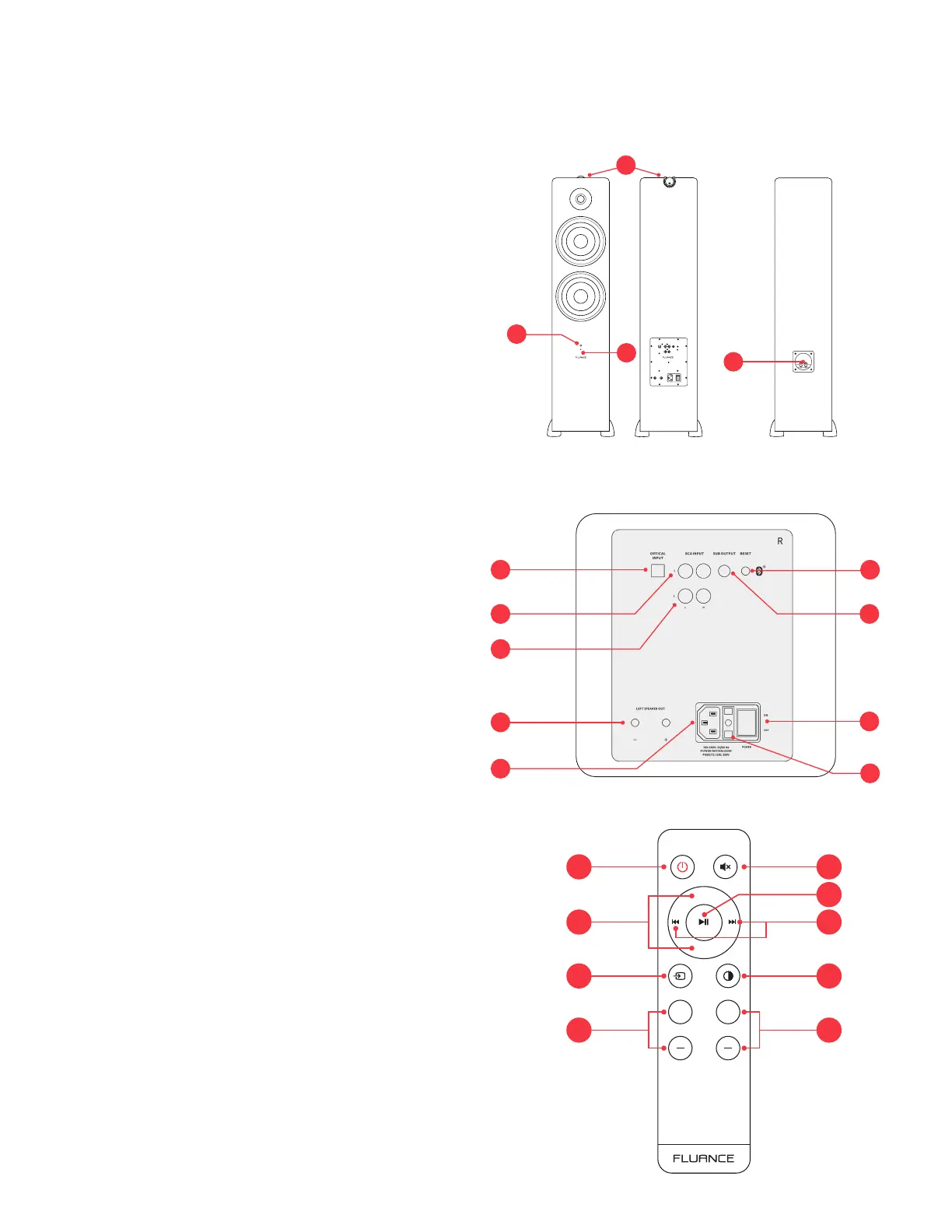
Front & Back Panel Layout
1. Control Knob
• Volume
• Input Selection
• Power ON/OFF
2. Source LED
• Blue (Solid) - Bluetooth
®
Paired
• Blue (Flashing) - Bluetooth
®
Pairing Mode
• Green (Solid) - RCA 1
• Purple (Solid) - RCA 2
• White (Solid) - Optical
• Red (Solid) - Standby Mode
• Red (Flashing) - Mute
3. IR Sensor
4. Speaker Input
5. Optical Input
6. RCA Input 1
7. RCA Input 2
8. Subwoofer Output
9. Bluetooth
®
Reset Pairing
10. Left Speaker Output
11. AC Input
12. Fuse (T3.15AL 250V)
13. Power Switch
Remote Control Layout
1. Power ON/OFF
2. Volume UP/DOWN
3. Source
4. Treble UP/DOWN
5. Mute
6. Play/Pause & Bluetooth
®
Pairing Reset*
*To enable Bluetooth
®
Pairing Reset, press + hold for 3 seconds.
7. Forward/Back
8. LED Brightness - (100% > 25% > OFF)
9. Bass UP/DOWN
2
4
Passive SpeakerActive Speaker
3
12
5
6
7
8
9
10
11
13
Active Speaker (Back)
1
VOL +
++
VOL -
TREBLE BASS
1 5
3 8
2
6
7
4
9


 To Next Page