Fluance Ai81 User Manual 8
EQ Adjustment
Use the Bass/Treble buttons on the Remote to adjust each from -5 to +5.
LED Behavior:
Red (Flash 2x) - Bass/Treble Set to -5 or +5
Source Color (Flash 2x) - Bass/Treble Set to 0
Note: If using a source device, with its own EQ settings, ensure it is set to at (0). Some apps also
include an EQ that should also be set to at.
EQ Reset
To reset the Bass and Treble levels to 0 put the speakers into Standby Mode and press and
hold the Bluetooth Reset button until the red LED ashes. This will reset the speaker to
default settings but will not reset Bluetooth Settings.
RCA Input
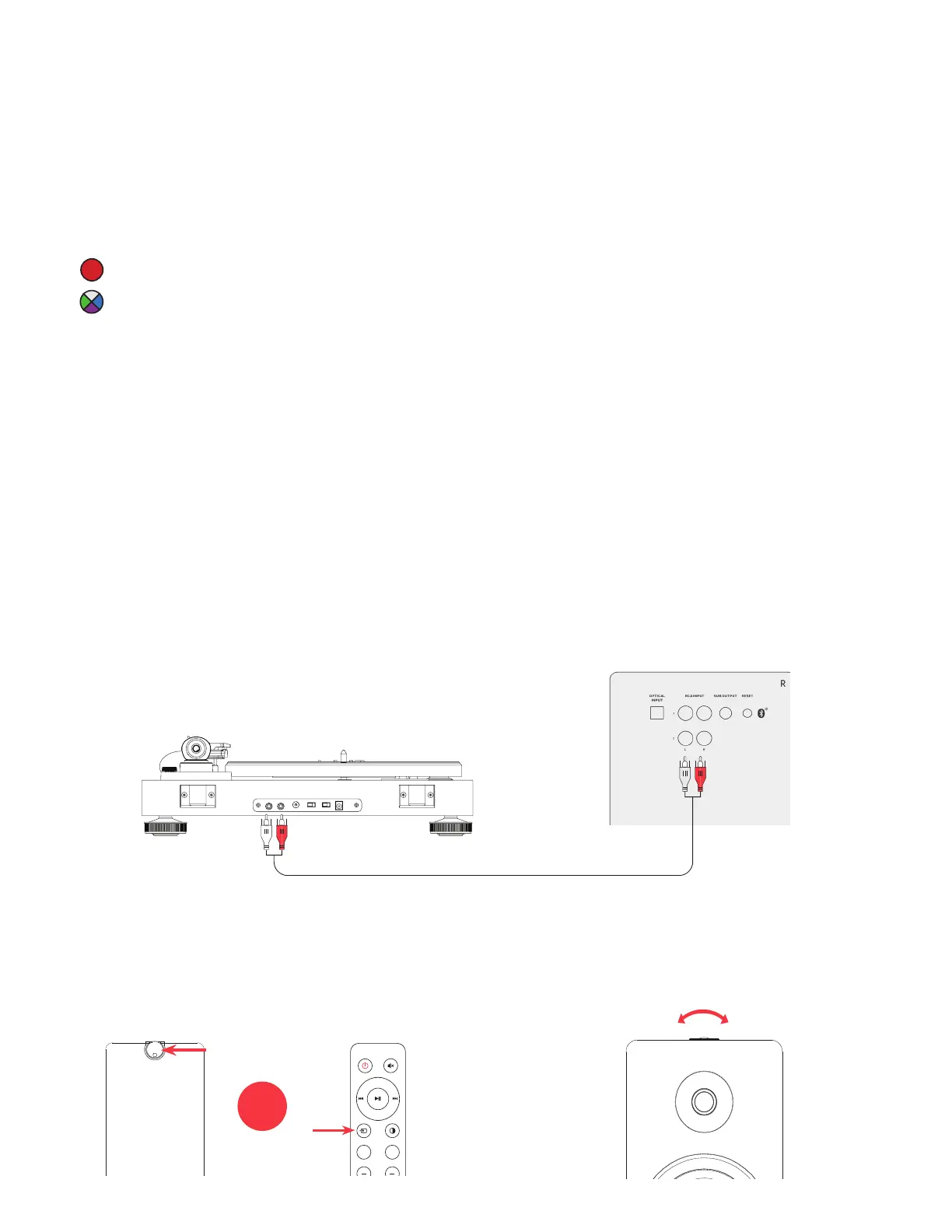
1. Connect the RCA cable to your
source device (Turntable, Smartphone,
Computer...).
2. Connect the other end of the RCA ca-
ble to back of the Active Speaker.
4. Adjust volume on Ai81 as well as
source device.
3. Press the Control Knob to select the
RCA input (RCA 1 - Green; RCA 2 -
Purple), or Press the Source button on
the remote control.
*RCA to RCA cable not included
-
+
OR
Note: If using a turntable an internal or
external preamp is required.
VOL +
++
VOL -
TREBLE BASS


 To Next Page