Features
Introduction 3
3-3
Introduction
This chapter is a reference for the functions and locations of the front and rear panel
features. It also provides descriptions of each feature. Read this information before the
5730A Calibrator is used. Front-panel operation instructions for the Calibrator are in
Chapter 4. Remote operation instructions are in Chapter 6.
Front-Panel Features
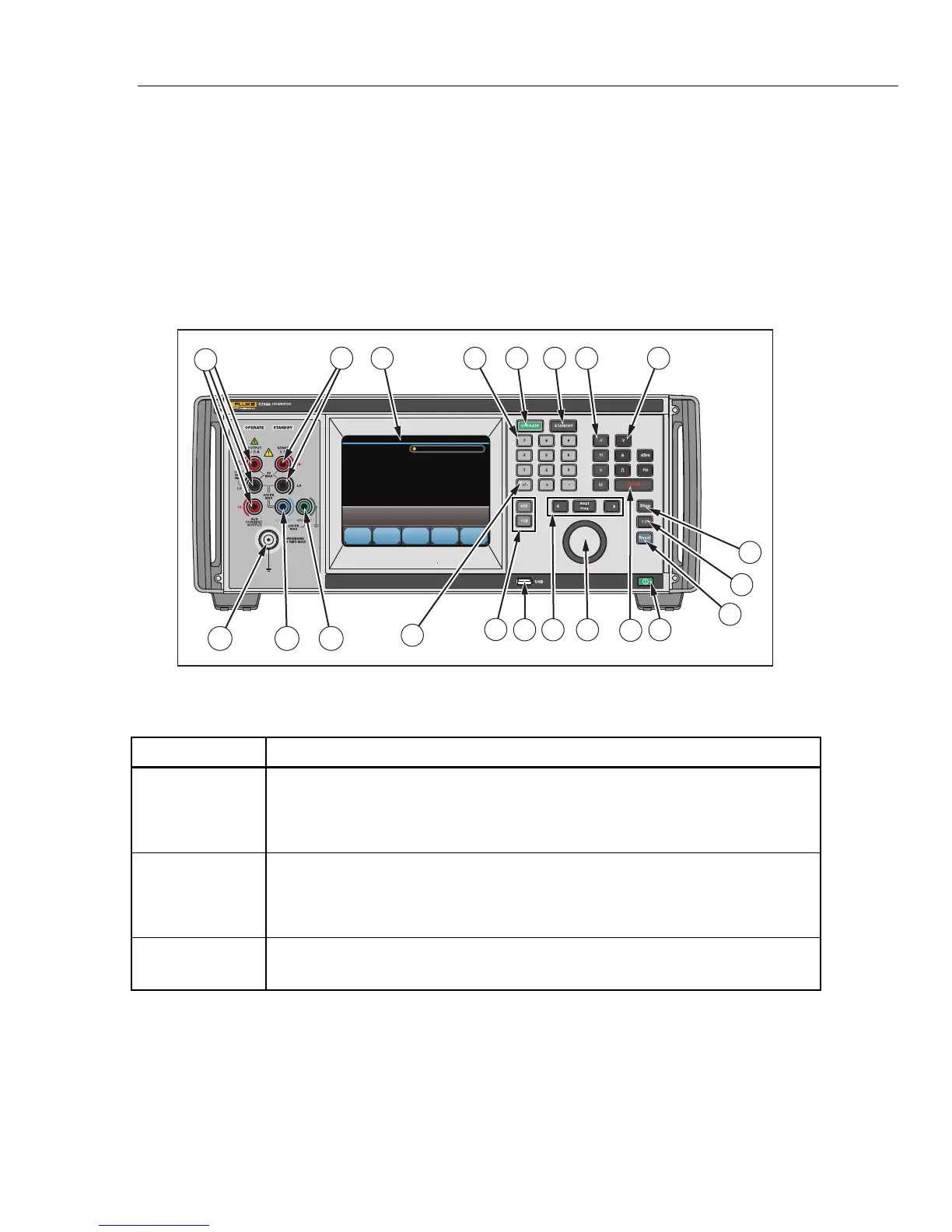
Front-panel features (including all controls, displays, indicators, and terminals) are shown
in Figure 3-1. Each front-panel feature is briefly described in Table 3-1.
54
14
6
12
11
3
7
16
1
2
8
9
15
13
19 1718
21
20
10
hhp006.eps
Figure 3-1. Front-Panel Features
Table 3-1. Front-Panel Features
Item Description
The color touch-sensitive display shows the output amplitude, frequency, and other
active conditions and messages. The display provides controls not available with
the keys alone. The Calibrator interface is made up of multiple menus, described in
Chapter 4.
Numbered keys to enter the output amplitude, frequency, and other data such as
the time and date. To enter a value, push the digits of the output value, a multiplier
key (if necessary), and an output function key. Then push
.For example,
for an output of 20 mV, push
.
activates the programmed output.


 To Next Page