1732/1734
Users Manual
6
WiFi and WiFi/BLE-to-USB Adapter
The USB adapter enables the wireless connectivity of the Logger:
•
Connection to the Fluke Connect
smartphone app for easy asset
management and data sharing.
•
Data transfer to "Energy Analyze Plus" PC software.
•
Remote control via Virtual Network Computing (VNC). See
Remote Control on page 52 for more information about VNC.
•
Display and store data of up to 2 modules of the Fluke FC 3000
series together with the instrument data into logging sessions
(requires WiFi/BLE adapter feature, available with firmware
version 2.0).
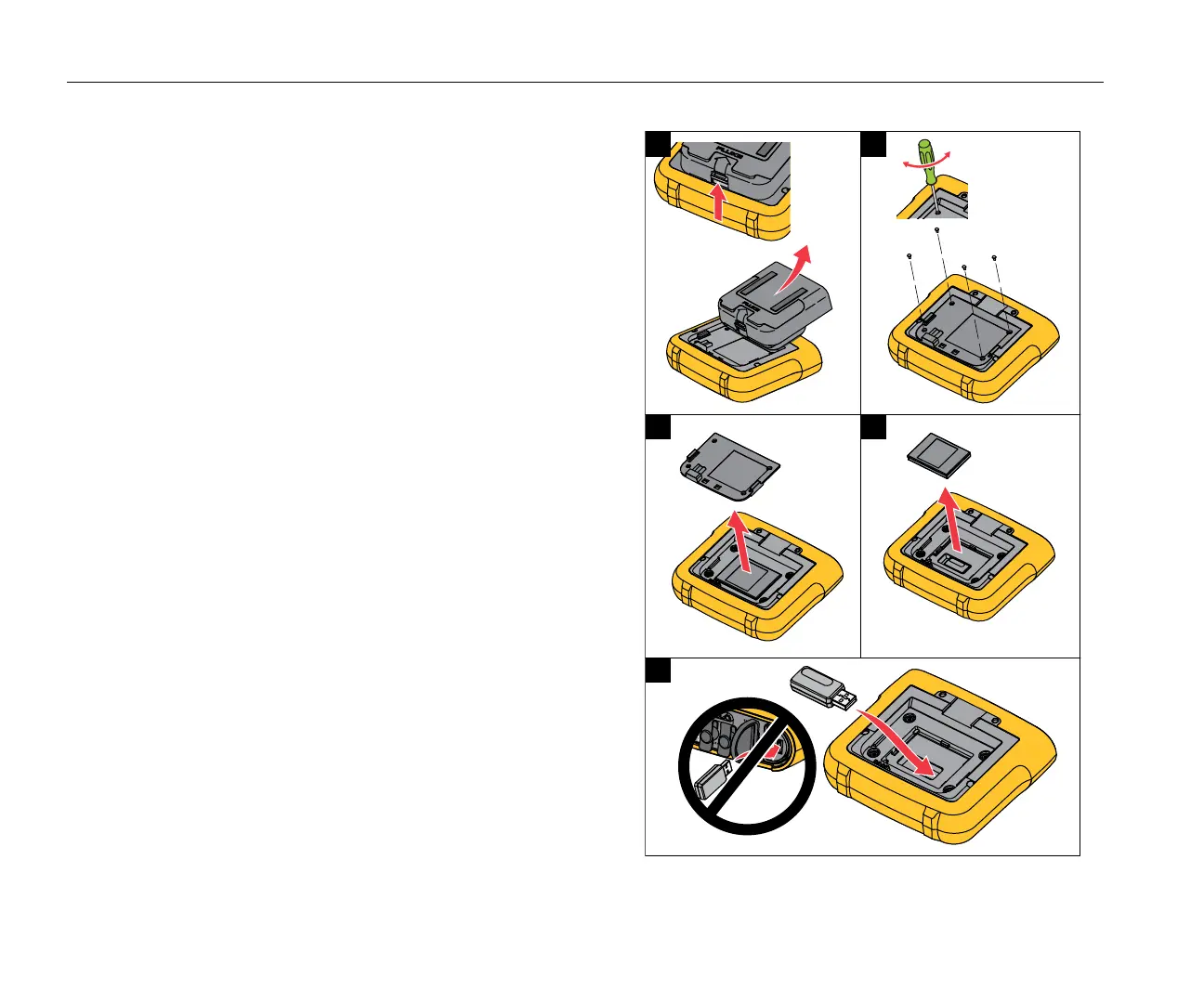
To install the adapter in the Logger, see See Figure 1:
1.
Remove the Power Supply.
2.
Unscrew the four screws.
3.
Remove the battery door.
4.
Remove the battery.
5.
Insert the WiFi/BLE adapter in the compartment with the serial
number visible.
Connect the WiFi/BLE adapter to the USB port by sliding it
gently to the right until the adapter snaps into the USB socket
of the Logger. About 3.5 mm (0.14 in.) of the metal shield
should be visible.
6.
Insert the battery.
7.
Fasten the battery door.
Figure 1. Adapter Installation



 To Next Page