EasyManua.ls Logo

Fluke 80i-1010 - Page 3

Fluke 80i-1010
12 pages
Print Icon
To Next Page IconTo Next Page
To Previous Page IconTo Previous Page
Loading...
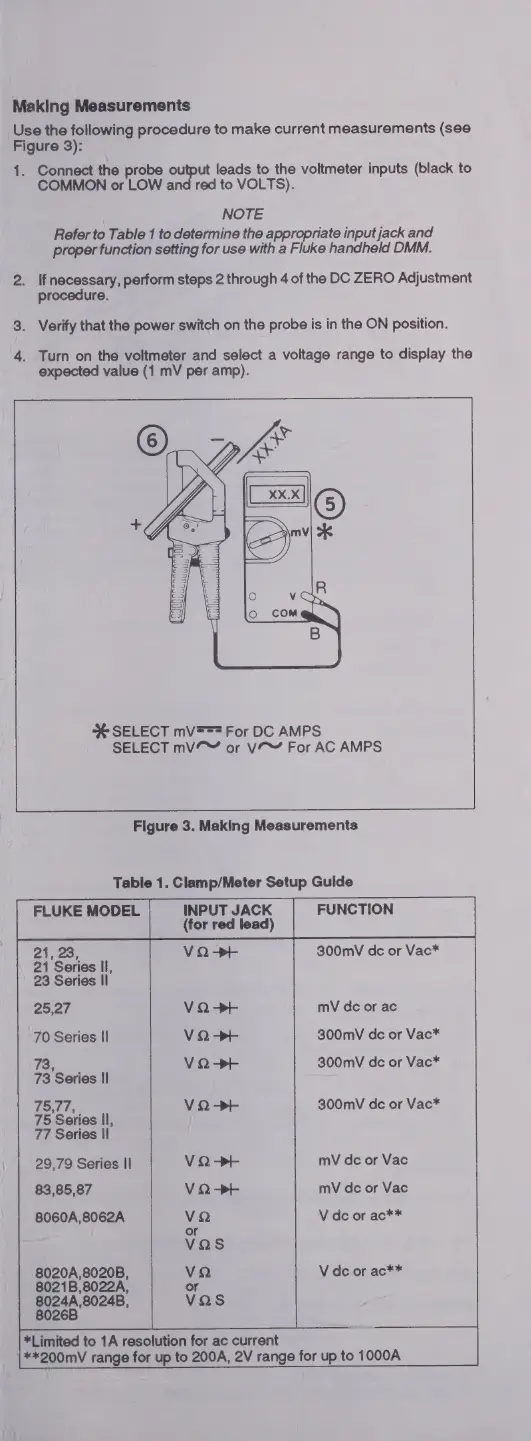
Making
Measurements
Use
the
following
procedure
to
make
current
measurements
(see
Figure
3):
1.
Connect
the
probe
output
leads
to
the
voltmeter
inputs
(black
to
COMMON
or
LOW
and
red
to
VOLTS).
NOTE
Refer
to
Table
1
to
determine
the
appropriate
input
jack
and
proper
function
setting
for
use
with
a
Fluke
handheld
DMM.
2.
If
necessary,
perform
steps
2
through
4
of
the
DC
ZERO
Adjustment
procedure.
3.
Verify
that
the
power
switch
on
the
probe
is
in
the
ON
position.
4.
Turn
on
the
voltmeter
and
select
a
voltage
range
to
display
the
expected
value
(1
mV
per
amp).
%
SELECT
mV===
For
DC
AMPS
SELECT
mV
or
VA
For
AC
AMPS
Figure
3.
Making
Measurements
Table
1.
Clamp/Meter
Setup
Gulde
FLUKE
MODEL
INPUT
JACK
FUNCTION
]
(for
red
lead)
Zines;
300mV
de
or
Vac*
21
Series
Il,
23
Series
Il
25,27
V
Q
>H
mV
dc
or
ac
70
Series
II
V
Q
>+
300mV
de
or
Vac*
73,
V
Q
>+
300mV
de
or
Vac*
73
Series
Il
75,77,
V
Q
>+
300mV
dc
or
Vac*
75
Series
Il,
77
Series
Il
29,79
Series
II
V
Q
>+
mV
dc
or
Vac
83,85,87
V
Q
>+
mV
dc
or
Vac
8060A,8062A
VQ
V
dc
or
ac**
or
Vas
8020A,8020B,
VQ
V
de
or
ac**
8021B,8022A,
or
8024A,8024B,
vas
8026B
*Limited
to
1A
resolution
for
ac
current
**200mV
range
for
up
to
200A,
2V
range
for
up
to
1000A

Related product manuals