CERTIFIBER ENGLISH - 20
to select it as the Autotest to run and to
return to the Setup screen.
Editing Autotests
In addition to the preprogrammed certifica-
tion standards, CERTIFIBER allows you to cus-
tomize Autotest settings and to develop new
custom Autotests by specifying the PASS/FAIL
limits to be used.
To edit an Autotest, proceed as follows:
1. From the Autotest setup screen use the é
or ê to highlight the Autotest you want to
customize and then press F2 (Edit).
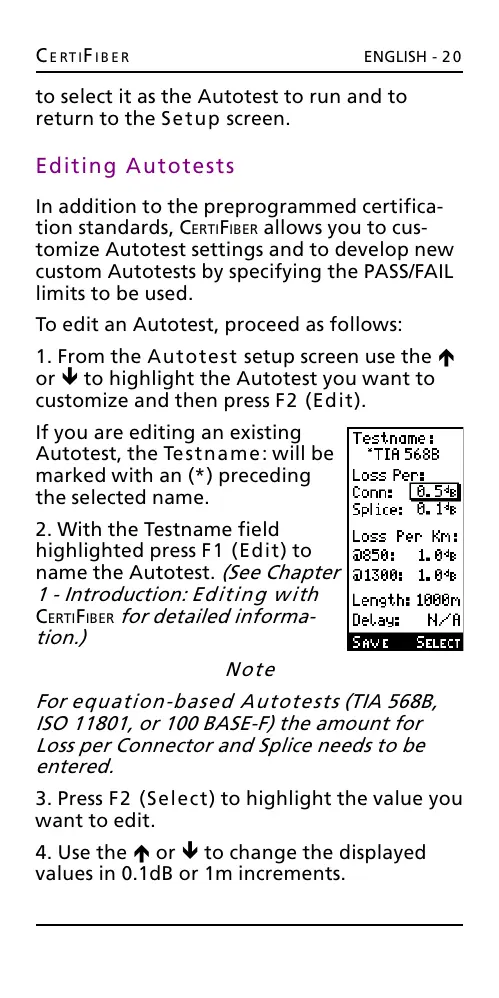
If you are editing an existing
Autotest, the Testname: will be
marked with an (*) preceding
the selected name.
2. With the Testname field
highlighted press F1 (Edit) to
name the Autotest. (See Chapter
1 - Introduction: Editing with
CERTIFIBER for detailed informa-
tion.)
Note
For equation-based Autotests (TIA 568B,
ISO 11801, or 100 BASE-F) the amount for
Loss per Connector and Splice needs to be
entered.
3. Press F2 (Select) to highlight the value you
want to edit.
4. Use the é or ê to change the displayed
values in 0.1dB or 1m increments.
All manuals and user guides at all-guides.com










 To Next Page