CERTIFIBER ENGLISH - 32
standards, and displays a
PASS/FAIL indication.
An Autotest can be easily
customized to run the
different certification tests
required for your site or
system.
Autotest supports many
different network types.
The tests and results vary
depending on the type of
network. (See Appendix A
- Technical Specifications
for a list of supported
network types.)
For certain Autotests, the
PASS/FAIL criteria needs to
be customized in the Edit
Autotest screen. (See
Chapter 2 - Setup:
Autotest for more infor-
mation.)
To run an Autotest pro-
ceed as follows:
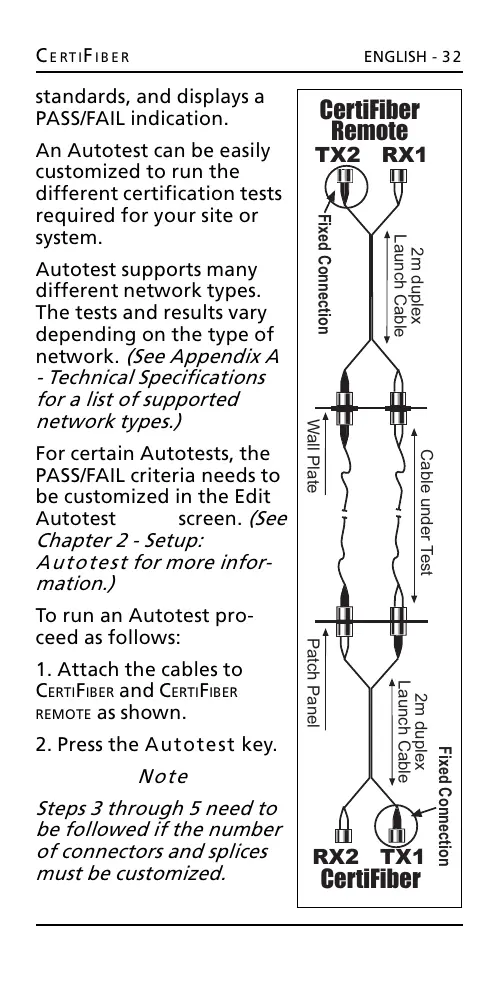
1. Attach the cables to
CERTIFIBER and CERTIFIBER
REMOTE
as shown.
2. Press the Autotest key.
Note
Steps 3 through 5 need to
be followed if the number
of connectors and splices
must be customized.
2m duplex
Launch Cable
2m duplex
Launch Cable
Patch Panel
Wall Plate
Cable under Test
CertiFiber
Remote
TX2 RX1
CertiFiber
RX2 TX1
Fixed Connection
Fixed Connection
All manuals and user guides at all-guides.com










 To Next Page