CERTIFIBER ENGLISH - 39
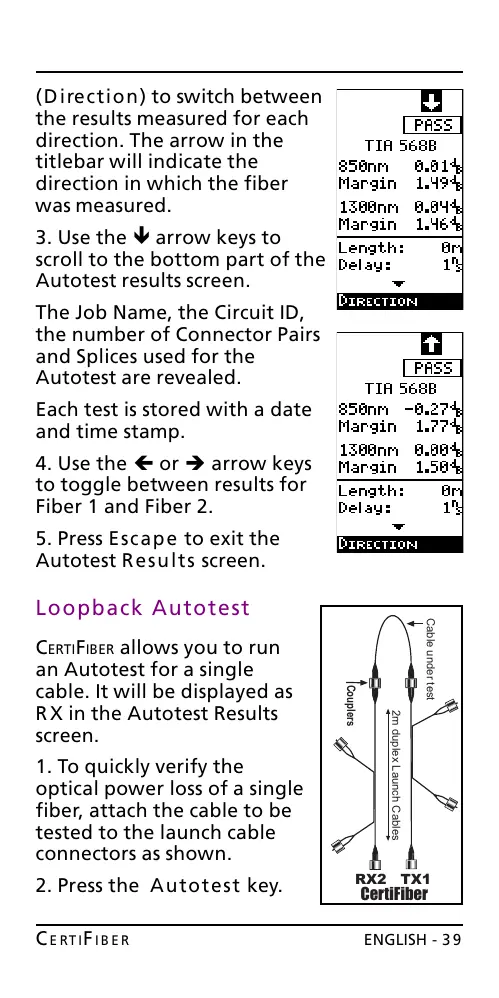
(Direction) to switch between
the results measured for each
direction. The arrow in the
titlebar will indicate the
direction in which the fiber
was measured.
3. Use the ê arrow keys to
scroll to the bottom part of the
Autotest results screen.
The Job Name, the Circuit ID,
the number of Connector Pairs
and Splices used for the
Autotest are revealed.
Each test is stored with a date
and time stamp.
4. Use the ç or è arrow keys
to toggle between results for
Fiber 1 and Fiber 2.
5. Press Escape to exit the
Autotest Results screen.
Loopback Autotest
CERTIFIBER allows you to run
an Autotest for a single
cable. It will be displayed as
RX in the Autotest Results
screen.
1. To quickly verify the
optical power loss of a single
fiber, attach the cable to be
tested to the launch cable
connectors as shown.
2. Press the Autotest key.
2m duplex Launch Cables
CertiFiber
RX2 TX1
Couplers
Cable under test
All manuals and user guides at all-guides.com










 To Next Page