CERTIFIBER ENGLISH - 40
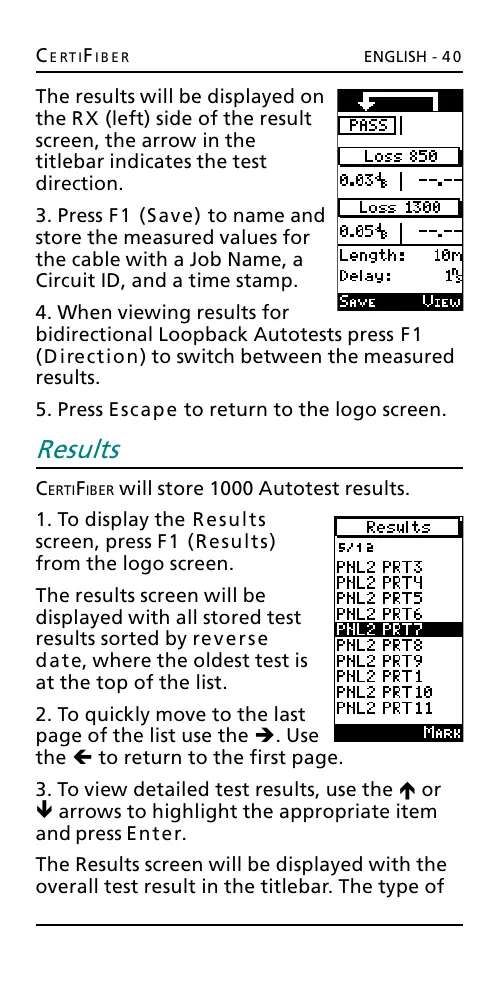
The results will be displayed on
the RX (left) side of the result
screen, the arrow in the
titlebar indicates the test
direction.
3. Press F1 (Save) to name and
store the measured values for
the cable with a Job Name, a
Circuit ID, and a time stamp.
4. When viewing results for
bidirectional Loopback Autotests press F1
(Direction) to switch between the measured
results.
5. Press Escape to return to the logo screen.
Results
CERTIFIBER will store 1000 Autotest results.
1. To display the Results
screen, press F1 (Results)
from the logo screen.
The results screen will be
displayed with all stored test
results sorted by reverse
date, where the oldest test is
at the top of the list.
2. To quickly move to the last
page of the list use the è. Use
the ç to return to the first page.
3. To view detailed test results, use the é or
ê arrows to highlight the appropriate item
and press Enter.
The Results screen will be displayed with the
overall test result in the titlebar. The type of
All manuals and user guides at all-guides.com










 To Next Page