CERTIFIBER ENGLISH - 41
Autotest used, the Circuit ID (Test name), the
loss for both wavelengths, the length, the
delay, the number of connectors and splices,
the overall test number, and the time and
date the test was taken will be shown in the
scrollable screen.
4. Press Escape to return to the Results
screen.
Deleting Autotests
CERTIFIBER allows you to delete selected
Autotest results.
1. Display the Results screen and use the é
or ê key to highlight the Autotest result you
want to delete.
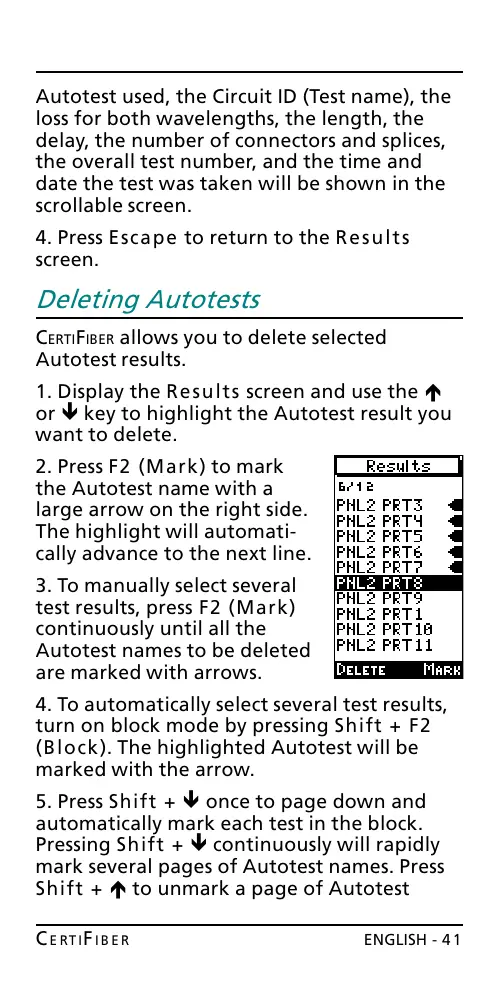
2. Press F2 (Mark) to mark
the Autotest name with a
large arrow on the right side.
The highlight will automati-
cally advance to the next line.
3. To manually select several
test results, press F2 (Mark)
continuously until all the
Autotest names to be deleted
are marked with arrows.
4. To automatically select several test results,
turn on block mode by pressing Shift + F2
(Block). The highlighted Autotest will be
marked with the arrow.
5. Press Shift + ê once to page down and
automatically mark each test in the block.
Pressing Shift + ê continuously will rapidly
mark several pages of Autotest names. Press
Shift + é to unmark a page of Autotest
All manuals and user guides at all-guides.com










 To Next Page