Keyboard
Test
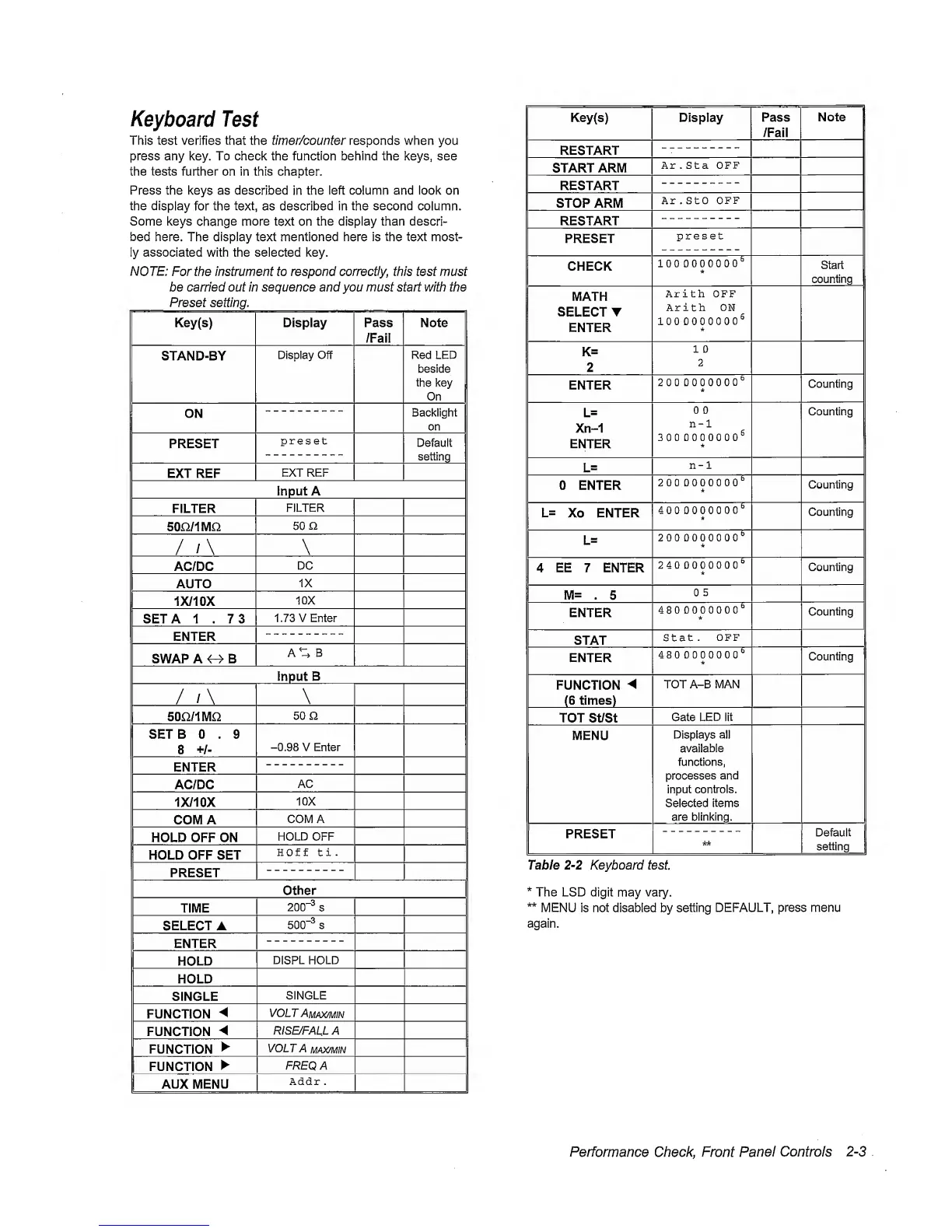
This test verifies that the fimer/counfer responds when you
press any key. To check the function behind the keys, see
the tests further on in this chapter.
Press the keys as described
in
the left column and look on
the
display
for the
text,
as
described
in
the second
column.
Some keys
change more text
on
the display than descri-
bed here. The display text mentioned here is
the
text most-
ly associated with the selected key.
NOTE:
For the instrument to respond
correctly,
this test must
be carried out in sequence and you must start with the
Preset setting.
Key(s)
Display Pass
/Fail
Note
STAND-BY
Display Off Red LED
beside
the
key
On
ON
Backlight
on
PRESET
preset
Default
setting
EXT REF
EXT REF
1
Input A
1
FILTER
FILTER
5on/iMn
50 a
/
/\
\
AC/DC
DC
AUTO
1X
1X/10X
10X
SETA 1 , 73
1.73 V Enter
ENTER
SWAP A
O
B
A%
B
I
Input B
II
/
/\
\
50Q/1MQ
50 Q
SETS 0 . 9
8
+/-
-0.98
V Enter
ENTER
AC/DC
AC
1X/10X
10X
COMA
COMA
HOLD OFF ON
HOLD OFF
HOLD OFF SET
HOf f ti
.
PRESET
II
Other
II
TIME
200“^
s
SELECT
A
500"*
s
ENTER
HOLD
DISPL HOLD
HOLD
SINGLE
SINGLE
FUNCTION
VOLT
Amax/MIN
FUNCTION
RISE/FALLA
FUNCTION
VOLT A
MAX/M
IN
FUNCTION
FREQ A
AUX MENU
Addr .
Key(s)
Display
Pass
/Fail
Note
RESTART
START ARM
Ar . Sta OFF
RESTART
STOP ARM
Ar . StO
OFF
RESTART
PRESET
preset
CHECK
1000000000^
Start
counting
MATH
SELECT
T
ENTER
Arith OFF
Arith ON
lOODOOOOOO^
K=
2
1 0
2
ENTER
2000000000^
k
Counting
L=
Xn-1
ENTER
0 0
n-1
3000000000^
k
Counting
L=
n-1
0 ENTER
2000000000^
k
Counting
L= Xo ENTER
^
4000000000^
*
Counting
L=
200
0000000*^
4 EE 7 ENTER
240
0000000*=’
Counting
M=
. 5
0 5
ENTER
4800000000^
*
Counting
STAT
Stat.
OFF
ENTER
480 DOOOOOO*’
Counting
FUNCTION
(6
times)
TOT A-B MAN
TOT St/St
Gate
LED lit
MENU
Displays all
available
functions,
processes
and
input
controls.
Selected
items
are blinking.
PRESET
kk
Default
setting
Table
2-2
Keyboard test
*
The LSD
digit may vary.
**
MENU is not disabled by setting
DEFAULT, press menu
again.
Performance
Check,
Front
Panel Controls
2-3
.



 To Next Page