EasyManua.ls Logo

Fluke PM6681 - Page 56

Fluke PM6681
153 pages
Print Icon
To Next Page IconTo Next Page
To Previous Page IconTo Previous Page
Loading...
Microcontroller
(Functional
Level
3)
8MHz
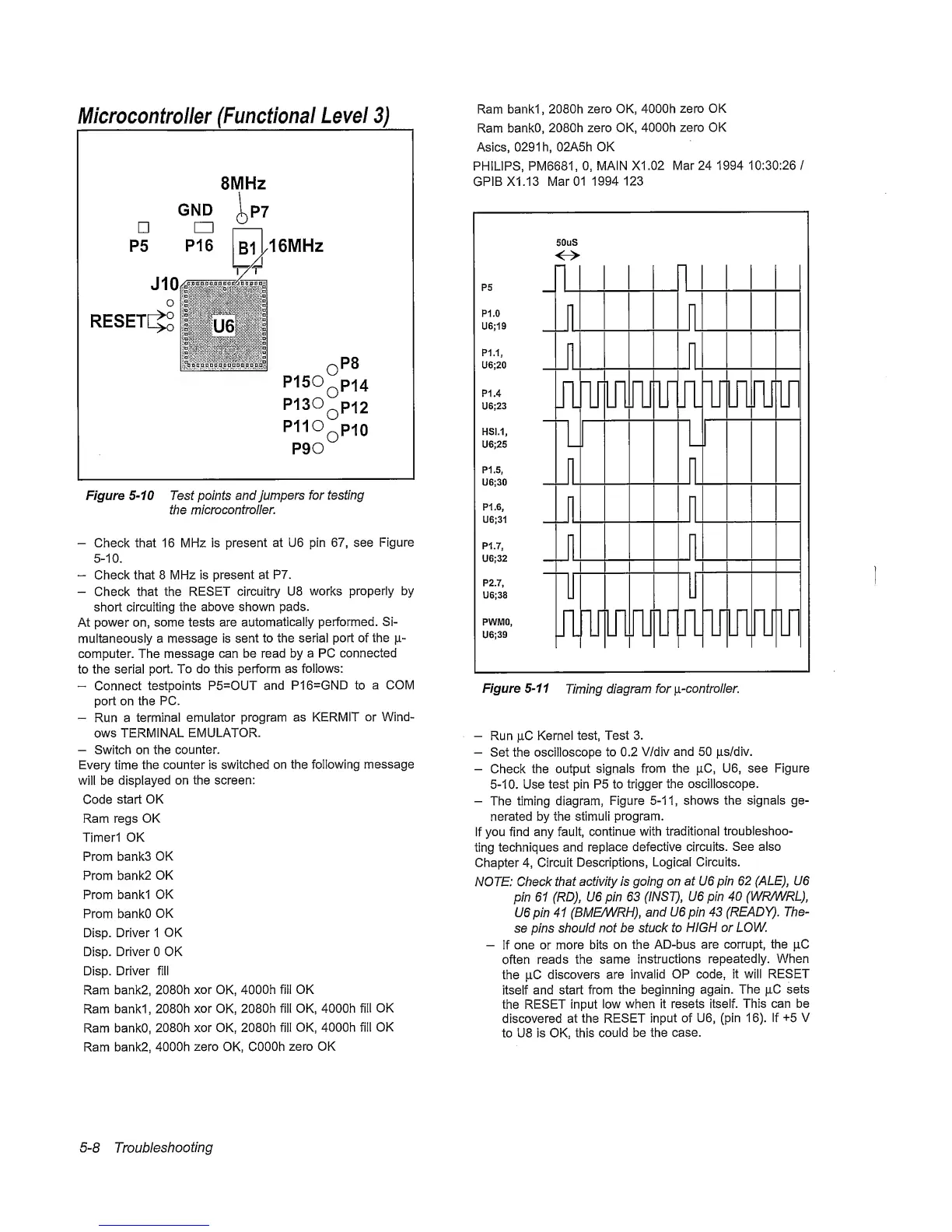
Figure
5-10
Test points and
Jumpers
fortesting
the
microcontroller.
-
Check that 16 MHz is
present
at U6 pin
67,
see
Figure
5-10.
Check that 8 MHz is present
at
P7.
-
Check that the
RESET
circuitry U8 works
properly by
short circuiting
the
above shown pads.
At
power
on,
some tests are
automatically
performed. Si-
multaneously a message is
sent
to the serial port of
the
fi-
computer. The message
can be read by a PC
connected
to the serial
port.
To
do this perform as
follows:
Connect
testpoints P5=OUT
and
P16=GND to a
COM
port on the
PC.
Run a
terminal emulator
program
as KERMIT
or
Wind-
ows TERMINAL
EMULATOR.
-
Switch on the
counter.
Every time
the counter is
switched
on the following
message
will be
displayed on the screen:
Code
start OK
Ram regs OK
Timerl OK
Prom
banks
OK
Prom bank2
OK
Prom
banki
OK
Prom bankO
OK
Disp. Driver 1
OK
Disp.
Driver 0 OK
Disp. Driver fill
Ram
bank2, 2080h
xor
OK,
4000h fill OK
Ram
banki,
2080h
xor
OK,
2080h fill OK, 4000h
fill
OK
Ram bankO,
2080h xor OK, 2080h
fill
OK, 4000h fill OK
Ram bank2,
4000h zero OK, COOOh
zero OK
Ram
banki, 2080h
zero
OK, 4000h
zero
OK
Ram
bankO,
2080h zero OK,
4000h zero OK
Asics,
0291
h,
02A5h OK
PHILIPS, PM6681,
0,
MAIN X1.02
Mar 24 1994
10:30:26
/
GP1BX1.13
Mar 01
1994 123
P5
_
P1.0
U6;19
50t
<-
jS
>
r-|
J
-|
P1.1,
U6;20
Ill
-
P1.4
U6;23
HSI.1,
U6;25
P1.5,
U6;30
¥
n
¥
_
1
“1
p n r
¥
r
1
P1.6,
U6;31
J
1
P1.7,
U6;32
J l
r
P2.7,
U6;38
PWMO,
U6;39
J1
¥
n
[-1
¥
1
-1
r
1
[-1
n r
¥
Figure
5-11
Timing
diagram
for
\i-controi!er.
-
Run |iC
Kernel
test. Test
3.
-
Set the
oscilloscope
to 0.2
V/div
and
50
|is/div.
-
Check the
output signals from
the jiC, U6, see Figure
5-10.
Use
test pin P5 to
trigger
the oscilloscope.
-
The timing diagram,
Figure 5-11,
shows the signals ge-
nerated by the stimuli
program.
If
you find any fault,
continue
with
traditional
troubleshoo-
ting
techniques and
replace
defective
circuits.
See also
Chapter
4,
Circuit
Descriptions,
Logical Circuits.
NOTE: Check
that
activity is going
on at U6 pin
62
(ALE),
U6
pin
61
(RD),
U6
pin
63
(INST),
U6 pin
40
(WRAA/RL),
U6 pin
41
(BME/WRH),
and
U6
pin
43
(READY).
The-
se pins should
not be stuck to
HIGH or LOW.
-
If
one or more bits
on
the AD-bus
are corrupt, the pC
often
reads the same
instructions
repeatedly. When
the pC
discovers are
invalid
OP code,
it will
RESET
itself
and start from
the beginning
again.
The pC sets
the
RESET input low
when it resets itself.
This can be
discovered at
the
RESET
input
of
U6, (pin
16).
If
+5
V
to U8 is OK, this
could be the
case.
5-8
Troubleshooting

Related product manuals