EasyManua.ls Logo

Fluke PM6681 - Page 58

Fluke PM6681
153 pages
Print Icon
To Next Page IconTo Next Page
To Previous Page IconTo Previous Page
Loading...
Microcomputer
Kernel (Functional
Level
4b)
NOTE:
It is not possible to
run
this
test before you
have
run the
Keyboard
test,
Test
5.
-
Set the
oscilloscope to
2 V/div. on channel A
and
B.
-
Set the time base to
0.5
ps/div.
-
Use pin 40
on
U6
to
trigger the oscilloscope.
-
Run the
Address test,
Test 6.
-
Enter
the data code
85
(hex
55)
on the DATA
ENTRY
keypad.
-
Press ENTER.
-
Enter the
address
code
43690
(hex AAAA) on
the DATA
ENTRY
keypad.
-
Press ENTER.
-
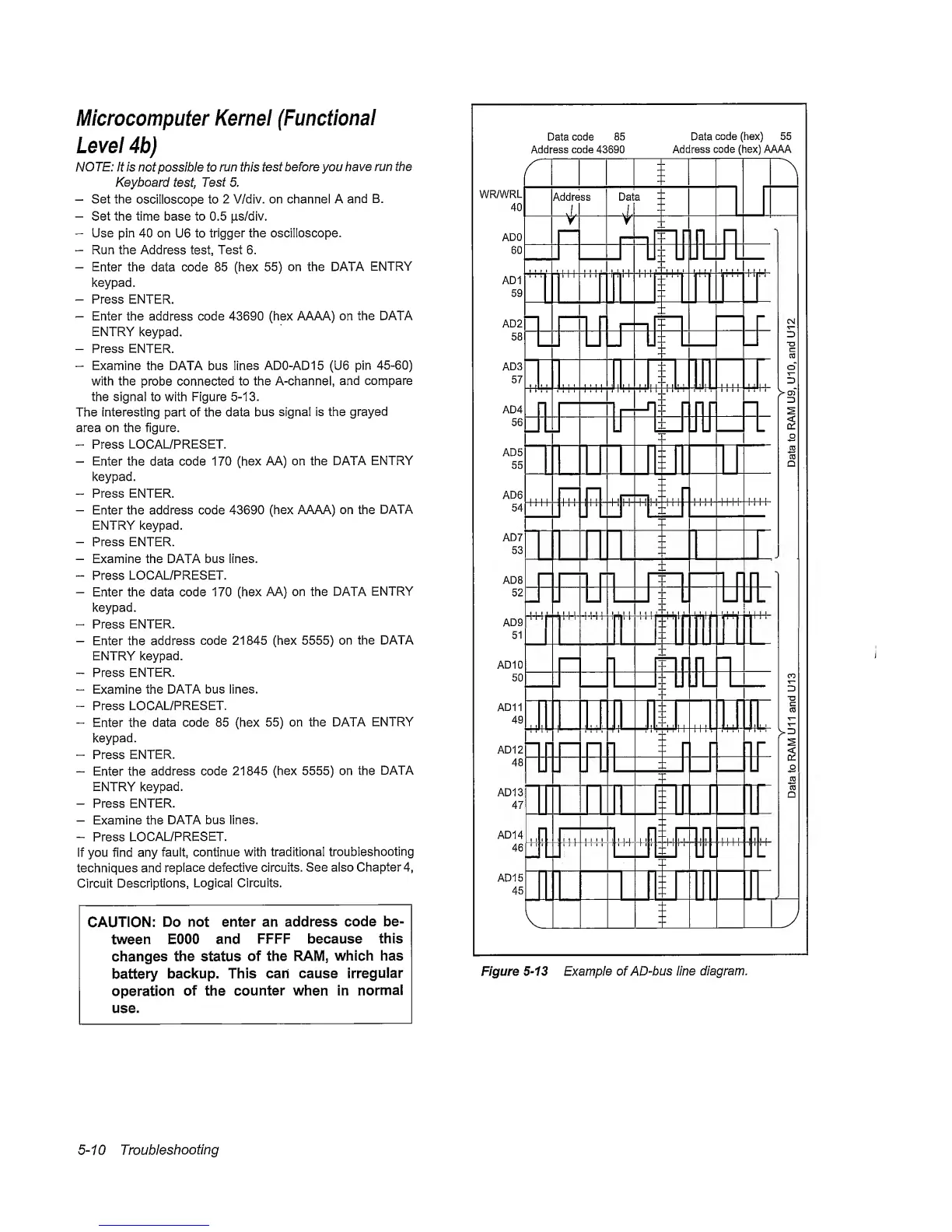
Examine
the DATA bus
lines
ADO-AD
15
(U6 pin
45-60)
with the
probe
connected
to the A-channel,
and
compare
the signal to with Figure
5-13.
The interesting part of the data bus
signal is the
grayed
area on the figure.
-
Press LOCAL/PRESET.
-
Enter the data code
170
(hex
AA) on the DATA
ENTRY
keypad.
-
Press ENTER.
-
Enter the address code
43690
(hex
AAAA) on the
DATA
ENTRY keypad.
-
Press ENTER.
-
Examine the DATA bus lines.
-
Press
LOCAL/PRESET.
-
Enter the data code
170
(hex
AA) on the DATA
ENTRY
keypad.
-
Press
ENTER.
-
Enter the
address
code
21845
(hex
5555)
on
the DATA
ENTRY
keypad.
-
Press
ENTER.
~
Examine
the DATA bus lines.
-
Press
LOCAL/PRESET.
-
Enter the
data code
85
(hex
55)
on the DATA
ENTRY
keypad.
-
Press
ENTER.
Enter the
address code
21845
(hex
5555)
on the
DATA
ENTRY
keypad.
-
Press ENTER.
-
Examine the
DATA bus lines.
-
Press
LOCAL/PRESET.
if you find any
fault, continue with
traditional
troubleshooting
techniques and
replace
defective
circuits.
See also
Chapter
4,
Circuit
Descriptions,
Logical Circuits.
CAUTION:
Do
not
enter an address
code be-
tween
EOOO and
FFFF because
this
changes the status
of the RAM,
which has
battery
backup.
This
can cause
irregular
operation
of the
counter when
in
normal
use.
Data code
85 Data
code (hex) 55
Address code 43690
Address code (hex) AAAA
Figure
5~13
Example of
AD~bus line
diagram.
5-10
Troubleshooting

Related product manuals