EasyManua.ls Logo

Fluke PM6681 - Page 64

Fluke PM6681
153 pages
Print Icon
To Next Page IconTo Next Page
To Previous Page IconTo Previous Page
Loading...
Input Amplifier
(Functional
Level
9)
A and
B Input
Check
DC
levels
-
Switch on the counter.
-
Press LOCAL/PRESET and ENTER.
-
Select Time
A-B.
-
Deselect
AUTO
and set the trigger
level
to
-1
V on both
inputs.
-
Select ATTENUATION A and B to x1.
-
Select DC
on
both inputs.
Measure
the DC voltages
according to Figure
5-22
and
Table
5-7.
Use the DMM
with
a 10 kO
resistor
in
series
with the test cable.
Test point
Vdc
Vpp
A, a
0.5
B, b
+2.7
C,
c
-2.7
D,
d
+0.4
E, e
+1.5
F, f
+1.5
G,g
+0.8
H, h
+0
0.5
J.i
-0.4
K. k
-2.8
L. I
-3.8
M, m
-1.5
N, n
-1.7
0.5
(square)
0,
0
-0.8
0.5
(square)
p,p
+4.2
1
(square)
Q.
q
-2.2
1
(square)
R, r
+3.3
S, s
-1.6
T.t
+4.2
U, u
CM
i
V, V
0
0.25
W, w
0
0.25
X, X
+2.7 0.5
Y,V
+1.2
z, z
+2.6 0.5
Table
5-7
Typical
voltages, Input
Amplifier.
AC levels
-
Connect
a 1000 Hz
sine
wave signal
with
an amplitude
of 1 Vp-p
to
Input A.
-
Set
the input
amplitude
to 1 Vp-p.
-
Measure
the AC-levels
according to Figure
5-22
and
Table
5-7.
Use the oscilloscope
and
a 10 MQ probe.
-
Trace the
signal
from V23 pin E and
V29 pin E to PRO-
BE
COMP
VIEW A
and
B OUT, P25 pin 5 and 4
at the
rear panel.
If you find any
fault, continue
with traditional
troubleshoo-
ting
techniques
and replace
defective circuits. See also
Chapter
4,
CIRCUIT
DESCRIPTIONS,
Input Amplifiers
A
and
B.
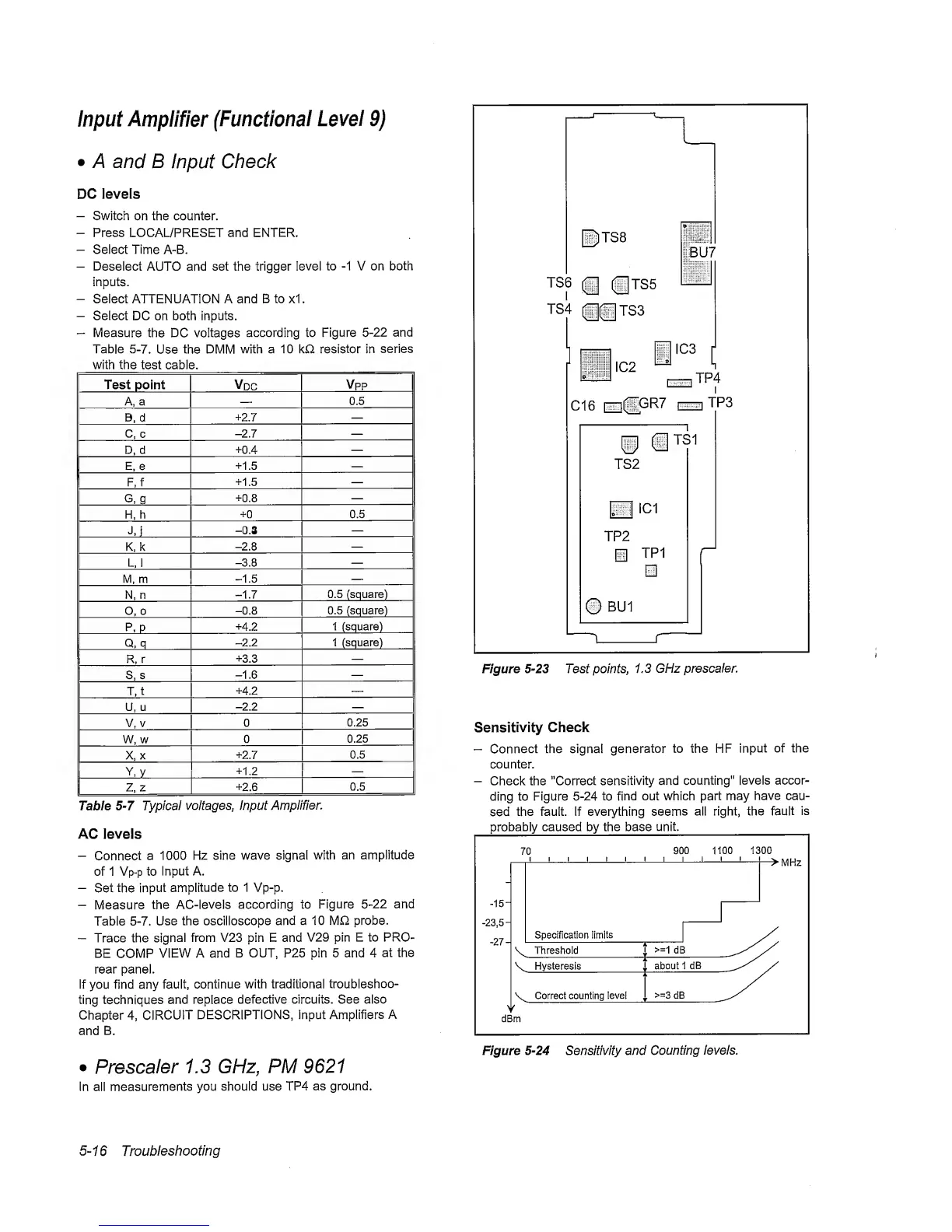
Figure
5-23
Test points,
1.3
GHz prescaler.
Sensitivity
Check
-
Connect
the signal
generator
to the HF
input
of the
counter.
-
Check the "Correct
sensitivity and counting"
levels accor-
ding to Figure
5-24
to find
out which part
may
have cau-
sed
the fault. If everything
seems
all right, the
fault
is
Figure
5-24
Sensitivity and
Counting levels.
Prescaler
1.3 GHz,
PM 9621
In all
measurements
you should use TP4
as ground.
5-1
6
Troubleshooting