Charging the Gps LS
1. Use the supplied Micro-USB cable.
2. Use any 5V USB charger with at least 1A output. The Gps LS also
charges when connected to a computer.
3. When the GPS LS is OFF and connected to the power source the
display shows the message “CHRG”. When the battery is fully charged
the display shows the message “FULL”. In both cases the battery icon
will show an animation of the battery charging and status. If the GPS LS
detects some problem with the battery the display shows the message
“BAD”, this can be caused by trying to charge the instrument in an
excessively hot environment, or a damaged battery.
When the GPS LS is ON and the instrument is connected to any power
supply (computer or wall charger), the battery icon will show an animation
of the battery charging and status.
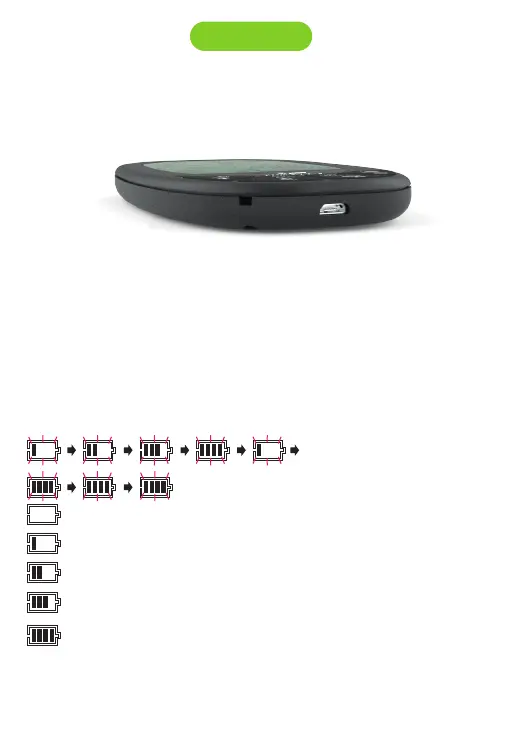
Battery is charging
7. Battery
Battery status:
The flight time with the battery fully charged is around 35 hours. This is a
estimated duration. External factors such as temperature and natural ageing of
the battery may affect these durations.
...
Battery is charging but is near full charge
Battery capacity is below 20%
Battery capacity is between 20% to 40%
Battery capacity is between 40% to 60%
Battery capacity is between 60% to 80%
Battery capacity is between 80% to 100%
...



 To Next Page