Figure 3.4: Dial Vario
3.1.5 Navigation Circle
The Navigation Element is a multi-information element which shows graphically the bearing, wind direction
and thermal core. Additionally, if a destination was dened (waypoint) the navigation element will also
indicates the direction to the waypoint center, the waypoint edge and the direction to the waypoint after
the next one. This element cannot be resized but can be re-positioned. For navigation information to be
displayed the GPS the
Start Fligth
conditions must be met (see Section 4.8.4).
Figure 3.5: Navigation Element
Navigation information is shown within the inner most circles. The external circle contains the cardinal
points and the Wind Flag. The current traveling direction (bearing) corresponds to the point indicated in
the top of the navigation circle. On the example shown in Figure 3.5, the bearing is approximately 80
º
.
Navigation Arrows
. If no route is dened the arrow will start showing the direction to the takeo, after the takeo is detected
(TakeO is the point taken when the Flight Starts)
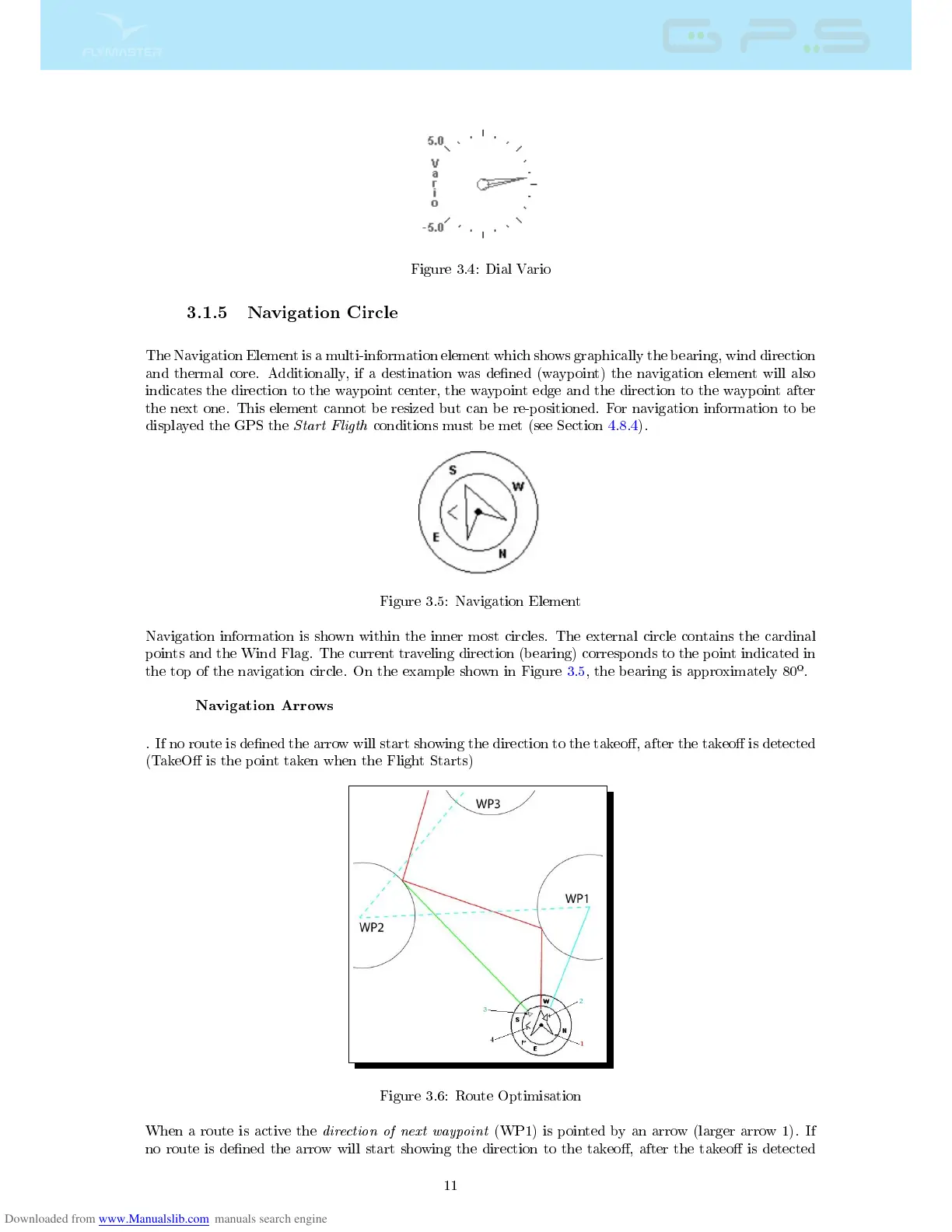
Figure 3.6: Route Optimisation
When a route is active the
direction of next waypoint
(WP1) is pointed by an arrow (larger arrow 1). If
no route is dened the arrow will start showing the direction to the takeo, after the takeo is detected
11



 To Next Page