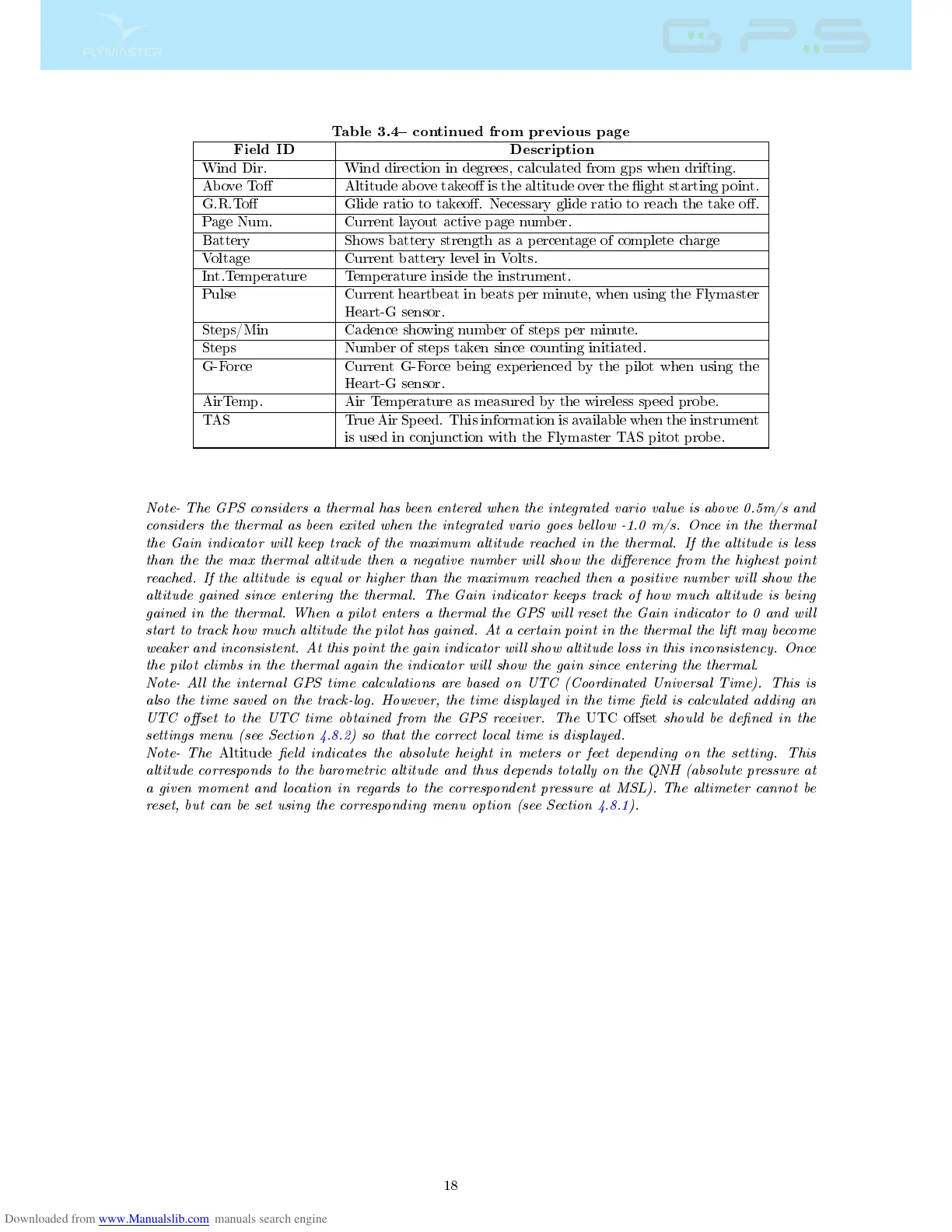
Table 3.4 continued from previous page
Field ID Description
Wind Dir. Wind direction in degrees, calculated from gps when drifting.
Above To Altitude above takeo is the altitude over the ight starting point.
G.R.To Glide ratio to takeo. Necessary glide ratio to reach the take o.
Page Num. Current layout active page number.
Battery Shows battery strength as a percentage of complete charge
Voltage Current battery level in Volts.
Int.Temperature Temperature inside the instrument.
Pulse Current heartbeat in beats per minute, when using the Flymaster
Heart-G sensor.
Steps/Min Cadence showing number of steps per minute.
Steps Number of steps taken since counting initiated.
G-Force Current G-Force being experienced by the pilot when using the
Heart-G sensor.
AirTemp. Air Temperature as measured by the wireless speed probe.
TAS True Air Speed. This information is available when the instrument
is used in conjunction with the Flymaster TAS pitot probe.
Note- The GPS considers a thermal has been entered when the integrated vario value is above 0.5m/s and
considers the thermal as been exited when the integrated vario goes bellow -1.0 m/s. Once in the thermal
the Gain indicator will keep track of the maximum altitude reached in the thermal. If the altitude is less
than the the max thermal altitude then a negative number will show the dierence from the highest point
reached. If the altitude is equal or higher than the maximum reached then a positive number will show the
altitude gained since entering the thermal. The Gain indicator keeps track of how much altitude is being
gained in the thermal. When a pilot enters a thermal the GPS will reset the Gain indicator to 0 and will
start to track how much altitude the pilot has gained. At a certain point in the thermal the lift may become
weaker and inconsistent. At this point the gain indicator will show altitude loss in this inconsistency. Once
the pilot climbs in the thermal again the indicator will show the gain since entering the thermal.
Note- All the internal GPS time calculations are based on UTC (Coordinated Universal Time). This is
also the time saved on the track-log. However, the time displayed in the time eld is calculated adding an
UTC oset to the UTC time obtained from the GPS receiver. The
UTC oset
should be dened in the
settings menu (see Section 4.8.2) so that the correct local time is displayed.
Note- The
Altitude
eld indicates the absolute height in meters or feet depending on the setting. This
altitude corresponds to the barometric altitude and thus depends totally on the QNH (absolute pressure at
a given moment and location in regards to the correspondent pressure at MSL). The altimeter cannot be
reset, but can be set using the corresponding menu option (see Section 4.8.1).
18



 To Next Page