FS key. However, the sound level adjusted using the FS key is not kept in memory, so is only valid until
the GPS is turned o.
In
Flight Mode
the current volume level can be seen using the sound element (see Section 3.1.2 for more
details).
4.8.4 Advanced Features
The advanced features settings option can be used to set more of the GPS vario acoustics. (Figure 4.22).
Figure 4.22: Advanced Features
Damper
The GPS 's vertical speed calculation is based on air pressure variations. It is very seldom to have air
pressure absolutely stable. Turbulence caused by air moving near the sensor is sucient to cause small
variations in pressure. For this reason the GPS lters (averages) the pressure data to prevent constantly
detecting tiny pressure variations. The value that denes how must the pressure is ltered is the
Damper
.
Setting a lower damper value caused the GPS to become more responsive but harsher. Inversely a higher
value causes the GPS to be less responsive but smoother. The default value is 6.
Cadence
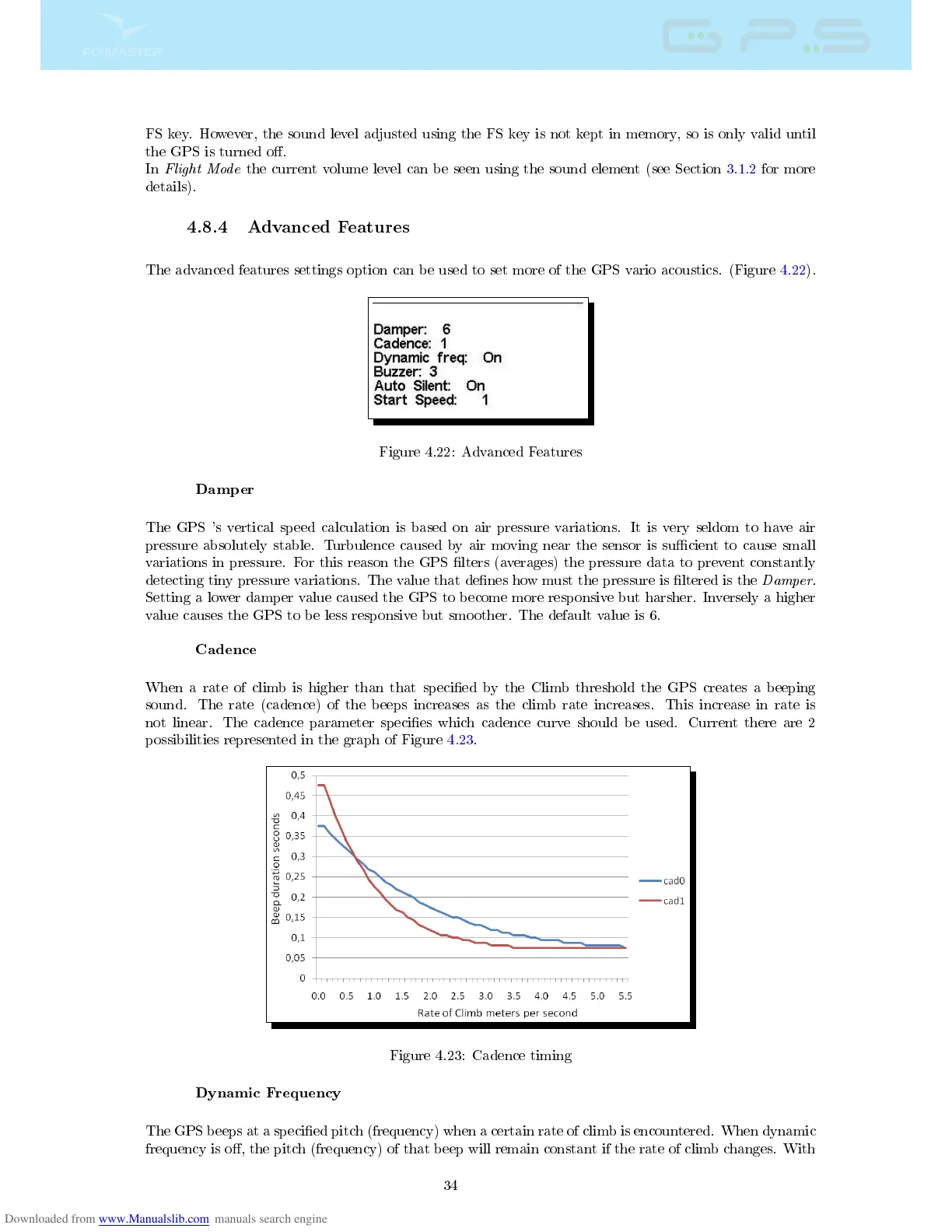
When a rate of climb is higher than that specied by the Climb threshold the GPS creates a beeping
sound. The rate (cadence) of the beeps increases as the climb rate increases. This increase in rate is
not linear. The cadence parameter species which cadence curve should be used. Current there are 2
possibilities represented in the graph of Figure 4.23.
Figure 4.23: Cadence timing
Dynamic Frequency
The GPS beeps at a specied pitch (frequency) when a certain rate of climb is encountered. When dynamic
frequency is o, the pitch (frequency) of that beep will remain constant if the rate of climb changes. With
34



 To Next Page