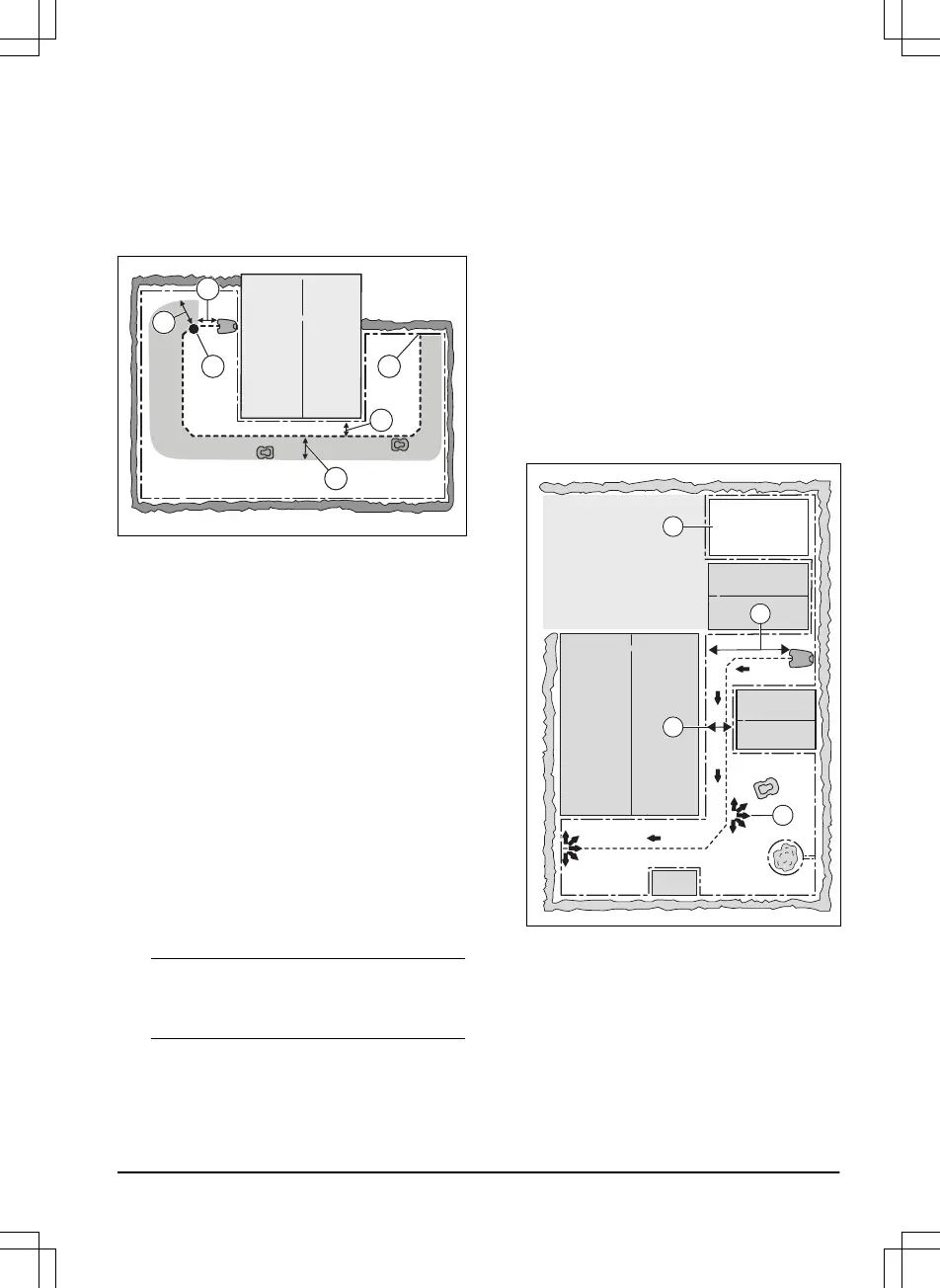
3.4.4 To examine where to put the guide
wire
Put the guide wire from the charging station
through the work area and connect it to the
boundary wire. The installation of the guide wire
is important for a successful guide calibration,
refer to
Guide calibration on page 23
.
• Put the guide wire in a line at a minimum of
1 m / 3.3 ft. in front of the charging station
(A).
• Put the guide wire minimum 30 cm / 1 ft.
from the boundary wire (B).
• Starting point (C). Refer to
Starting point on
page 28
.
• Minimum distance 60 cm / 2 ft.
perpendicular to the guide wire (D). If less
distance, the calibration process is
interrupted. For the widest possible guide
corridor, have a minimum distance of 1.35
m / 4.5 ft. Refer to
Guide calibration on page
23
.
• Where the guide wire is connected to the
boundary wire (E).
• Guide corridor (F). The product always runs
to the left of the guide wire as seen facing
the charging station. Make sure that the
guide wire has as much free area as
possible to the left of the guide wire.
Note:
The product runs at different distances
to the guide wire but stays in the guide
corridor.
3.4.5 Work area examples
• If the charging station is put in a small area
(A), make sure that the distance to the
boundary wire is at a minimum 2 m / 6.6 ft.
in front of the charging station.
• If the work area has a passage (B), make
sure that the distance to the boundary wire
is at a minimum 2 m / 6.5 ft. If the passage is
smaller than 2 m / 6.5 ft., install a guide wire
through the passage. Minimum passage
between the boundary wire is 60 cm / 24 in.
• If the work area has areas which are
connected by a narrow passage (B), you
can set the product to first follow and then
leave the guide wire after a certain distance
(C). The settings can be changed in
Lawn
Coverage and PassageSense on page 26
.
• If the work area includes a secondary area
(D), refer to
To make a secondary area on
page 18
. Put the product in the secondary
area and select
Secondary area mode
.









 To Next Page