8. Push the STOP button when the product is
at the distance you select to measure. The
distance shows in the display.
3.10.7.5 To disable or enable the Lawn Coverage
function
Disable or enable the
Lawn Coverage
function for
each area.
1. Do steps 1–3 in
To get access to the menu
on page 23
.
2. Use the arrow buttons and the OK button to
move through the menu structure
Settings >
Lawn Coverage > Area 1-3 > Disable
.
3. Push the OK button.
4. Push the BACK button.
3.10.7.6 To reset the Lawn Coverage settings
You can reset the
Lawn Coverage
settings for
each area and use the factory setting.
1. Do steps 1–3 in
To get access to the menu
on page 23
.
2. Use the arrow buttons and the OK button to
move through the menu structure
Settings >
Lawn Coverage > Area 1-3 > More > Reset
.
3. Push the OK button.
3.10.8 Starting point
This function allows you to control how far the
product drives along the guide wire from the
charging station before it starts operating. The
factory setting is 60 cm and the maximum
distance is 300 cm.
Note:
The product straddles the guide wire from
the charging station to the starting point. Keep as
short distance to the starting point as possible to
reduce the risk of tracks forming on the lawn.
If the charging station is placed in a limited space
area, for example under a veranda, choosing a
good starting point is important so that the guide
calibration process is optimized. Refer to
Guide
calibration on page 23
.
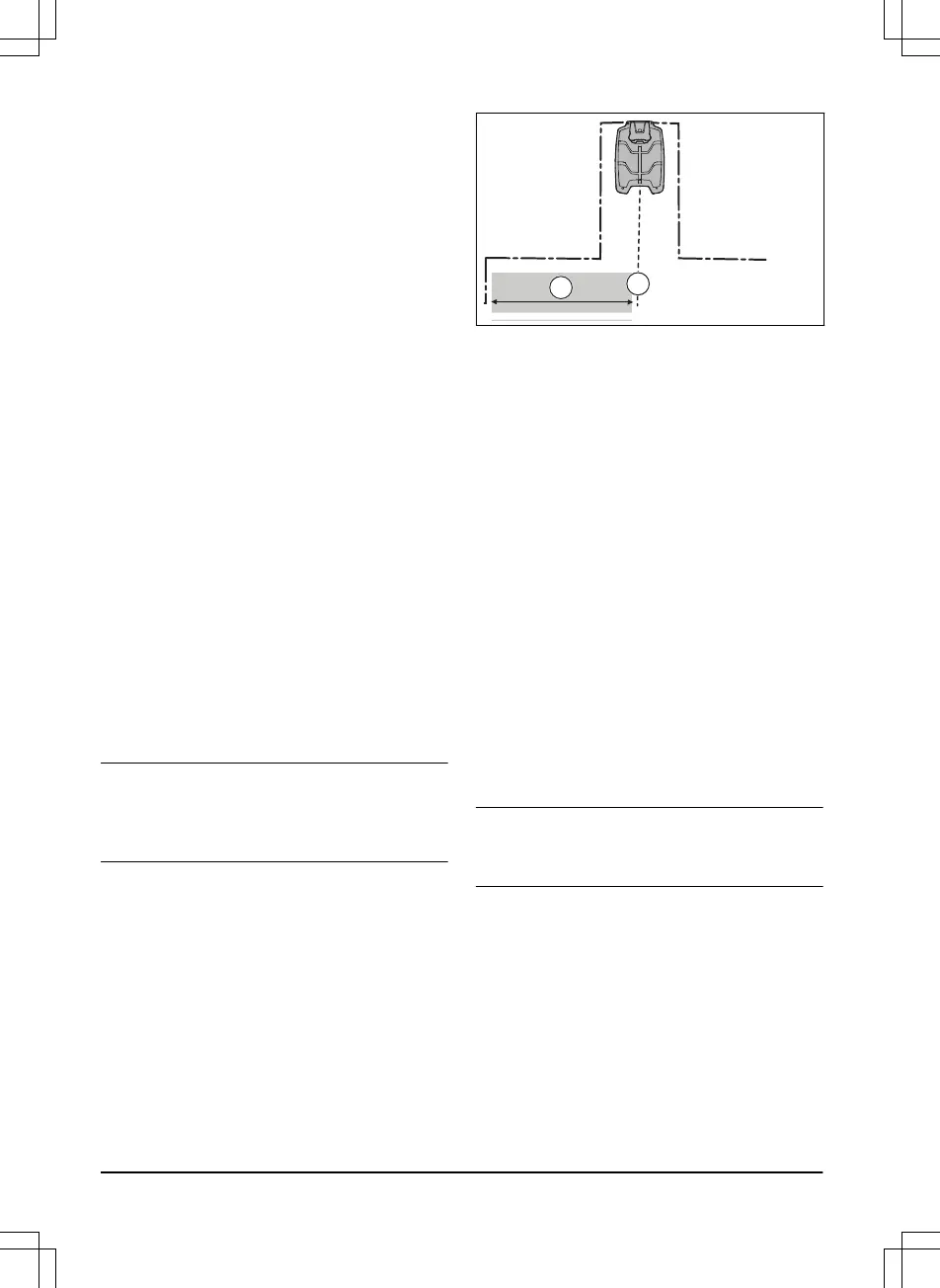
A) Starting point
B) Minimum distance 60 cm / 2 ft (perpendicular
to the guide wire). If less distance, the calibration
process is interrupted. For the widest possible
guide corridor, have a minimum distance of 1.35
m / 4.5 ft. Refer to
Guide calibration on page 23
.
3.10.8.1 To set the starting point
1. Do steps 1-3 in
To get access to the menu
on page 23
.
2. Use the arrow button and the OK button to
move through the menu structure
Settings >
Installation > Starting point
.
3. Use the arrow buttons to specify the
distance in cm.
4. Push the BACK button.
3.10.9 Drive Past Wire function
The front of the product always moves past the
boundary wire by a specified distance before the
product moves back into the work area. The
factory setting is 32 cm. You can select a
distance of 20-40 cm.
Note:
If the
Drive Past Wire
distance is changed,
the distance will change along the boundary wire
in every point of the yard.
3.10.9.1 To set the Drive Past Wire function
1. Do steps 1–3 in
To get access to the menu
on page 23
.
2. Use the arrow button and the OK button to
move through the menu structure
Settings >
Installation > Drive Past Wire
.
3. Use the arrow buttons to set the distance in
cm.
4. Push the BACK button.
28
- Installation
1392 - 001 -



 To Next Page