6.3 Information messages
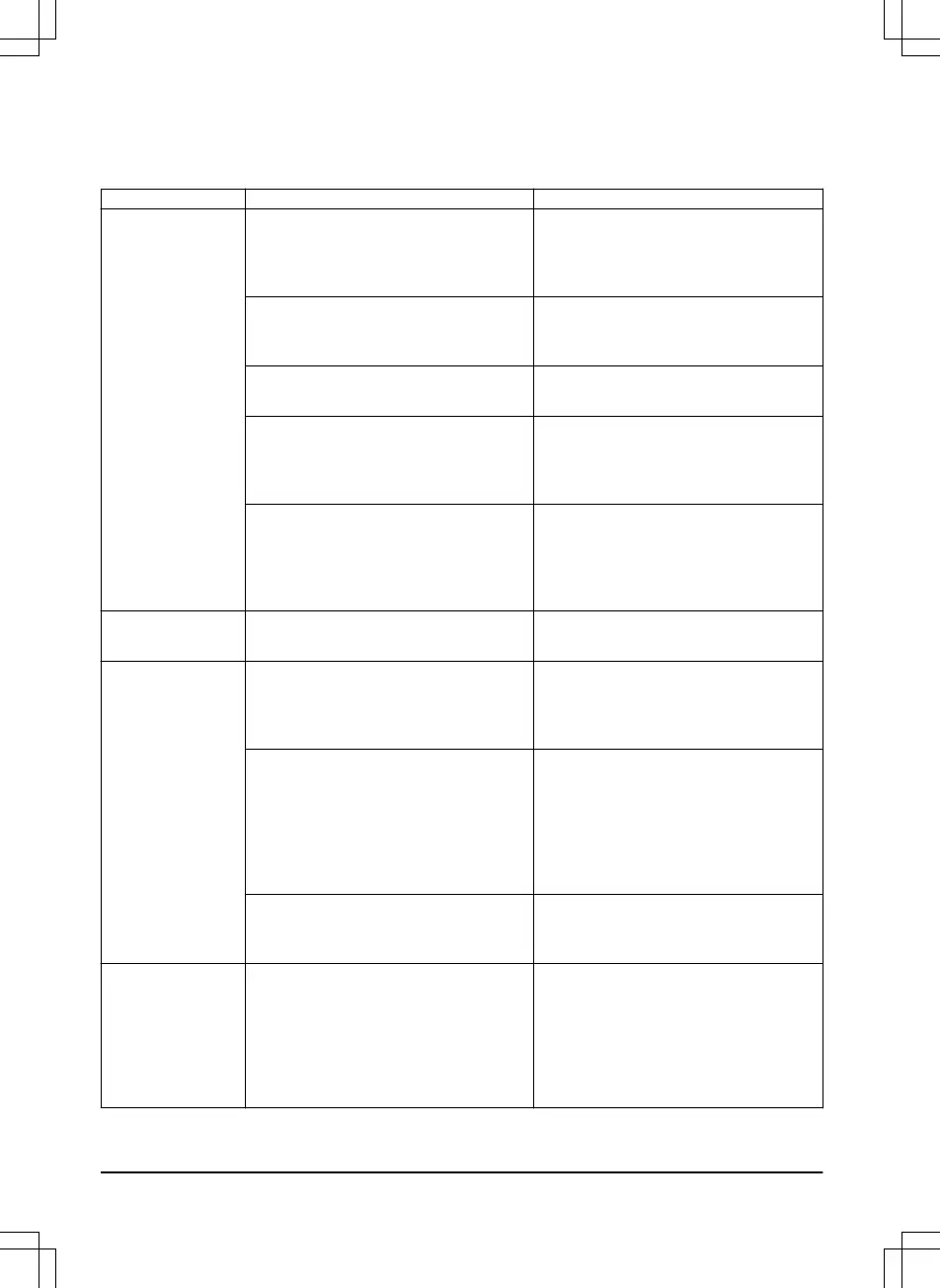
The information messages in the table below are shown in the display of the product. Speak to your
Flymo customer service if the same message shows frequently.
Message Cause Action
Low battery
The product cannot find the charging
station.
Check that the charging station and the
guide wire are installed in accordance
with the instructions. Refer to
To install
the guide wire on page 21
.
The guide wire is broken or not connec-
ted.
Check that the guide wire is connected
to the charging station correctly. Find
out where the break is and rectify it.
The battery is spent. Replace the battery. Refer to
Battery
on page 36
.
The charging station’s antenna is de-
fective.
Check if the indicator lamp in the
charging station flashes red. Refer to
Indicator lamp in the charging station
on page 45
.
The charging plates on the product or
contact plates on the charging station
are corroded.
Clean the charging and contact plates
using a fine grade emery cloth. If the
problem remains, the message re-
quires action by authorized service
technician.
Settings restored
Confirmation that a
Reset all user set-
tings
has been carried out.
No action required.
Guide not found
The guide wire is not connected to the
charging station.
Check that the guide wire connector is
tightly connected to the charging sta-
tion. Refer to
To install the guide wire
on page 21
.
Break in the guide wire. Check if the indicator lamp in the
charging station flashes yellow. Refer
to
Indicator lamp in the charging station
on page 45
. Find out where the break
is. Replace the damaged section of the
guide wire with a new loop wire and
splice using an original coupler.
The guide wire is not connected to the
boundary loop.
Check that the guide wire is connected
correctly to the boundary loop. Refer to
To install the guide wire on page 21
.
Guide calibration
failed
The product has failed to calibrate the
guide wire.
Check that the guide wire is installed
according to the instructions. Refer to
To install the guide wire on page 21
. Al-
so, check that the minimum distance to
the left of the guide wire is met. Refer
to
To examine where to put the guide
wire on page 19
.
44 - Troubleshooting
1392 - 001 -




 To Next Page