EN-16
Troubleshooting
If you follow the recommended steps but the problem
persists, or error messages other than the ones below appear,
please call your local customer service.
Do not attempt to repair the device yourself and never try to
disassemble the device under any circumstances.
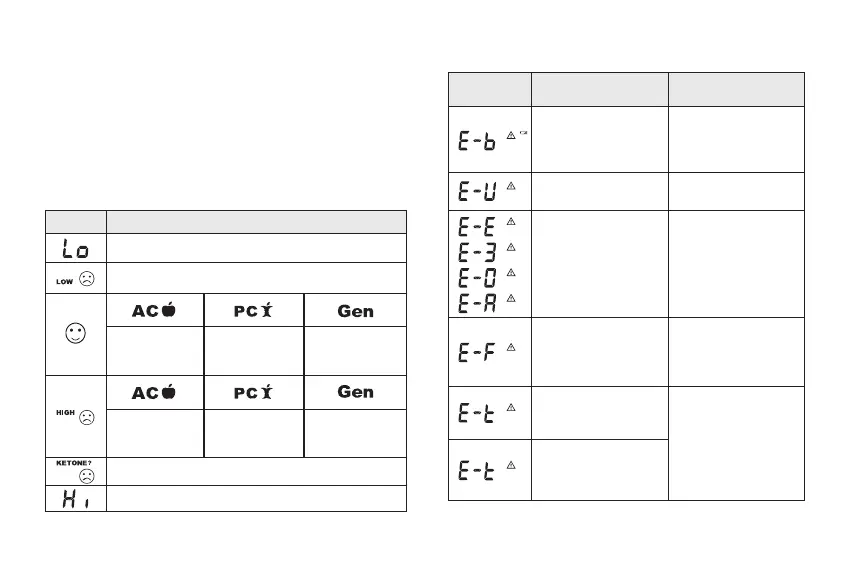
Result Readings (for glucose test)
Message What it Means
< 20 mg/dL (1.1 mmol/L)
20-69 mg/dL (1.1-3.8 mmol/L)
70-129 mg/dL
(3.9-7.2 mmol/L)
70-179 mg/
dL (3.9-9.9
mmol/L)
70-119 mg/dL
(3.9-6.6 mmol/L)
130-239 mg/
dL (7.2-13.3
mmol/L)
180-239 mg/
dL (9.9-13.3
mmol/L)
120-239 mg/
dL (6.7-13.3
mmol/L)
≥ 240 mg/dL (13.3 mmol/L)
> 600 mg/dL (33.3 mmol/L)
Error Message
Error
Message
Cause What To Do
The batteries cannot
provide enough power
for a test.
Replace the battery
immediately and reset
date and time on the
meter setting.
Strip has been used.
Repeat the test with a
new strip.
Problem in operation.
Review the
instructions and
repeat the test with a
new strip. If problem
persists, contact the
local customer service
for assistance.
You may have removed
the strip after applying
blood, or insucient
blood volume.
Review the
instructions and
repeat test with a new
test strip.
Ambient temperature
is below the system’s
operation range.
System operational
range is 10°C to
40°C (50°F to 104°F).
Repeat the test after
the device and test
strip have reached the
above temperature.
Ambient temperature
is above the system’s
operation range.



 To Next Page