EN-3
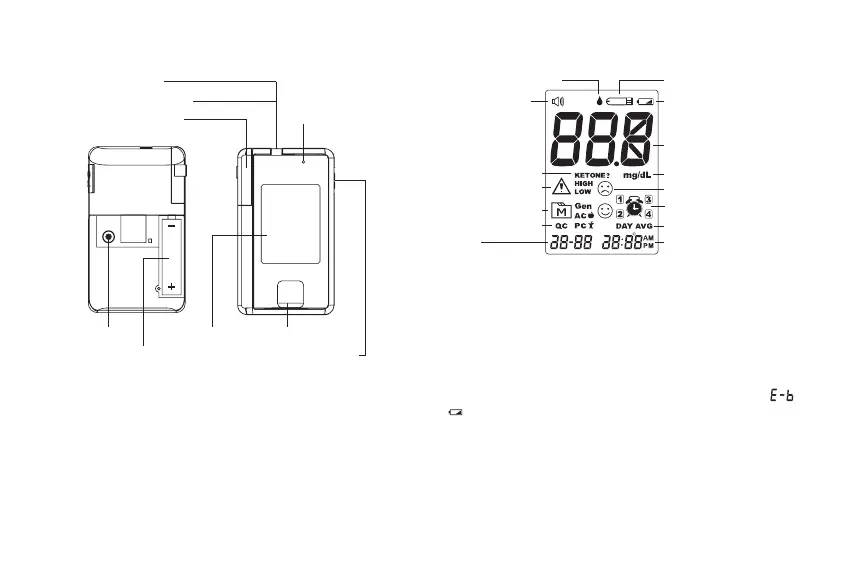
1. Test Strip Slot 9. Bluetooth
Indicator (for
GD50b)
2. Strip Indication Light
3. Test Strip Ejector
4. SET Button
5. Battery Compartment
6. Display Screen
7. USB/RS-232 Port
8. MAIN Button
M
SET
Product Overview
Screen Display
1. Blood Drop Symbol
8. Time
9. Day Average
10. Reminder Alarm
11. Face Low/High Symbol
12. Measurement Unit
13. Test Result
14. Low Battery Symbol
15. Test Strip Symbol
3. Ketone Warning
4. Warning Symbol
5. Memory Symbol
6. Measuring Mode
7. Date
Getting Started
Initial Setup
Please follow the initial setup procedure before using the
device for the rst time or after you have replaced the
battery. When the battery power is extremely low and “ &
” appears on the screen, the meter cannot be turned on.
Step 1: Enter the Setting Mode
Open the battery cover and press SET. The display turns on.
Step 2: Conguring the Settings (Date, Time Format,
Time, Universal Tone, Memory Deletion and Reminder
Alarm)
2. Universal Tone



 To Next Page