EN-4
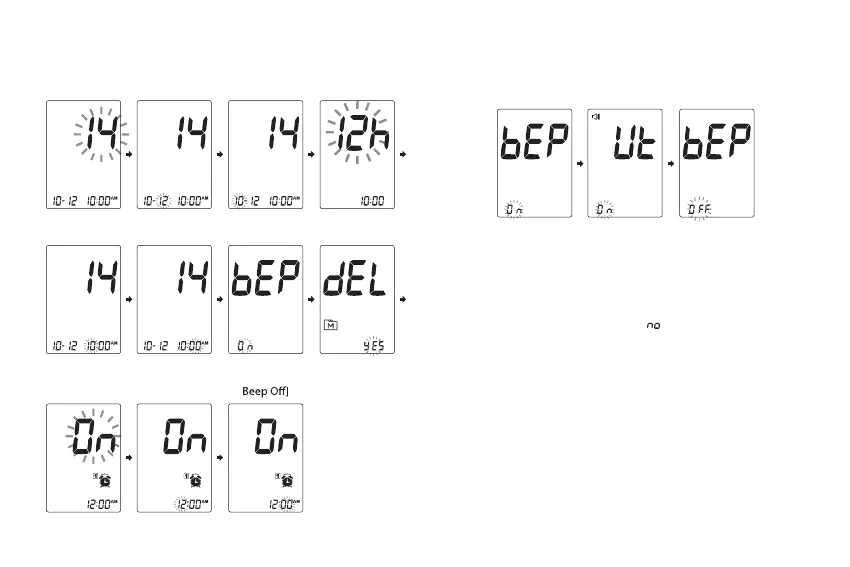
Set [Year] Set [Month] Set [Day] Set [Time
Format]
Set [Hour] Set [Minute]
Set [Beep On,
Universal Tone,
Delete Memory
Records
Set [Alarm Time
Set [Alarm Time
(Hour)]
Set [Reminder
Alarm]
Note:
• You may setup Beep On, Universal Tone On and Beep O by
press MAIN to change it.
• When Universal Tone is turned on, the meter guides you
through the blood glucose test using beep tones; it also
outputs the result as a series of beeps.
• When Beep is turned o, the alarm function will remain
eective.
• During memory deletion, select “
”to keep all saved
results.
• You may set it up to four reminder alarms.
• To turn o an alarm, nd the alarm number by pressing SET,
then press MAIN to toggle On to OFF.
• When the alarm goes o, the device will automatically turn
on. Press MAIN to mute the alarm. If you do not press MAIN,
the device will beep for 2 minutes then switch o.
• If the device is idle for 3 minutes during the setting mode, it
will turn o automatically.
Press MAIN repeatedly to adjust the value or enable/disable
the setting. Then press SET to conrm the setting and switch
to another eld.



 To Next Page