EN-5
Testing Your Blood Glucose
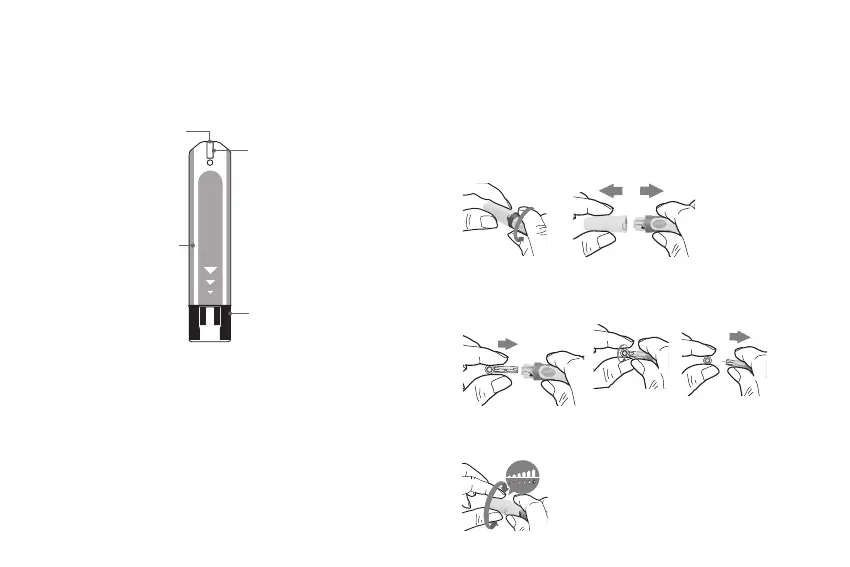
Test Strip Appearance
Absorbent Hole
Apply a drop of blood
here. The blood will be
automatically absorbed.
Conrmation Window
This is where you conrm
if enough blood has been
applied to the absorbent hole
in the strip.
Test Strip Handle
Hold this part to insert
the test strip into the slot.
Contact Bars
Insert this end of the test strip
into the meter. Push it in rmly
until it will go no further.
Inserting a Test Strip
Insert the test strip into its slot.
Important!
The front side of test strip should face up when inserting the
test strip. Test results might be wrong if the contact bar is
not fully inserted into the test slot.
Important!
To reduce the chance of infection:
• Never share a lancet or a lancing device.
• Always use a new, sterile lancet. Lancets are for single use
only.
• Avoid getting hand lotion, oils, dirt, or debris in or on the
lancets and the lancing device.
Preparing the Lancing Device
1. Remove the cap.
2. Insert a new lancet rmly into the white lancet holder cup.
3. Remove the protective disk on the lancet.
Hold the lancet rmly in place and twist o the protective
disk.
4. Replace the cap until it snaps or clicks into place.
5. Rotate the dial to set the desired lancing depth.



 To Next Page