8
www.force1rc.com
QUICK-START GUIDE
• Insert the drone battery and turn the drone on
by pressing and holding the power button on the
bottom of the drone.
• The transmitter will beep once to indicate it’s turned
on and beep a second time when it’s paired with the
drone. The red light will almost immediately turn solid.
• If you turn the transmitter on before you turn the
drone on, the transmitter will beep twice and the
red light will ash until you turn the drone on and the
transmitter pairs with the drone.
• Once the drone and transmitter are paired, the light
on the transmitter and the drone LEDs turn solid to
indicate pairing was successful.
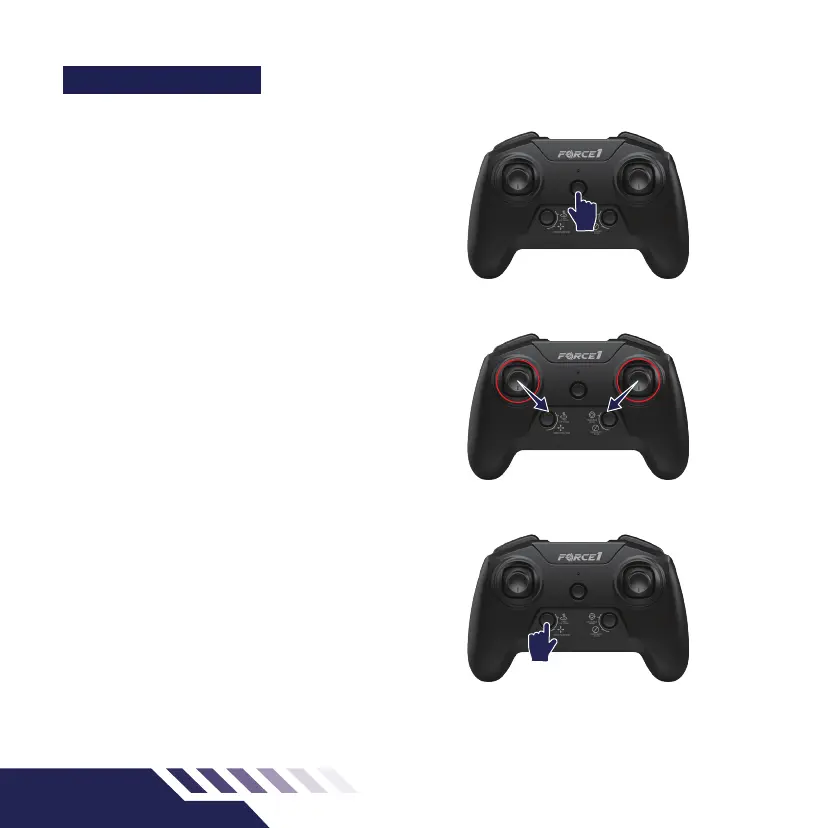
• Push the throttle and joystick to the inner bottom
corners at the same time to calibrate the drone
(Fig.7). The drone lights will ash green and once
successful the front LEDs will turn blue and the back
LEDs will turn white.
• Press the 1-Key lift/land button and the drone will
immediately start lifting (Fig.8).
• When you are done ying. Press the 1-Key lift/land
button again to land the drone. (Fig.8).
NOTE:
Follow the Preight Checklist steps below if your drone
doesn’t start or isn’t performing properly.
• Before ying your drone, carefully review the quick
start guide above and the rest of the ight controls
and functions outlined in this manual.
• See the troubleshooting guide on
pg.14
and
pg.15
• Make sure your drone and remote control batteries
are fully charged.
• Make sure the connection between the drone and
transmitter is solid.
• Make sure the propellers are installed correctly and
the motors are working normally after unlocking.
Fig.6
Fig.7
Fig.8



 To Next Page