10
www.force1rc.com
TRIM ADJUSTMENTS
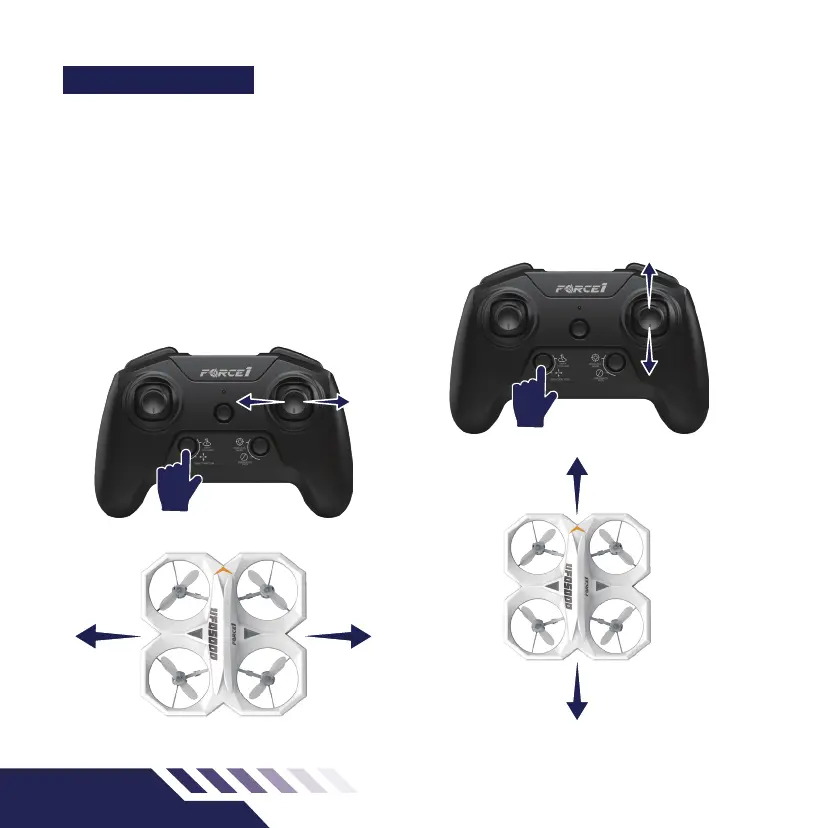
Long press the button pointed out on the
transmitter in (Fig.9) to adjust trim. When your
drone drifts in an unwanted direction, long press
the DIRECTION TRIM button (Fig.9/10) and move
the direction stick to make the adjustments.
LEFT/RIGHT TRIM
When the drone drifts left while ying, press and
hold the DIRECTION TRIM button and push the
direction stick to the right.
When the drone drifts right while ying, press and
hold the DIRECTION TRIM button and push the
direction stick to the left.
FORWARD/BACKWARD TRIM
When the drone drifts forward while ying press
and hold the DIRECTION TRIM button and push the
direction stick on the right downward.
When the drone drifts backwards while ying,
press and hold the DIRECTION TRIM button and
push the direction stick on the right upward.
Fig.10Fig.9
PRESS AND HOLD
PRESS AND HOLD



 To Next Page