UFO5000 | USER MANUAL
7
DRONE ASSEMBLY
PROPELLER INSTALLATION/REMOVAL
BATTERY INSTALLATION
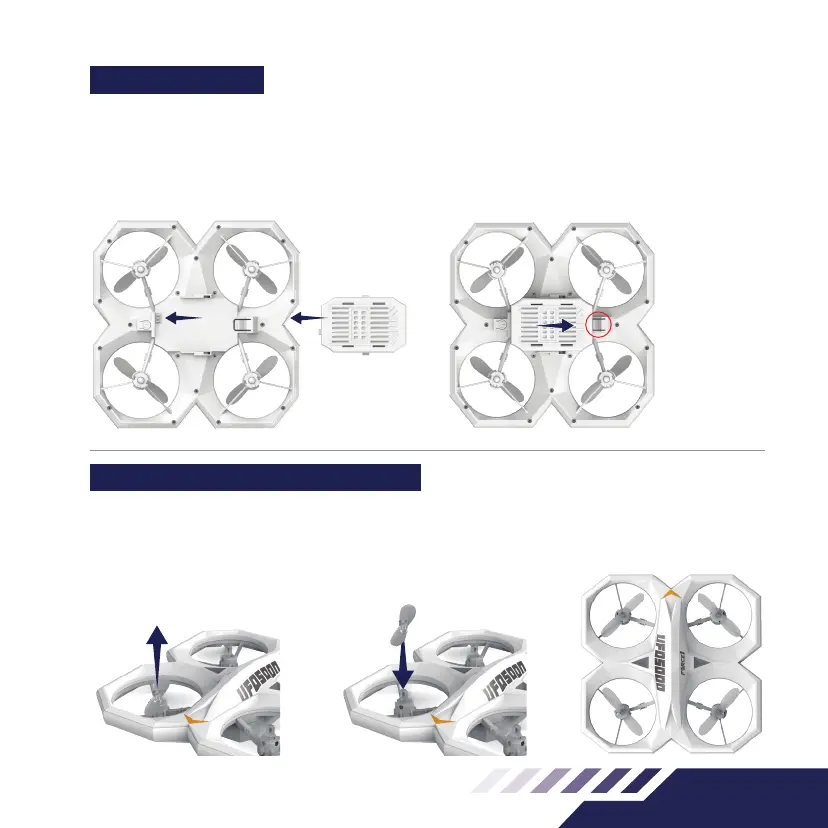
Place the battery on the center underside of the
drone and slide the battery into place (Fig.1).
Ensure the battery is rmly installed so it won’t fall
out during ight.
BATTERY REMOVAL
Turn o the drone before removing the battery.
Press and hold the tab circled in (Fig.2). Slide the
battery to the right side to release it from the drone.
• To remove a propeller, use the spanner to lift
the propeller up until it comes o (Fig.3)
• The replacement propeller should have the
same rotational direction; place on the correct
motor pin, and apply pressure until it snaps into
place (Fig.4)
Note: Installing the wrong propeller in the wrong
quadrant will cause the drone to ip over, not lift or
go in circles on the ground when trying to take o.
Fig.1 Fig.2
Fig.3 Fig.4
Fig.5
A B
AB
PRESS AND
HOLD THE TAB
AND MOVE THE
BATTERY TO THE
RIGHT SIDE



 To Next Page