23
GB
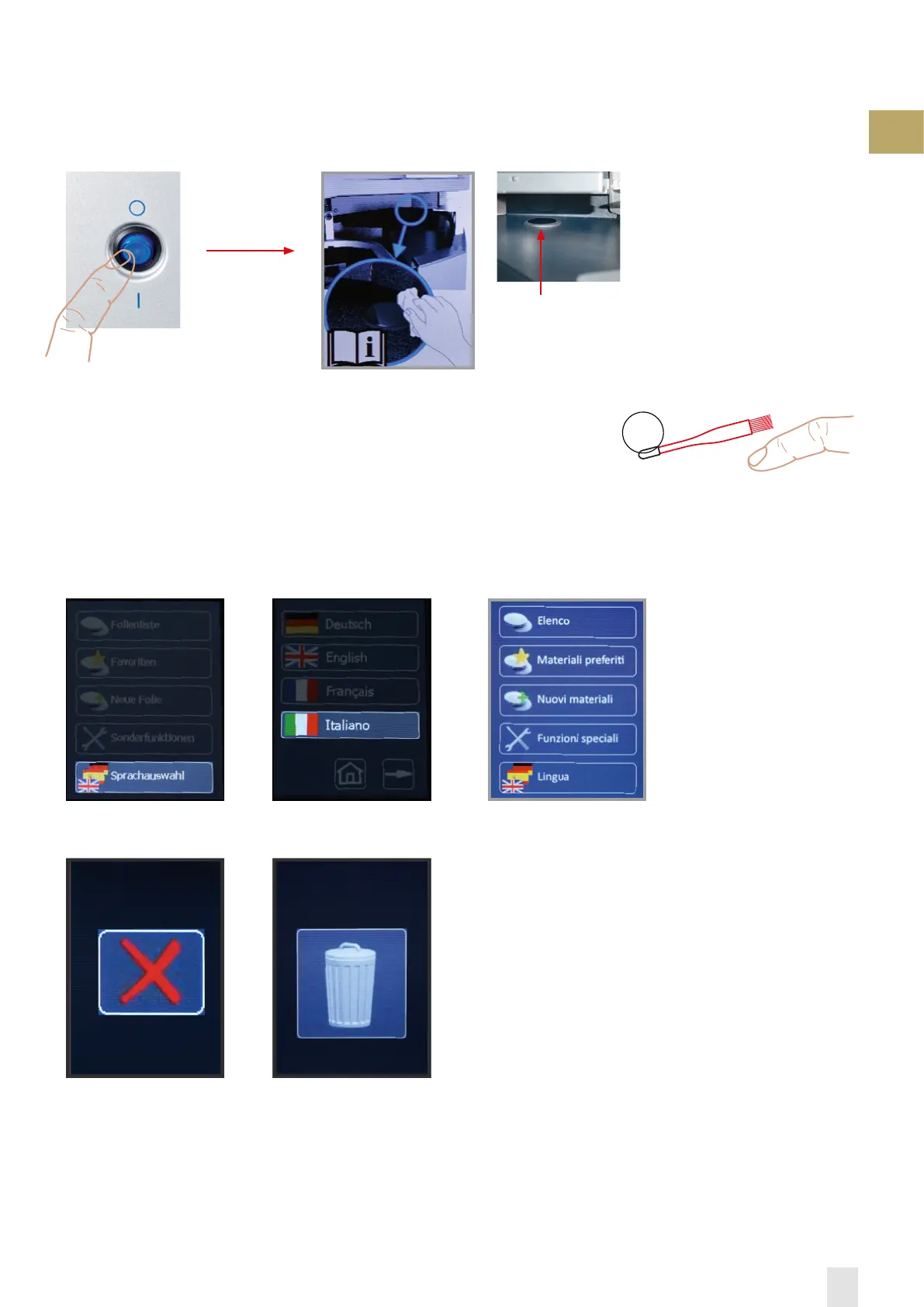
Switch on unit:
The touchpanel first shows the FORESTADENT Logo and then it requires to check if the sensor window is dusty or dirty. If so,
dust off or clean with a damp cloth (no cleaning agents!).
After a few seconds the basic display automatically appears.
Basic display:
The touchpanel responds in the framed function fields on slight pressure. For input
the enclosed brush for granules is equipped with a rubber cap. However, input is also
possible with fingers.
main switch
The sensor window is
located behind the
insertion ramp.
3.) Menu, selected language
Note:
If within 10 seconds the next
required working step is not
performed, the working pro-
gram will be switched off for
safety reasons.
Note:
The function field »X« aborts
the respective process. Each
termination has to be confir-
med.
Note: The function field »dele-
te« has to be confirmed.
1.) Select „language option“ 2.) Select „language“


 To Next Page