38
9.8.2. Sounds in blaster
All sound effects reproduced by the blaster loud speaker are installed when delivered to a
customer. If, however, there is a necessity the sound files are replaceable.
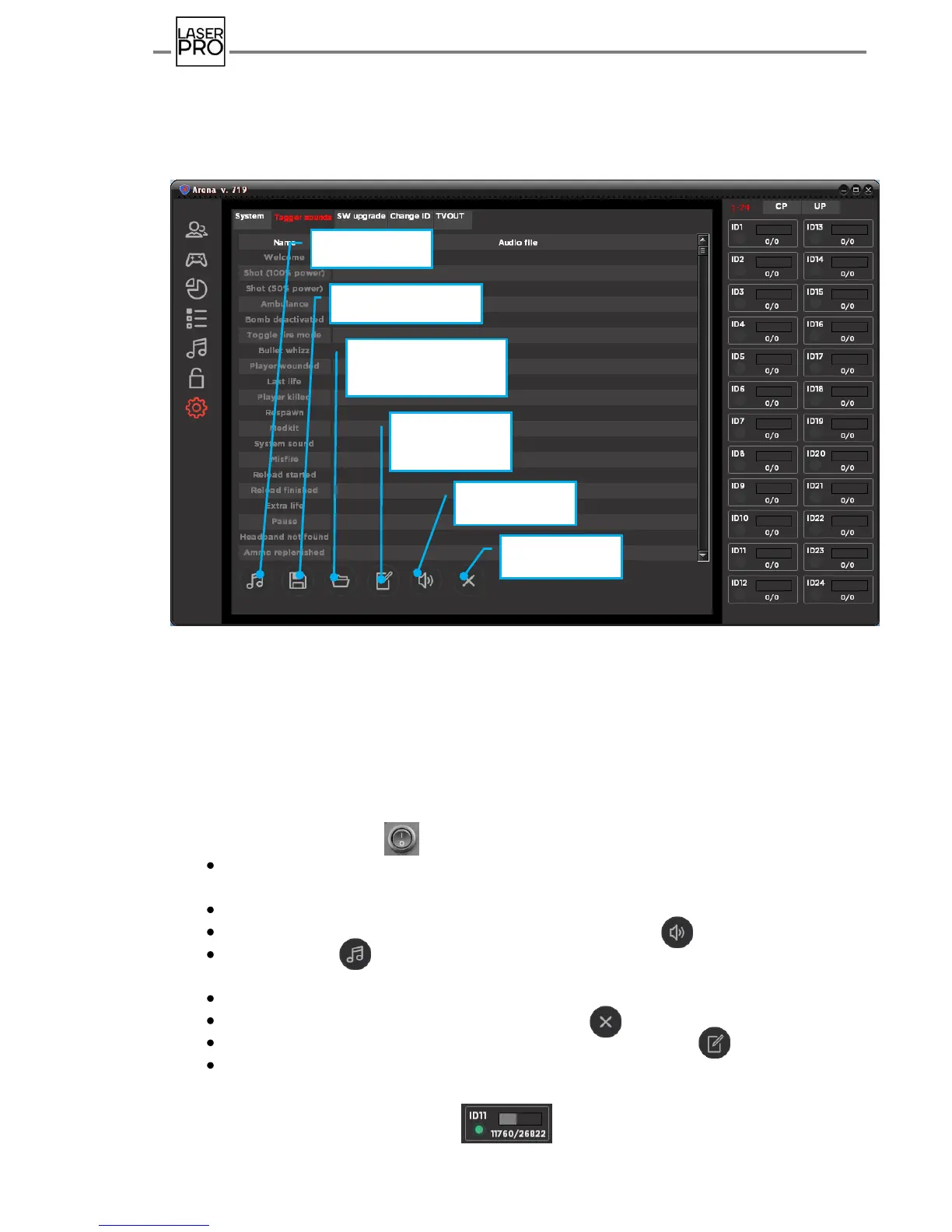
For this purpose open tab "Sounds in blaster"
Fig 40 "Sounds in blaster" tab
Each sound effect is loaded to the blaster memory separately, and procedure can
be performed for several kits simultaneously. It is recommended to locate them in the
distance of 3 meters from the router.
Sounds replacement in the blasters is performed when kits are switched in the
standby mode:
Switch kits by button on the control unit of the vests.
Wait until kits are connected with server and buttons nearby ID numbers become
active in the corresponding boxes. Check them.
Pick line of sound effect to be replaced.
Where appropriate, listen installed sound pressing the icon .
Press the icon and find required sound file in the opened explorer window with
extension .wav (8 bit extension, mono, sample rate 22050 Hz).
Explorer is also opened by double click of left mouse button on the effect line.
When replacement is cancelled press the icon .
In order to record a sound into blasters memory press the icon .
Control the recording process by variation of numerical value and spinner in the bar
of corresponding box from kit ID on the status panel of game devices (on the right).



 To Next Page