11
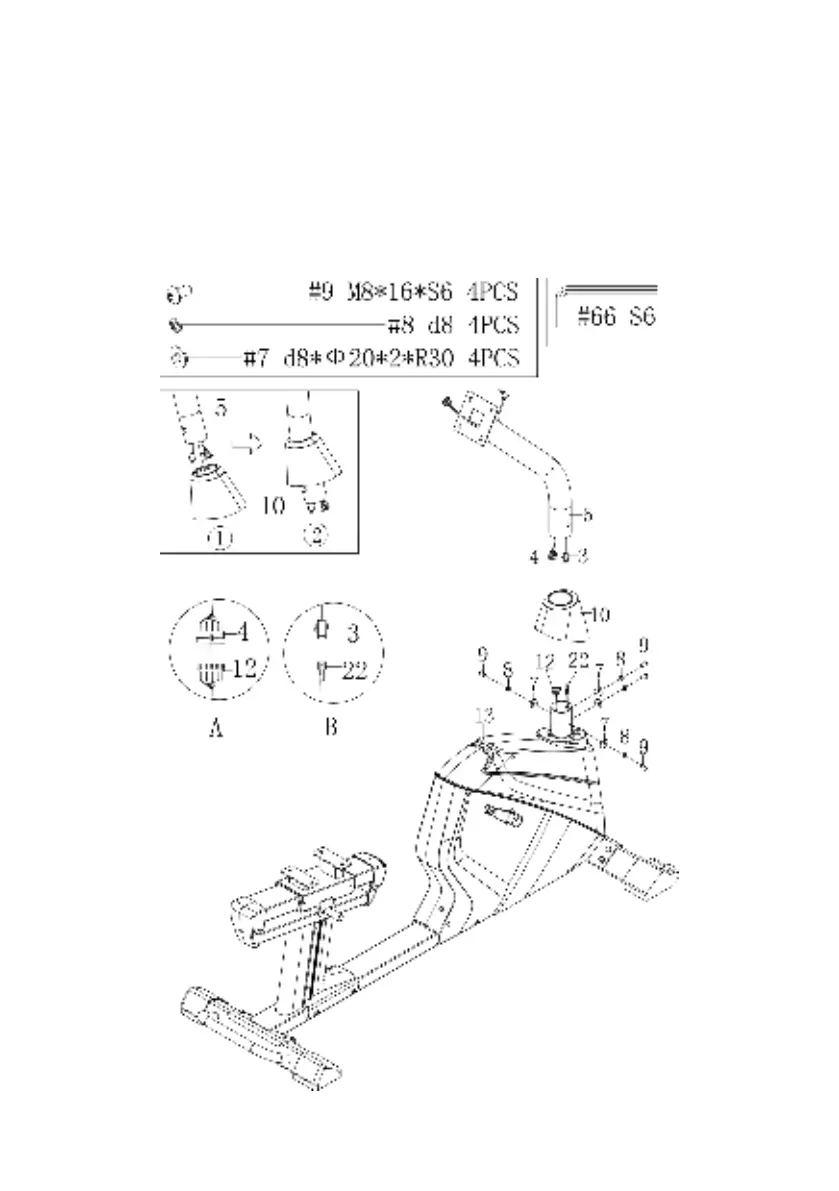
Step 3
Use the Allen Wrench (66) to unscrew the x4 Screws (9), x4 Spring Washers 8mm (8) and x4
Arc Washers (7) from the Handlebar Post (5).
Slide the Post Cover (10) onto the Handlebar Post (5) and connect the Mid Sensor Wire 1 (4)
at the bottom of the Handlebar Post (5) with the Mid Sensor Wire 2 (12) coming out of the
Main Frame (13). Connect the Trunk Line 2 (3) to Trunk Line 1 (22).
Slide the Handlebar Post (5) on to the Main Frame (13) and secure with x4 Screws (9), x4
Spring Washers (8) and x4 Arc Washers (7). Tighten with Allen Wrench (66).


 To Next Page