EasyManua.ls Logo

Foscam FI8906W - Page 45

Foscam FI8906W
59 pages
Print Icon
To Next Page IconTo Next Page
To Previous Page IconTo Previous Page
Loading...
44
w
w
w
w
ww.foscam.
ww.foscam.
com
com
Shenzhen
Shenzhen
Foscam
Foscam
Intelligent
Intelligent
Technology
Technology
Co.,
Co.,
Limited
Limited
Tel:
Tel:
86
86
755
755
2674
2674
5668
5668
Fax:
Fax:
86
86
755
755
2674
2674
5168
5168
44
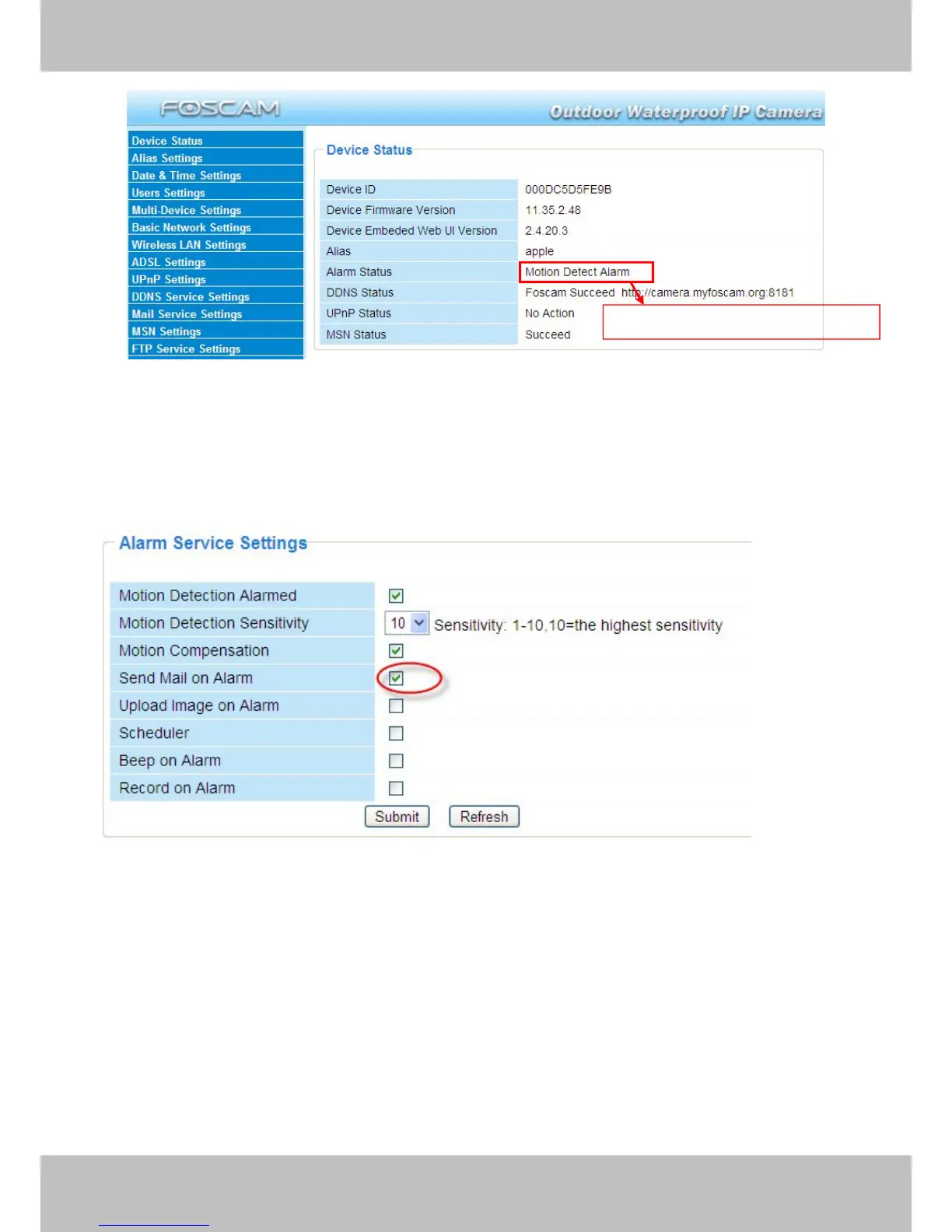
Figure 3.40
There are four alarm indicators:
1) Camera will send emails when motion is activated.
If you want to receive images when motion is detected, you must set Mail Service Settings first.
(Figure 3.31) Then set motion alarm as follows:
Figure 3.41
2) Upload images via FTP server when motion trigger.
To upload images to an FTP server when motion is detected, you must set FTP Service
Settings(Figure 3.36/3.37) first and then set motion alarm as pictured below
Here you can see the alarm status

Other manuals for Foscam FI8906W

Related product manuals