EasyManua.ls Logo

Foscam FI8906W - Restore Factory Settings

Foscam FI8906W
59 pages
Print Icon
To Next Page IconTo Next Page
To Previous Page IconTo Previous Page
Loading...
51
w
w
w
w
ww.foscam.
ww.foscam.
com
com
Shenzhen
Shenzhen
Foscam
Foscam
Intelligent
Intelligent
Technology
Technology
Co.,
Co.,
Limited
Limited
Tel:
Tel:
86
86
755
755
2674
2674
5668
5668
Fax:
Fax:
86
86
755
755
2674
2674
5168
5168
51
4) Never shut down the power of the camera during upgrade until the IP camera restart and get
connected.
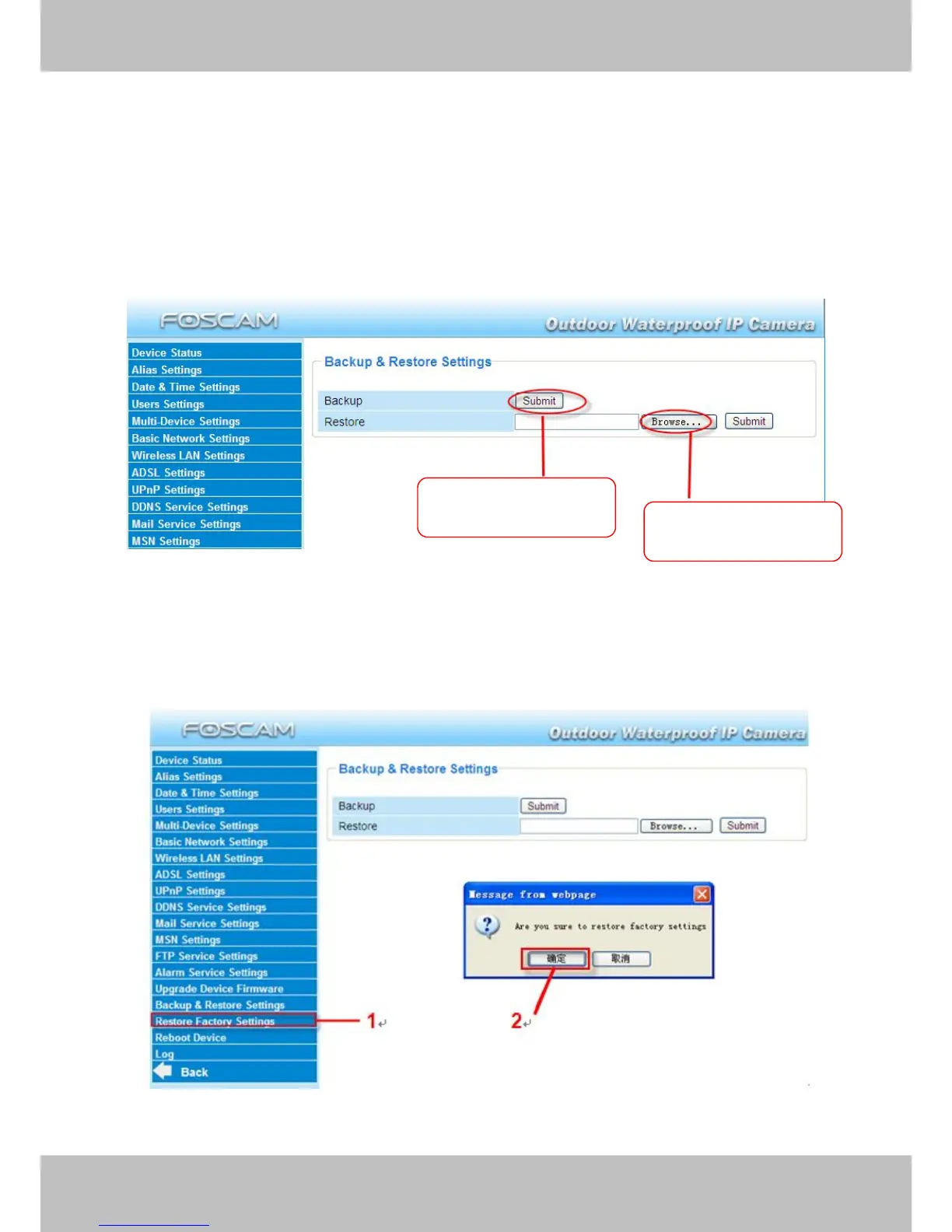
3.16 Backup & Restore Settings
Click Submit to save all the parameters you have set. These parameters will be stored in a bin
file for future use. The bin file can be reloaded to restore the parameters that were set.
Figure 3.52
3.17 Restore Factory Settings
All parameters will return to factory settings if selected.
Figure 3.53
Click Submit to store
parameters
Load the parameters
bin file

Other manuals for Foscam FI8906W

Related product manuals