46
w
w
w
w
w
w
w
w
www
www
www
www
www
www
www
www
.foscam.com
.foscam.com
.foscam.com
.foscam.com
.foscam.com
.foscam.com
.foscam.com
.foscam.com
Shenzhen
Shenzhen
Shenzhen
Shenzhen
Shenzhen
Shenzhen
Shenzhen
Shenzhen
Foscam
Foscam
Foscam
Foscam
Foscam
Foscam
Foscam
Foscam
Intelligent
Intelligent
Intelligent
Intelligent
Intelligent
Intelligent
Intelligent
Intelligent
Technology
Technology
Technology
Technology
Technology
Technology
Technology
Technology
Co.,
Co.,
Co.,
Co.,
Co.,
Co.,
Co.,
Co.,
Limited
Limited
Limited
Limited
Limited
Limited
Limited
Limited
Tel:
Tel:
Tel:
Tel:
Tel:
Tel:
Tel:
Tel:
86
86
86
86
86
86
86
86
755
755
755
755
755
755
755
755
2674
2674
2674
2674
2674
2674
2674
2674
5668
5668
5668
5668
5668
5668
5668
5668
Fax:
Fax:
Fax:
Fax:
Fax:
Fax:
Fax:
Fax:
86
86
86
86
86
86
86
86
755
755
755
755
755
755
755
755
2674
2674
2674
2674
2674
2674
2674
2674
5168
5168
5168
5168
5168
5168
5168
5168
46
46
46
46
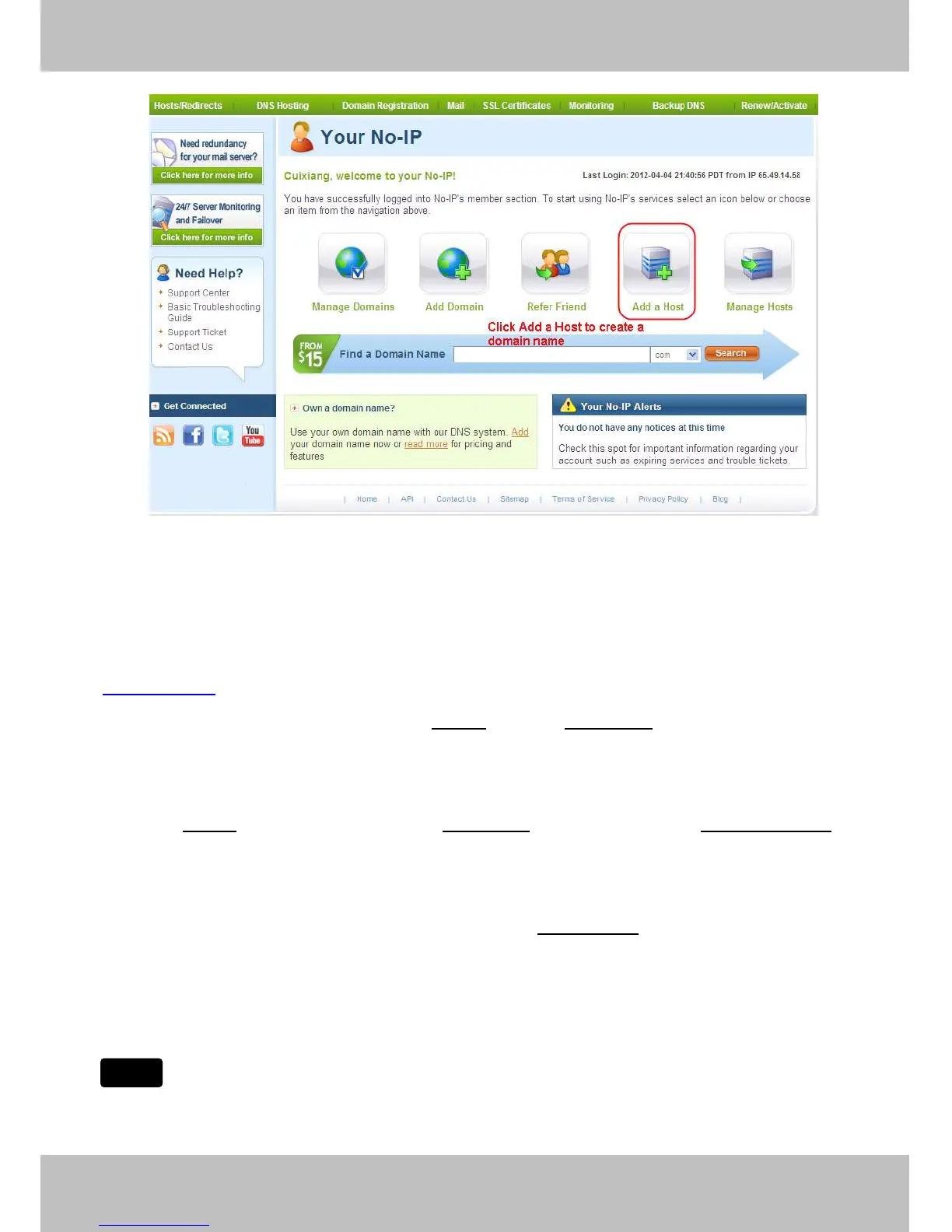
Figure 4 .29
Please
Please
Please
Please create
create
create
create the
the
the
the domain
domain
domain
domain name
name
name
name step
step
step
step by
by
by
by step
step
step
step according
according
according
according to
to
to
to instructions
instructions
instructions
instructions on
on
on
on www.no-ip.com
www.no-ip.com
www.no-ip.com
www.no-ip.com
Step
Step
Step
Step 2,
2,
2,
2, DO
DO
DO
DO DDNS
DDNS
DDNS
DDNS Service
Service
Service
Service Settings
Settings
Settings
Settings within
within
within
within the
the
the
the Camera
Camera
Camera
Camera
Please set DDNS
DDNS
DDNS
DDNS Settings
Settings
Settings
Settings within the camera by hostname
hostname
hostname
hostname , a user
user
user
user name
name
name
name and password
password
password
password you ’ ve got from
www.
www.
www.
www. no-ip
no-ip
no-ip
no-ip .com
.com
.com
.com
Take hostname
hostname
hostname
hostname ycxgwp.no-ip.info
ycxgwp.no-ip.info
ycxgwp.no-ip.info
ycxgwp.no-ip.info , user name fosc
fosc
fosc
fosc am
am
am
am , password fos
fos
fos
fos cam201
cam201
cam201
cam201 2
2
2
2 for example.
Firstly
Firstly
Firstly
Firstly , goes to option of DDNS
DDNS
DDNS
DDNS Settings
Settings
Settings
Settings on the administrator panel.
Secondly
Secondly
Secondly
Secondly , select No-Ip as a server ..
Thirdly
Thirdly
Thirdly
Thirdly , fill foscam
foscam
foscam
foscam as DDNS user, fill password foscam
foscam
foscam
foscam 201
201
201
201 2
2
2
2 as DDNS password, fill ycxgwp.no-ip.info
ycxgwp.no-ip.info
ycxgwp.no-ip.info
ycxgwp.no-ip.info as
DDNS domain and server URL, Then click save to make effect. The camera will restart and to take the DDNS
settings effective.
Fourthly
Fourthly
Fourthly
Fourthly , after the restart, login the camera, and go to option of Device
Device
Device
Device Status
Status
Status
Status on the administrator panel, and
check if the DDNS status is successful.
If
If
If
If failed,
failed,
failed,
failed, please
please
please
please double
double
double
double check
check
check
check if
if
if
if you
you
you
you have
have
have
have input
input
input
input the
the
the
the correct
correct
correct
correct hostname,
hostname,
hostname,
hostname, user
user
user
user name,
name,
name,
name, and
and
and
and password,
password,
password,
password, and
and
and
and
try
try
try
try to
to
to
to redo
redo
redo
redo the
the
the
the settings.
settings.
settings.
settings.
If you have set Third Party DDNS successfully ,the Foscam Domain Name will be invalid. The Third Party
Note
Note
Note
Note



 To Next Page