47
w
w
w
w
w
w
w
w
www
www
www
www
www
www
www
www
.foscam.com
.foscam.com
.foscam.com
.foscam.com
.foscam.com
.foscam.com
.foscam.com
.foscam.com
Shenzhen
Shenzhen
Shenzhen
Shenzhen
Shenzhen
Shenzhen
Shenzhen
Shenzhen
Foscam
Foscam
Foscam
Foscam
Foscam
Foscam
Foscam
Foscam
Intelligent
Intelligent
Intelligent
Intelligent
Intelligent
Intelligent
Intelligent
Intelligent
Technology
Technology
Technology
Technology
Technology
Technology
Technology
Technology
Co.,
Co.,
Co.,
Co.,
Co.,
Co.,
Co.,
Co.,
Limited
Limited
Limited
Limited
Limited
Limited
Limited
Limited
Tel:
Tel:
Tel:
Tel:
Tel:
Tel:
Tel:
Tel:
86
86
86
86
86
86
86
86
755
755
755
755
755
755
755
755
2674
2674
2674
2674
2674
2674
2674
2674
5668
5668
5668
5668
5668
5668
5668
5668
Fax:
Fax:
Fax:
Fax:
Fax:
Fax:
Fax:
Fax:
86
86
86
86
86
86
86
86
755
755
755
755
755
755
755
755
2674
2674
2674
2674
2674
2674
2674
2674
5168
5168
5168
5168
5168
5168
5168
5168
47
47
47
47
DDNS and the Foscam Domain Name cannot work at the same time, the last time you configured will take
effect.
② D
D
D
D o
o
o
o port
port
port
port forwarding
forwarding
forwarding
forwarding within
within
within
within the
the
the
the router
router
router
router
Example:
Example:
Example:
Example: The
The
The
The camera
camera
camera
camera
’
’
’
’
s
s
s
s LAN
LAN
LAN
LAN IP
IP
IP
IP address
address
address
address is
is
is
is http://192.168.
http://192.168.
http://192.168.
http://192.168. 8
8
8
8 .
.
.
. 100
100
100
100 :
:
:
: 2000
2000
2000
2000 ,
,
,
, Media
Media
Media
Media port
port
port
port no.
no.
no.
no. is
is
is
is 9200
9200
9200
9200 .
Firstly,
Firstly,
Firstly,
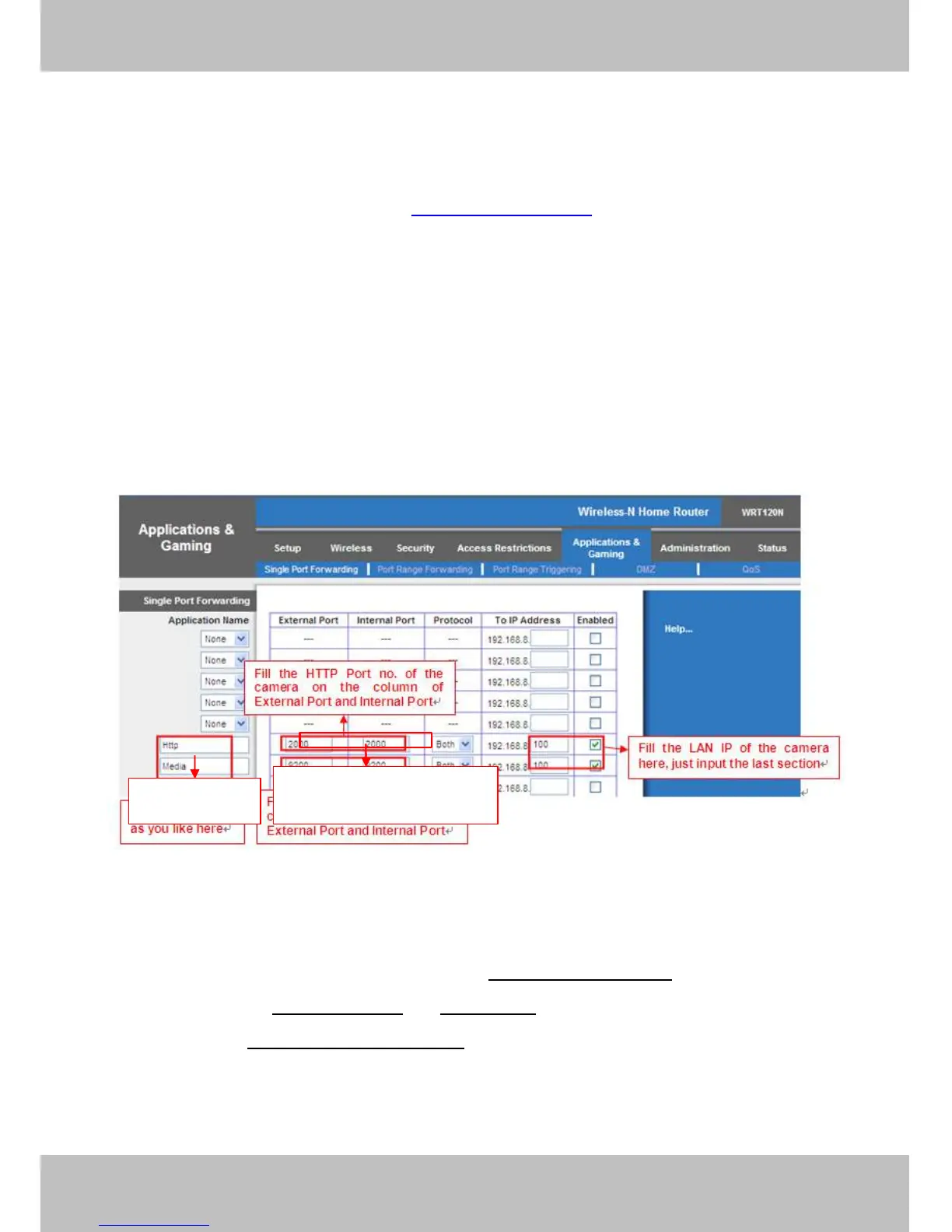
Firstly, login the router, goes to the menu of Port
Port
Port
Port Forwarding
Forwarding
Forwarding
Forwarding or
or
or
or Port
Port
Port
Port Trigger
Trigger
Trigger
Trigger (or named Virtue
Server on some brands of router). Take
Take
Take
Take Linksys
Linksys
Linksys
Linksys brand
brand
brand
brand router
router
router
router as
as
as
as an
an
an
an example,
example,
example,
example, Login
Login
Login
Login the
the
the
the router,
router,
router,
router, and
and
and
and goes
goes
goes
goes
to
to
to
to Applications
Applications
Applications
Applications &
&
&
& Gaming->Single
Gaming->Single
Gaming->Single
Gaming->Single Port
Port
Port
Port Forwarding.
Forwarding.
Forwarding.
Forwarding.
Secondly,
Secondly,
Secondly,
Secondly, Create a new column by LAN IP address & HTTP Port No. of the camera within the router showed
as below.
Figure 4 .30
③ Use
Use
Use
Use domain
domain
domain
domain name
name
name
name to
to
to
to access
access
access
access the
the
the
the camera
camera
camera
camera via
via
via
via internet
internet
internet
internet
After the port forwarding is finished, you can use the domain
domain
domain
domain name+
name+
name+
name+ http
http
http
http no.
no.
no.
no. to access the camera via
internet. Take hostname ycxgwp.no-ip.info
ycxgwp.no-ip.info
ycxgwp.no-ip.info
ycxgwp.no-ip.info and
and
and
and http
http
http
http no.
no.
no.
no. 2000
2000
2000
2000 for example, the accessing link of the camera
via internet would be http://
http://
http://
http:// ycxgwp.no-ip.info
ycxgwp.no-ip.info
ycxgwp.no-ip.info
ycxgwp.no-ip.info :
:
:
: 2000
2000
2000
2000
Assign
Assign
Assign
Assign a
a
a
a name
name
name
name
as
as
as
as you
you
you
you like
like
like
like here
here
here
here
Fill
Fill
Fill
Fill the
the
the
the Media
Media
Media
Media Port
Port
Port
Port no.
no.
no.
no. of
of
of
of the
the
the
the
camera
camera
camera
camera on
on
on
on the
the
the
the column
column
column
column of
of
of
of
External
External
External
External Port
Port
Port
Port and
and
and
and Internal
Internal
Internal
Internal Port
Port
Port
Port



 To Next Page