52
w
w
w
w
w
w
w
w
www
www
www
www
www
www
www
www
.foscam.com
.foscam.com
.foscam.com
.foscam.com
.foscam.com
.foscam.com
.foscam.com
.foscam.com
Shenzhen
Shenzhen
Shenzhen
Shenzhen
Shenzhen
Shenzhen
Shenzhen
Shenzhen
Foscam
Foscam
Foscam
Foscam
Foscam
Foscam
Foscam
Foscam
Intelligent
Intelligent
Intelligent
Intelligent
Intelligent
Intelligent
Intelligent
Intelligent
Technology
Technology
Technology
Technology
Technology
Technology
Technology
Technology
Co.,
Co.,
Co.,
Co.,
Co.,
Co.,
Co.,
Co.,
Limited
Limited
Limited
Limited
Limited
Limited
Limited
Limited
Tel:
Tel:
Tel:
Tel:
Tel:
Tel:
Tel:
Tel:
86
86
86
86
86
86
86
86
755
755
755
755
755
755
755
755
2674
2674
2674
2674
2674
2674
2674
2674
5668
5668
5668
5668
5668
5668
5668
5668
Fax:
Fax:
Fax:
Fax:
Fax:
Fax:
Fax:
Fax:
86
86
86
86
86
86
86
86
755
755
755
755
755
755
755
755
2674
2674
2674
2674
2674
2674
2674
2674
5168
5168
5168
5168
5168
5168
5168
5168
52
52
52
52
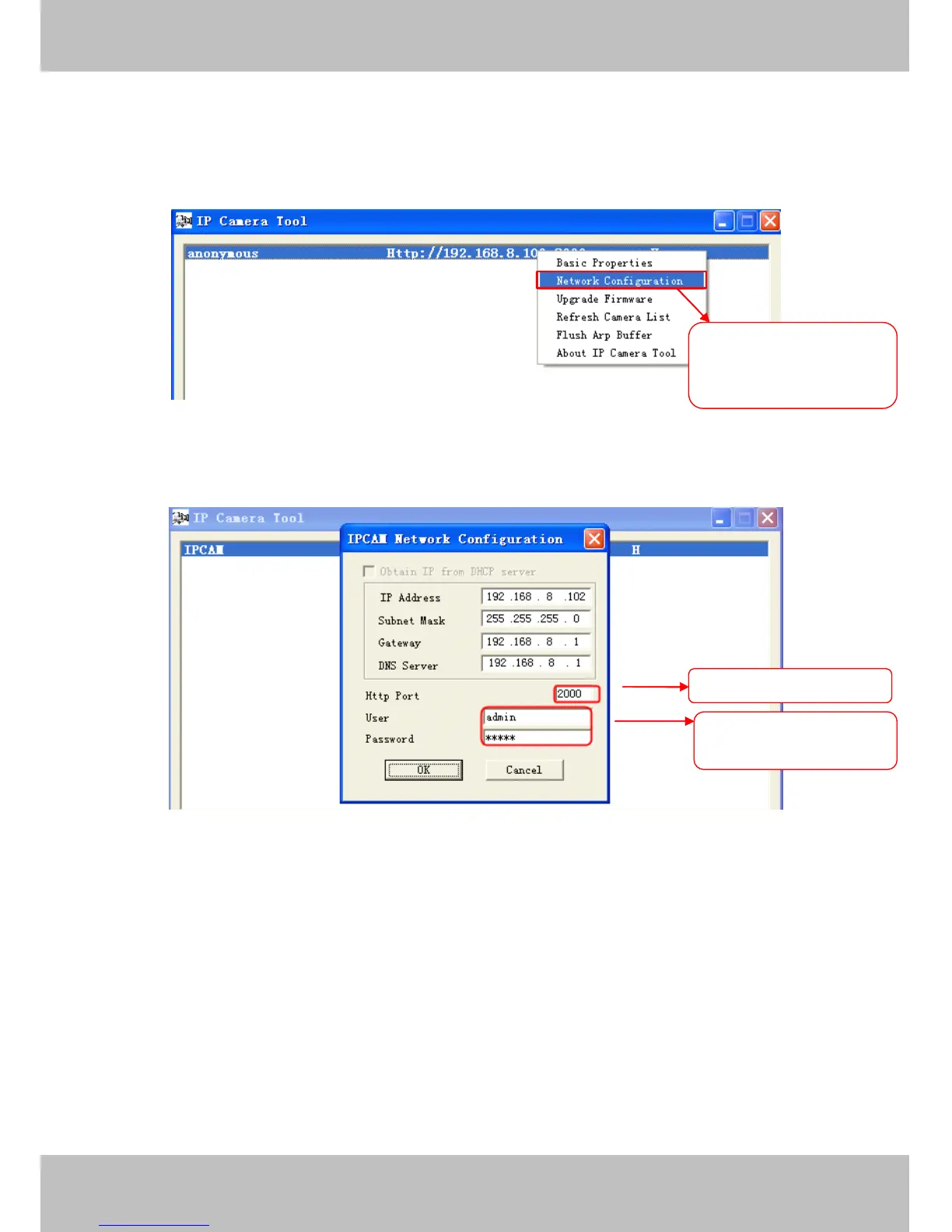
address, and click on ” Network Configuration ” , this brings up the network configuration box as shown in Figure
4 .35 and 4 .36.
Figure 4 .35
Figure 4 .36
Step
Step
Step
Step 2:
2:
2:
2: Enter the username and password of the Administrator (default username is admin with a blank
password), and click “ OK ” to apply changes.
Step
Step
Step
Step 3:
3:
3:
3: Wait around 10 seconds, you ’ ll see that the camera
’
s LAN IP address has changed. In our example it
was changed to 2000, so we see http://192.168.8.102:2000 in IP Camera
Tool.
Also, the LAN IP address is
now fixed at a static IP address of http://192.168.8.102:2000. This IP address will not change even if the
camera is powered off and back on, the camera will remain on this LAN IP address. This is very important that
Select
Select
Select
Select which
which
which
which camera
camera
camera
camera
you
you
you
you ’
’
’
’ d
d
d
d like
like
like
like to
to
to
to change
change
change
change the
the
the
the
port
port
port
port for,
for,
for,
for, and
and
and
and right
right
right
right click
click
click
click
Modify
Modify
Modify
Modify the
the
the
the Http
Http
Http
Http Port.
Port.
Port.
Port.
Enter
Enter
Enter
Enter the
the
the
the Username
Username
Username
Username and
and
and
and
password,
password,
password,
password, click
click
click
click OK.
OK.
OK.
OK.



 To Next Page