83
w
w
w
w
w
w
w
w
www
www
www
www
www
www
www
www
.foscam.com
.foscam.com
.foscam.com
.foscam.com
.foscam.com
.foscam.com
.foscam.com
.foscam.com
Shenzhen
Shenzhen
Shenzhen
Shenzhen
Shenzhen
Shenzhen
Shenzhen
Shenzhen
Foscam
Foscam
Foscam
Foscam
Foscam
Foscam
Foscam
Foscam
Intelligent
Intelligent
Intelligent
Intelligent
Intelligent
Intelligent
Intelligent
Intelligent
Technology
Technology
Technology
Technology
Technology
Technology
Technology
Technology
Co.,
Co.,
Co.,
Co.,
Co.,
Co.,
Co.,
Co.,
Limited
Limited
Limited
Limited
Limited
Limited
Limited
Limited
Tel:
Tel:
Tel:
Tel:
Tel:
Tel:
Tel:
Tel:
86
86
86
86
86
86
86
86
755
755
755
755
755
755
755
755
2674
2674
2674
2674
2674
2674
2674
2674
5668
5668
5668
5668
5668
5668
5668
5668
Fax:
Fax:
Fax:
Fax:
Fax:
Fax:
Fax:
Fax:
86
86
86
86
86
86
86
86
755
755
755
755
755
755
755
755
2674
2674
2674
2674
2674
2674
2674
2674
5168
5168
5168
5168
5168
5168
5168
5168
83
83
83
83
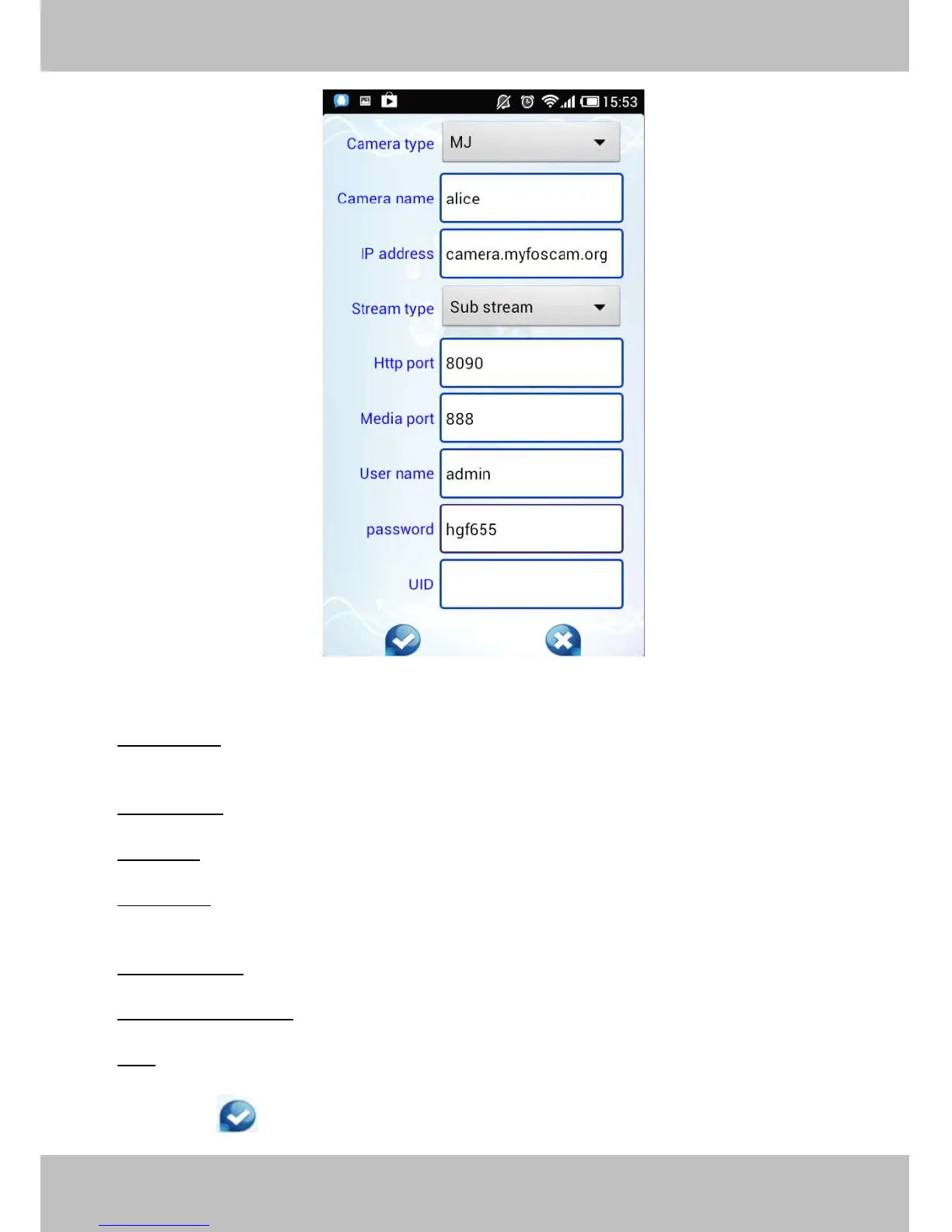
Figure 6 .7
Camera
Camera
Camera
Camera Type:
Type:
Type:
Type: Our Company produces two series cameras: MJ and H.264. Here select the camera type
that you want to add.
Camera
Camera
Camera
Camera name:
name:
name:
name: The Camera n ame is a unique name that you can give to your device to help you identify it.
IP
IP
IP
IP address:
address:
address:
address: Fill in the camera ’ s DDNS host or WAN IP not LAN IP.
Stream
Stream
Stream
Stream type:
type:
type:
type: It has two types: Main stream and Sub stream. For cell phones, we recommend you to select
Sub stream to get more fluent video.
Http
Http
Http
Http /
/
/
/ Media
Media
Media
Media port:
port:
port:
port: For MJ cameras, here share the same port.
User
User
User
User name
name
name
name &Password:
&Password:
&Password:
&Password: The camera ’ s user name and password.
UID:
UID:
UID:
UID: If your camera supports UID, here you may fill in the UID no.. Now FOSCAM camera does not
support UID.
Click the icon to add camera then you can see the camera in the Device List.



 To Next Page