EasyManua.ls Logo

Foscam FI9821W - Page 95

Foscam FI9821W
104 pages
Print Icon
To Next Page IconTo Next Page
To Previous Page IconTo Previous Page
Loading...
94
w
w
w
w
w
w
w
w
www
www
www
www
www
www
www
www
.foscam.com
.foscam.com
.foscam.com
.foscam.com
.foscam.com
.foscam.com
.foscam.com
.foscam.com
Shenzhen
Shenzhen
Shenzhen
Shenzhen
Shenzhen
Shenzhen
Shenzhen
Shenzhen
Foscam
Foscam
Foscam
Foscam
Foscam
Foscam
Foscam
Foscam
Intelligent
Intelligent
Intelligent
Intelligent
Intelligent
Intelligent
Intelligent
Intelligent
Technology
Technology
Technology
Technology
Technology
Technology
Technology
Technology
Co.,
Co.,
Co.,
Co.,
Co.,
Co.,
Co.,
Co.,
Limited
Limited
Limited
Limited
Limited
Limited
Limited
Limited
Tel:
Tel:
Tel:
Tel:
Tel:
Tel:
Tel:
Tel:
86
86
86
86
86
86
86
86
755
755
755
755
755
755
755
755
2674
2674
2674
2674
2674
2674
2674
2674
5668
5668
5668
5668
5668
5668
5668
5668
Fax:
Fax:
Fax:
Fax:
Fax:
Fax:
Fax:
Fax:
86
86
86
86
86
86
86
86
755
755
755
755
755
755
755
755
2674
2674
2674
2674
2674
2674
2674
2674
5168
5168
5168
5168
5168
5168
5168
5168
94
94
94
94
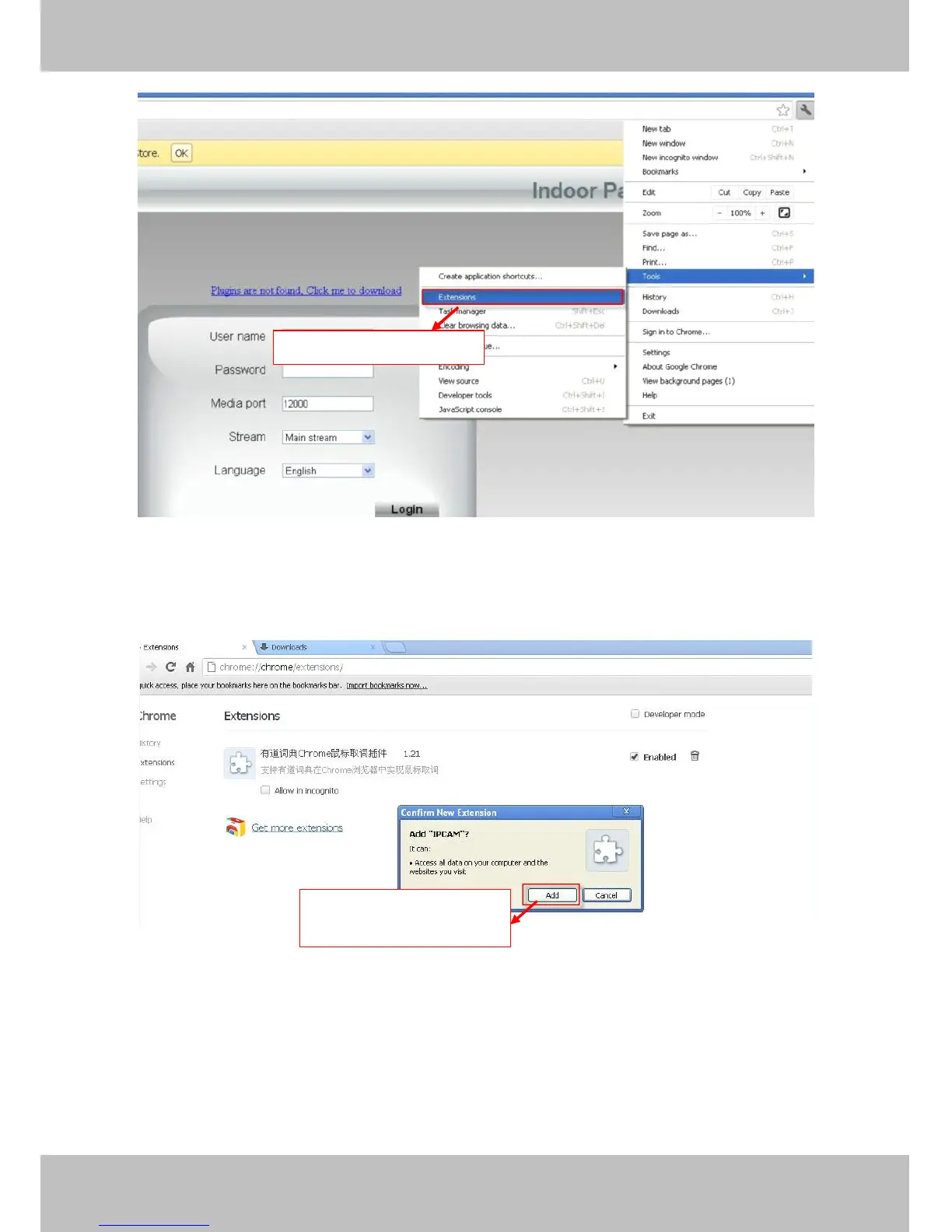
Figure 7 .4
Click Add button to install the Plugins.
Figure 7 .5
Reboot the browser and relogin the camera, you will see the surveillance window.
Go
Go
Go
Go to
to
to
to Extensions
Extensions
Extensions
Extensions page
page
page
page
Click
Click
Click
Click Add
Add
Add
Add button
button
button
button to
to
to
to install
install
install
install
the
the
the
the plugin
plugin
plugin
plugin