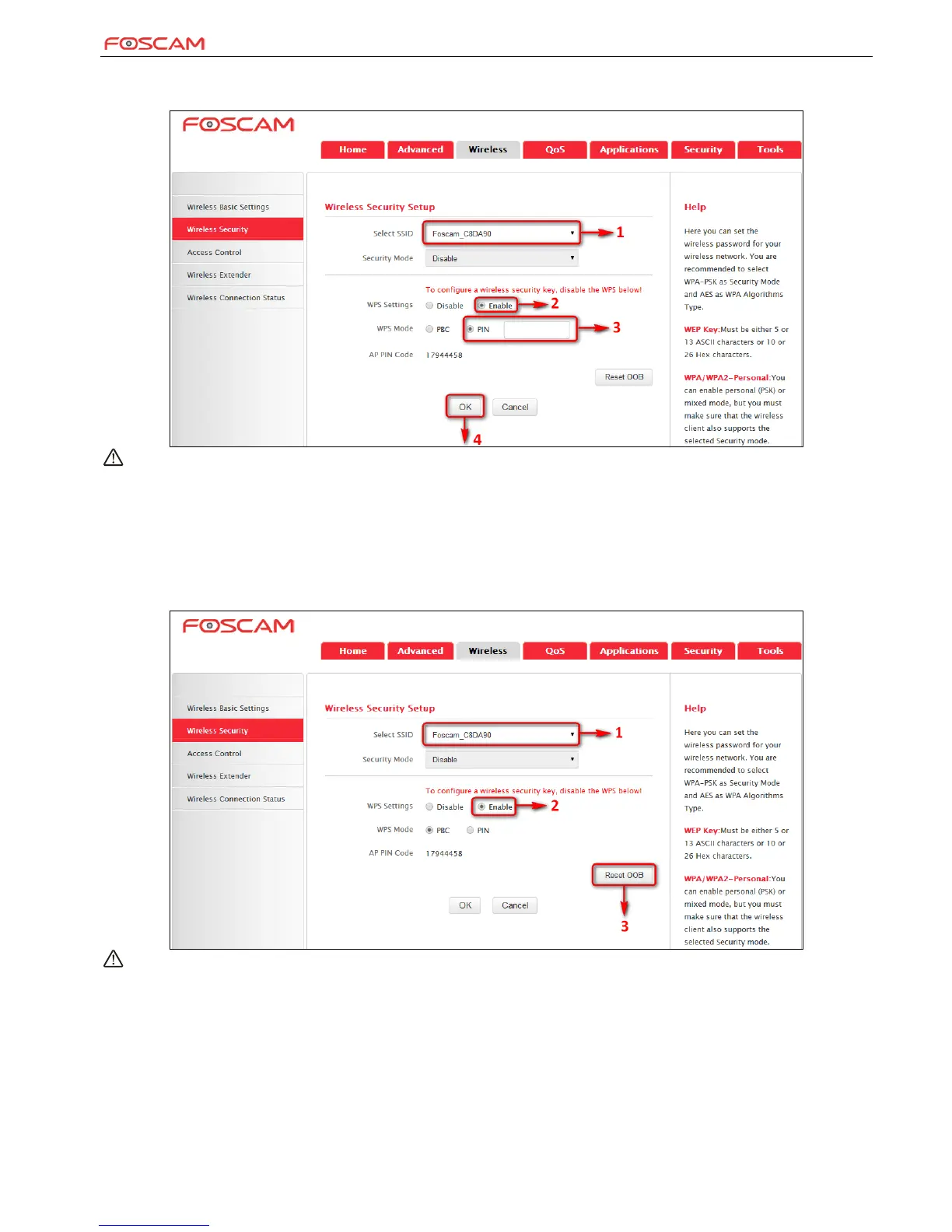
PIN: On the wireless security page, enable WPS, select PIN and enter the 8-digit PIN code from network adapter; then, within 2 minutes, enable
WPS/PIN on the client device.
Note:
With WPS successfully enabled, the WPS LED on the router keeps blinking for about 2 minutes, and during this time, you can enable WPS
on a wireless adapter; if the adapter successfully joins the wireless network, the WPS LED will display a solid light. Repeat steps above if
you want to add more wireless adapters to the router.
Reset OOB: Clicking this button will reset SSID to factory default and disable security mode.
Existing wireless settings will still be maintained by default after a successful WPS connection. Namely security settings and SSID on the
router will still be the same. If you want to generate a random wireless key via WPS, click Reset OOB and then follow WPS setup
instructions above.
Note:
To use the WPS security, the wireless client must be also WPS-capable.
Before you press the hardware WPS button on the device for WPS/PBC connection, making sure the WPS feature has been enabled on the
device.


 To Next Page